
TL;DR

Get everyday essentials delivered free with Prime
- Fast, free delivery on millions of items
- Prime Video, Amazon Music and more included
- Member-only deals all year
Building a custom AI workstation used to be cheaper, but today prebuilt systems often match or beat DIY costs due to component shortages and bulk buying. The choice now depends more on support, speed, and control than just price.
Imagine this: you need a powerful AI workstation. Do you spend weekends sourcing parts, assembling, and tuning? Or do you click ‘buy’ and get a system tested, validated, and ready to go? The stakes are higher than ever. In 2026, the classic wisdom — build for savings, buy for convenience — no longer holds. The market shifts, prices spike, and support becomes a real factor.
This isn’t just about money. It’s about speed, reliability, and future-proofing. Whether you’re training models, running inference, or creating content, your choice shapes your workflow. Let’s compare the real-world tradeoffs and see which approach suits your needs best.
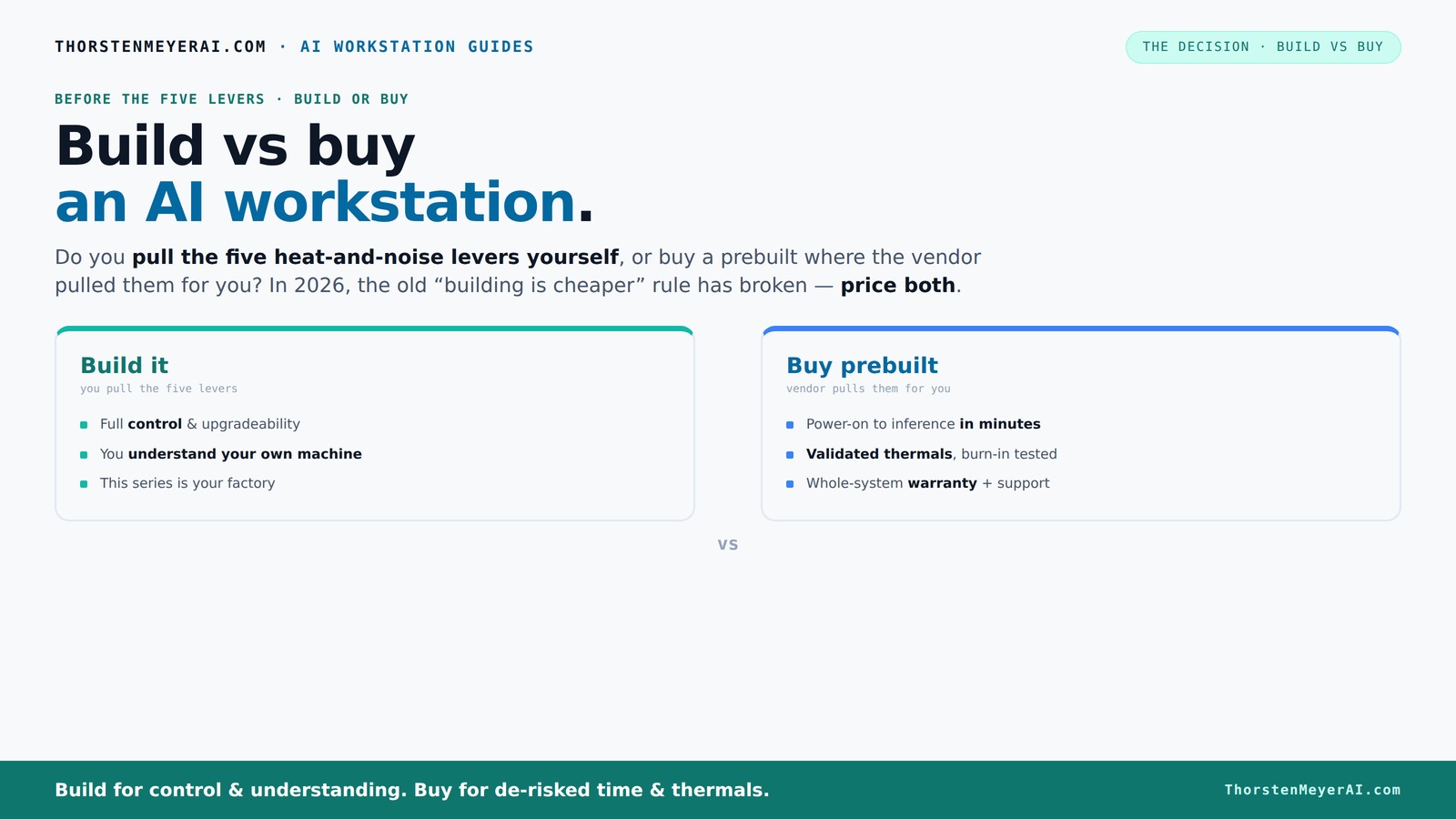
Build vs buy
an AI workstation.
The real question behind this whole series: do you pull the five heat-and-noise levers yourself, or buy a prebuilt where the vendor pulled them for you? And in 2026, the old “building is cheaper” rule has broken. Match your situation in Part 3.
Key Takeaways
- Component shortages in 2026 make prebuilt AI workstations often cost-competitive or cheaper than DIY builds.
- Prebuilts save time, offer validated thermals, and include support — ideal for users who need ready-to-run systems.
- DIY builds give you maximum control, upgradeability, and customization, best for hobbyists or evolving needs.
- Market shifts now emphasize support and speed over just cost — choose based on your workflow priorities.
- AI hardware is expanding beyond GPUs, with NPUs offering new performance and efficiency benefits in select systems.
As an affiliate, we earn on qualifying purchases.
Why 2026 Changes Everything for Build vs Buy
In the past, building a PC was always cheaper. Not anymore. Component shortages, especially for GPUs, DDR5 RAM, and SSDs, have driven prices sky-high. Build vs Buy a Prebuilt AI Workstation. Meanwhile, big manufacturers snapped up bulk supplies early, allowing them to offer systems at prices that are tough to beat.
For example, a DIY AI rig that used to cost around $1,200 now hits $1,500 or more. Meanwhile, prebuilt vendors like Lambda or Puget offer high-end, multi-GPU systems at similar or even lower prices. The long-held rule — DIY saves money — is broken for 2026. Now, your decision depends on more than just sticker price.
Why this matters: choosing between build and buy now involves evaluating not just initial costs but also the time, effort, and risk associated with sourcing parts that are in short supply. Prebuilts have become more appealing because they incorporate these supply chain efficiencies and validation processes, ensuring reliability and reducing unexpected expenses down the line. This shift means that the traditional cost advantage of DIY builds is diminishing, and strategic considerations like support, warranty, and future upgrades become more central to the decision.
As an affiliate, we earn on qualifying purchases.
The Heat and Noise Game: Who Controls the Thermals?
Building your own AI workstation means becoming the thermal engineer. You pick the GPU, the cooler, the case, and set the fan curves. It’s a puzzle, but one you control. Want a silent rig? You can undervolt your GPU, match a quiet cooler, and optimize airflow.
Prebuilts, on the other hand, come with factory-tuned thermals. Vendors like BIZON test systems for hours, fine-tune fan curves, and often include water-cooling options. This validation can cut noise and heat by up to 30%, ensuring your system won’t throttle during heavy workloads. Build vs Buy a Prebuilt AI Workstation.
Why this matters: thermal management directly impacts performance and longevity. Poor thermals can cause thermal throttling, reducing your system’s effective performance during prolonged AI training or inference. Noise levels also matter—quiet systems reduce distraction and fatigue, especially in shared or office environments. Prebuilts that undergo rigorous thermal testing provide peace of mind, allowing you to focus on your work without worrying about overheating or excessive noise. The tradeoff: DIY offers granular control but requires expertise and time, while prebuilts provide a plug-and-play solution with optimized thermal design, which can be crucial for maintaining peak performance over long workloads.
As an affiliate, we earn on qualifying purchases.
Cost Breakdown: Build or Buy — Which Wins?
| Factor | Build Your Own |
|---|---|
| Hardware parts | $1,200–$2,000, depending on specs |
| Labor & expertise | Time investment, learning curve |
| Tools & accessories | Additional costs for screwdrivers, thermal paste, cable management |
| Support & warranty | Multiple warranties, DIY troubleshooting |
| Factor | Prebuilt System |
|---|---|
| Price | $1,400–$2,200, often matching or beating DIY prices due to bulk buying |
| Support & warranty | Single vendor, typically 1–3 years |
| Time to deploy | Minutes to hours, plug-and-play |
| Customization | Limited, but configurable options available |
In 2026, actual prices for similar specs often favor prebuilts, especially for complex multi-GPU setups. Support and warranty add value by reducing downtime and troubleshooting headaches. Build vs Buy a Prebuilt AI Workstation. This means that even if initial costs are comparable, the overall value proposition may tilt in favor of prebuilt systems because they streamline deployment and maintenance, which are critical for productivity and minimizing disruptions in demanding AI workflows.
As an affiliate, we earn on qualifying purchases.
Who Should Build? When is DIY the Better Choice?
If you love the process, have time, and want total control, building remains attractive. Hobbyists, students, or those wanting a highly customized system often find DIY rewarding. For example, you can choose a quiet GPU and undervolt it for a near-silent operation, tailored exactly to your workflow.
More than just control, DIY allows you to tailor every component to your specific needs, which can be crucial if your AI tasks require specialized hardware or configurations. Build vs Buy a Prebuilt AI Workstation. Additionally, the learning process itself can be valuable, building skills that may help in troubleshooting or future upgrades. However, this approach demands significant time investment and technical expertise, which might not be feasible for everyone. The tradeoff: the satisfaction and customization are high, but so are the risks of delays or compatibility issues.
When a Prebuilt System Makes More Sense
If your time is limited or you prefer a hassle-free experience, prebuilt is the way to go. Systems like Lambda’s AI workstations are tested for hours, with thermals validated and noise optimized. They arrive ready to run your models, with software stacks pre-installed.
For example, a busy AI researcher can get a system up and running in an hour — instead of days spent troubleshooting compatibility issues. This rapid deployment can be critical when deadlines loom or when your team needs immediate access to high-performance hardware. Support and warranty services also provide peace of mind, reducing downtime and ensuring quick resolution of issues that might otherwise delay projects. Build vs Buy a Prebuilt AI Workstation. Such reliability is especially valuable in environments where uptime and performance are non-negotiable, making prebuilts a strategic choice for professionals who prioritize time and dependability over DIY customization.
Upgrade Paths and Future-Proofing
Custom systems usually offer more upgrade options — swapping GPUs, adding RAM, or improving cooling as needs evolve. Many prebuilts, especially from large OEMs, use proprietary parts that limit future expansion. But some, like Mac Studio, support upgrades if you plan ahead.
Understanding your long-term needs is critical. If you anticipate adding another GPU or increasing memory in the near future, building a system with standard, modular components offers more flexibility. Proprietary parts in prebuilts can lock you into specific upgrade paths, potentially requiring costly replacements or complete system overhauls later. This consideration is especially important for AI workloads that evolve rapidly, where being able to adapt your hardware can save significant time and money. So, weigh your future plans carefully—building might be more future-proof if you expect hardware upgrades, while prebuilts may suffice if your needs are stable now.
NPU or GPU — What Actually Matters for AI Workstations?
While GPUs dominate, new hardware like NPUs (Neural Processing Units) are changing the game. Vendors like Dell now market AI PCs with offload capabilities, which can reduce power use and boost performance for specific tasks like deepfake detection or real-time translation.
Understanding why this matters: NPUs are designed to accelerate specific AI workloads, often outperforming GPUs in tasks like pattern recognition or inference when optimized properly. They also tend to be more energy-efficient, which can be critical for large-scale deployments or environments with power constraints. For most general AI training and inference tasks, high-end GPUs with large VRAM remain the gold standard because of their versatility and maturity. However, if your workload involves specialized AI tasks—such as real-time video processing or edge AI—systems with NPUs or AI-specific hardware can offer significant performance and efficiency gains. The key is aligning your hardware choice with your specific AI use case, recognizing that hardware specialization can lead to better results but may also limit flexibility.
Frequently Asked Questions
Is it cheaper to build or buy an AI workstation in 2026?
Component shortages and bulk buying have leveled the playing field. Often, a high-end prebuilt system costs as much or less than a DIY build, especially for complex multi-GPU setups. Always price both options for your specific specs.
Which performs better for AI training or inference — a build or a prebuilt?
Performance depends on tuning and validation. Prebuilts often come with thermally optimized systems tested for sustained loads, which can be advantageous for heavy workloads. DIY builds can match or surpass this with careful tuning, but require additional effort and expertise. The choice hinges on whether you prioritize convenience or maximum performance tuning.
How much does support and warranty matter?
Prebuilt systems typically include single-vendor support with warranties up to 3–5 years, reducing downtime risks. DIY builds mean managing multiple warranties and troubleshooting yourself, which can be risky during critical tasks. Support can save significant time and prevent costly delays, especially for professional environments.
Can I upgrade a prebuilt AI workstation later?
Many prebuilt systems support upgrades, but some use proprietary parts that limit expansion. Checking compatibility beforehand is essential. Custom builds generally offer more flexibility for future upgrades, making them more adaptable to evolving AI workloads.
Are NPUs worth considering for a workstation?
NPUs are gaining traction for specific AI tasks like deepfake detection and real-time translation. For general training and inference, high-end GPUs with large VRAM remain essential. However, if your workload involves specialized AI acceleration, systems with NPUs or AI-specific hardware can provide significant efficiency and performance benefits, especially in edge or low-power environments.
Conclusion
In 2026, the old rule — build cheap, buy fast — no longer applies universally. Market forces have shifted the landscape, making prebuilt AI workstations a compelling choice for many. The real decision now hinges on your needs: do you want a plug-and-play solution with support, or the control and customization of a DIY build?
Either way, stay sharp. Think about your workload, your future plans, and how much time you want to spend tinkering. Your perfect AI workstation isn’t just about specs — it’s about what fits your workflow best.
Halloween Picks
halloween
As an affiliate, we earn on qualifying purchases.