If you need fast, cost-effective printing for large documents, a laser printer is ideal for your home office, especially for text-heavy tasks like reports and contracts. On the other hand, if you print lots of photos or artwork with vibrant colors and detail, a photo printer offers better quality but at a higher cost and slower speed. To know which option truly fits your needs, consider how you’ll use your printer most often—more details ahead can help you decide.
Key Takeaways
- Laser printers offer faster printing speeds suitable for high-volume document needs at home.
- Photo printers deliver superior color accuracy and detail ideal for printing high-quality photos.
- Laser printers are generally more cost-effective for frequent, text-heavy printing tasks.
- Photo printers are better for creative projects, artwork, and detailed image printing.
- Multi-purpose printers combine features, balancing speed, quality, and versatility for home office use.
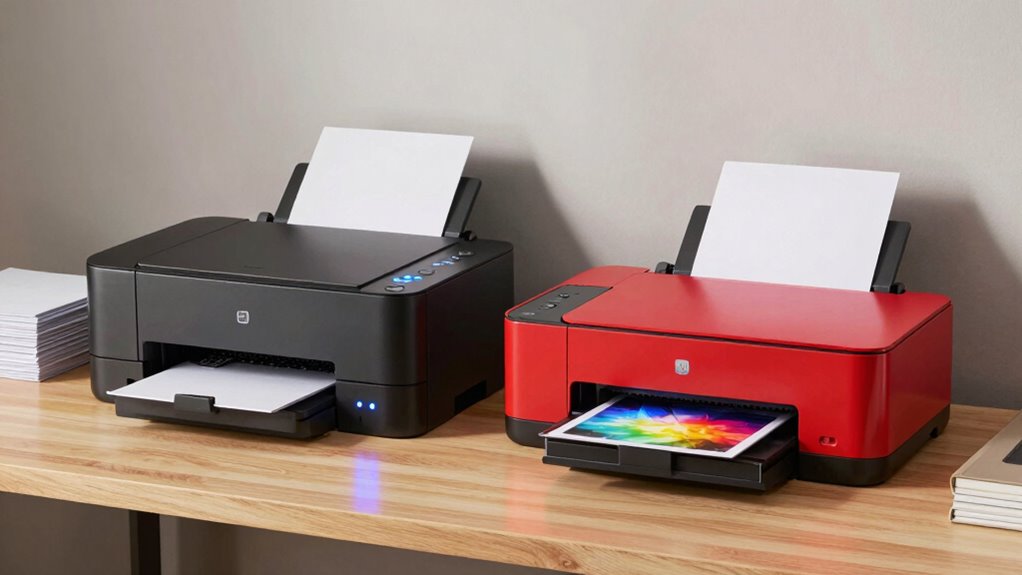
Choosing the right printer for your home office depends on your specific needs, especially when it comes to printing speed, quality, and cost. If you frequently print documents that require sharp, professional look, a laser printer might be your best choice. Laser printers excel in print speed, allowing you to produce large volumes of documents quickly and efficiently. They use toner, which adheres sharply to paper, resulting in crisp, clear text that’s ideal for reports, contracts, or other professional materials. However, if you’re working on images or photos that demand vibrant colors and fine detail, a photo printer might be more suitable. Photo printers are designed with color accuracy in mind, ensuring that your images come out with true-to-life hues and smooth gradations. They typically offer higher resolution and better color reproduction, which is essential for printing high-quality photos or artwork at home.
While laser printers dominate in speed and cost-effectiveness for text-heavy documents, photo printers tend to be slower and more expensive to operate. Their ink or dye-based systems require frequent refilling, and the quality of color reproduction often justifies the higher maintenance costs. If your main goal is to print photos that look stunning and accurate, investing in a dedicated photo printer makes sense. But if you need to frequently print lengthy reports or batches of documents, a laser printer’s faster print speed will save you time and frustration. You should also consider the initial investment; laser printers are generally more affordable upfront and have a lower cost per page for large-volume printing. Photo printers, on the other hand, often come with higher initial costs and consumables that can add up over time.
Additionally, some printers combine features of both, offering versatility for different types of printing needs in a single device, which can be ideal for a multi-purpose home office setup. This versatility can help streamline your workspace by reducing the need for multiple devices. When choosing between the two, it’s also helpful to understand the color accuracy capabilities, as this can significantly impact the quality of your prints—especially for creative work. This is particularly important if you work with detailed images or artwork, where subtle color differences matter. Moreover, understanding how printing technology impacts output quality can guide your decision based on your specific printing projects. Recognizing the cost-efficiency differences between laser and photo printers can also influence your long-term budgeting for supplies and maintenance.
In terms of color accuracy, photo printers tend to outperform laser printers because they’re built specifically to handle complex color blends and subtle shades. This makes them ideal for creative projects, photo printing, or any task where color fidelity is essential. Conversely, laser printers prioritize producing sharp, clear text with consistent quality, which is perfect for everyday document printing. Your decision hinges on whether you need high-speed, cost-efficient document printing or superior color fidelity for photos. Ultimately, evaluating your typical print jobs and budget will help you determine which type of printer aligns best with your home office needs.
best laser printers for home office
As an affiliate, we earn on qualifying purchases.
As an affiliate, we earn on qualifying purchases.
Frequently Asked Questions
Which Printer Type Is More Energy-Efficient for Home Use?
A laser printer is generally more energy-efficient for home use because it consumes less power during standby and printing compared to photo printers. Laser printers have better power efficiency, mainly because they use a laser and toner instead of ink or dye-based systems that require more frequent warming or refilling. If you’re concerned about energy consumption, a laser printer helps reduce your overall power use, making it a smarter choice for long-term home office energy efficiency.
How Long Do Laser and Photo Printer Ink or Toner Last?
Sure, because who doesn’t love the thrill of ink and toner running out at the worst moment? Laser toner typically lasts between 2,000 to 6,000 pages, offering impressive toner lifespan. Photo printers use ink cartridges that usually print around 200-300 photos, but ink longevity varies depending on usage. So, if you’re printing frequently, you’ll appreciate the longer toner lifespan, while occasional photo printing might mean frequent ink replacements.
Can Both Printers Print on Textured or Specialty Papers?
Yes, both laser and photo printers can print on textured or specialty papers, but their compatibility varies. Laser printers generally handle thicker or textured papers well, thanks to their robust fusing process, making textured paper printing feasible. Photo printers are designed for glossy, matte, or specialized media, offering excellent specialty media compatibility. Always check your printer’s specifications to confirm it supports the specific textured or specialty media you want to use.
Are Photo Printers Compatible With All Operating Systems?
Photo printers are generally compatible with most operating systems, but you should check specific model requirements. They are designed to deliver high photo quality, which depends heavily on ink compatibility. Make certain the printer supports your OS and uses compatible ink cartridges to achieve the best results. Some models offer software updates or drivers for various systems, so verify compatibility before purchasing to avoid any surprises.
What Are the Maintenance Requirements for Each Printer Type?
You need to regularly clean and replace parts to maintain both printers. Laser printers are known for durability, requiring less frequent maintenance, and their toner lasts longer, reducing ink replacement costs. Photo printers, however, need careful handling to preserve ink longevity, as their ink cartridges can dry out or clog if unused. Keeping both printers in a dust-free environment and following manufacturer guidelines guarantees peak performance and longevity.
high quality photo printers for photos
As an affiliate, we earn on qualifying purchases.
As an affiliate, we earn on qualifying purchases.
Conclusion
Choosing between a laser and photo printer is like selecting a trusty steed or a nimble sprinter for your home office. If you need speed and efficiency, a laser printer is your dependable horse, ready to carry heavy loads effortlessly. But if vivid, detailed photos are your goal, a photo printer is like a delicate butterfly, capturing beauty in every print. Think about your needs, and let your choice lead you smoothly on your printing journey.
multi-function laser and photo printer
As an affiliate, we earn on qualifying purchases.
As an affiliate, we earn on qualifying purchases.
color laser printer for documents
As an affiliate, we earn on qualifying purchases.
As an affiliate, we earn on qualifying purchases.