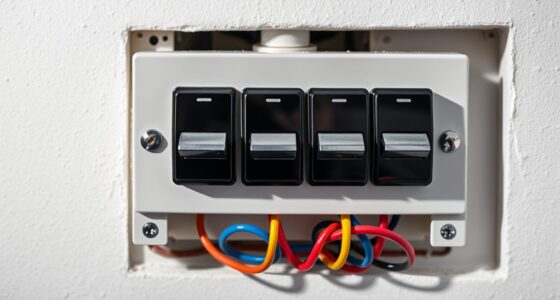
For a holiday gift, a smart speaker and a smart plug solve different versions of the same problem: making a home a little more convenient. A speaker is a more complete present, with voice assistance, music playback, and smart-home controls in one device. A plug costs less and can automate a lamp or other compatible appliance the recipient already owns. The real decision is whether to give someone a new way to interact with their home or a small upgrade to something they already use. Choose the speaker for a recipient who enjoys music and voice controls; choose the plug for a practical, lower-cost gift when you know what device they want to automate.

Get everyday essentials delivered free with Prime
- Fast, free delivery on millions of items
- Prime Video, Amazon Music and more included
- Member-only deals all year
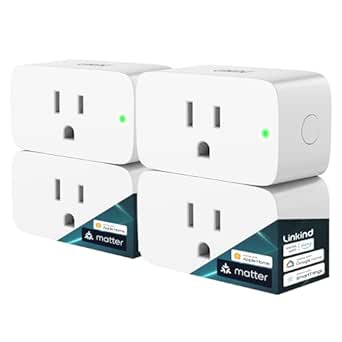
Linkind Matter Smart Plug
- ✔ Connectivity: Matter over Wi-Fi; 2.4 GHz Wi-Fi only
- ✔ Network requirement: IPv6
- ✔ Compatible platforms: Apple Home, Alexa, Google Home, SmartThings, and AiDot
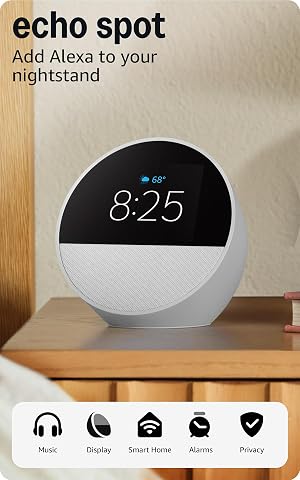
Amazon Echo Spot (2024 Release)
- ✔ Generation: 2024 release
- ✔ Dimensions: 4.5 × 4.1 × 4.4 inches
- ✔ Weight: 14.3 oz

Amazon Echo Show 5 (3rd Gen)
- ✔ Generation: 3rd Gen, 2023 release
- ✔ Dimensions: 5.8 × 3.6 × 3.2 inches
- ✔ Weight: 16.1 oz
At a Glance
| Criteria | Smart speaker | Smart plug | Winner |
|---|---|---|---|
| Upfront cost | Usually costs more; price varies by brand, model, and audio quality. | Usually the more affordable option, though smart features and multi-packs affect price. | B |
| Everyday usefulness | Combines voice requests, timers, information, and compatible device control. | Automates one plugged-in appliance, often a lamp, on a schedule or through an app. | A |
| Smart-home control | Can act as a voice interface for multiple compatible devices. | Controls only compatible devices plugged into it; voice control may require a separate assistant. | A |
| Entertainment | Built-in playback makes it useful for music, radio, and other audio. | No built-in audio or assistant experience. | A |
| Setup and recipient fit | Requires a suitable place and willingness to use a voice assistant. | Easy to understand when paired with a specific lamp or use case; app setup may still be needed. | Depends |
| Compatibility | Check the recipient’s preferred ecosystem and supported services. | Requires the appliance to work safely and correctly with switched power; check plug type and ecosystem. | Depends |
| Gift impact | Feels like a standalone gift, especially for someone who wants a speaker. | Practical, but can feel small unless matched to a recipient’s need. | A |
Linkind Matter Smart Plug
A smart plug is a low-friction way to make a familiar lamp or seasonal decoration easier to control. The Linkind Matter Smart Plug earns our top spot because it can add schedules, timers, and remote switching without asking the recipient to replace an appliance or learn a screen interface. Its Matter support covers Apple Home, Alexa, Google Home, and SmartThings, giving it broader potential fit than the Alexa-centered Echo Spot and Echo Show 5.There is a catch to that flexibility: the named platforms require a compatible Matter controller, such as a supported Echo, HomePod, Nest, or SmartThings Hub. The AiDot app is an alternative without a hub, but a recipient who expects to plug it in and immediately add it to any existing home may need help with setup. It also supports only 2.4 GHz Wi-Fi and IPv6. Once configured on the local network, Matter devices can communicate locally if internet access is lost, which is a useful distinction from features that depend on a cloud connection.For gifting, its best quality is that it can make a small routine more convenient: switch a lamp on at a set time, or turn a compatible device off after a timer. Compared with either Echo, it is less of a centerpiece and offers no voice assistant or display on its own. We would choose it for someone who values a simple household improvement, and skip it for someone who wants a ready-to-use, stand-alone smart device. The supplied listing describes a four-pack, which can help cover multiple rooms, but each outlet still needs to suit the device being connected and the recipient’s setup.
Pros:
- Matter support spans Apple Home, Alexa, Google Home, and SmartThings with a compatible controller.
- Scheduling, timers, and remote switching can add automation to existing plug-in devices.
- Local Matter communication can continue on the home network during an internet outage after setup.
- Compact form factor and 15A/1800W capacity suit many compatible household devices.
Cons:
- Platform integration requires a compatible Matter controller; AiDot is the no-hub alternative.
- Wi-Fi support is limited to 2.4 GHz and requires IPv6.
- It adds little as a gift for someone who does not want to configure or automate plug-in devices.
Best for: Someone who wants to automate lamps or other suitable plug-in devices and has a compatible Matter controller or is willing to use the AiDot app.
Not ideal for: A recipient who wants a stand-alone assistant, has no compatible controller and does not want another app, or needs support for a network outside 2.4 GHz Wi-Fi and IPv6.
Bottom line: We recommend the Linkind plug as the most adaptable practical gift here, as long as the recipient’s network and Matter setup meet its requirements.
“We recommend the Linkind plug as the most adaptable practical gift here, as long as the recipient’s network and Matter setup meet its requirements.”
Amazon Echo Spot (2024 Release)
The Echo Spot is the more personal of the two Alexa displays in this lineup. Its compact half-circle screen makes time, weather, reminders, and song titles visible at a glance, while Alexa handles alarms, music, and compatible smart home controls. That focused design makes it a natural holiday gift for a nightstand or desk: it can improve a routine the recipient already has instead of requiring them to build an elaborate smart home first.Compared with the Echo Show 5, the Spot trades video calls, a larger screen, and a camera for a camera-free design and a smaller footprint. The Show 5 makes more sense where people want a shared display or a way to check compatible cameras; the Spot is better suited to someone who mainly wants a visible clock and voice control. It can also use motion-based routines and offers Matter, Wi-Fi, and Bluetooth Low Energy Mesh compatibility. These features add room to grow, though they depend on compatible devices and setup rather than working with every household product.Its 2.83-inch screen is intentionally modest, so it is not the better pick for watching shows or making video calls. Eero Built-in is a bonus only for a recipient who already has a compatible eero network, links the relevant accounts, and keeps the Spot in range; the stated extension is limited in speed and connected-device count. That makes it a poor reason to choose the gift on its own. We place it second because it balances a useful daily ritual with smart home controls, while the Linkind plug is simpler and more ecosystem-flexible and the Show 5 is more capable for visual communication.
Pros:
- Compact display shows time, weather, reminders, and music information at a glance.
- Camera-free design may suit bedrooms and privacy-conscious recipients.
- Supports Alexa routines, compatible smart home controls, Matter, and Bluetooth Low Energy Mesh.
- Can act as an eero Built-in extender for a compatible eero network.
Cons:
- Small 2.83-inch display is less useful for video-oriented tasks than the Echo Show 5.
- Eero Built-in requires compatible equipment, account linking, and suitable placement, with stated performance limits.
- Its greatest usefulness is tied to Alexa and compatible services or smart home devices.
Best for: An Alexa-friendly recipient who would appreciate a visible bedside clock, alarms, music, and straightforward control of compatible smart devices.
Not ideal for: Someone who wants video calling, a larger screen for viewing content, or broad Wi-Fi extension without owning a compatible eero setup.
Bottom line: Choose the Echo Spot when the gift should make a bedside or desk routine smarter without adding a camera.
“Choose the Echo Spot when the gift should make a bedside or desk routine smarter without adding a camera.”
Amazon Echo Show 5 (3rd Gen)
For a recipient who will actually use a display around the home, the Echo Show 5 gives Alexa a broader visual role than the Spot. Its 5.5-inch screen can show weather, news, photos, and compatible camera feeds, while its 2 MP camera supports video calls with people using the Alexa app or a screen-equipped Echo. That makes it the most versatile gift in this group for a kitchen counter or shared household space.The extra capability comes with a privacy tradeoff: the Show 5 includes a camera. A built-in shutter and a button that turns off the camera and microphone offer physical controls, but a recipient who prefers a camera-free bedroom device may be more comfortable with the Spot. The Spot also has a smaller footprint and a more focused clock function; the Show 5’s advantage is that it can serve several people and purposes rather than mainly supporting one person’s routine.Its speaker is described as offering deeper bass and clearer vocals, and the screen can rotate a slideshow of family photos. Those features make the device feel more personal as a gift, though video and photo sharing still depend on the recipient’s services and preferences. It supports compatible smart home controls and Matter, but it remains an Alexa device rather than the cross-platform plug’s ecosystem-neutral entry point. We rank it third because its range of features is strong, yet the camera, larger role, and dependence on comfort with a shared smart display make it a less universal gift than a simple plug or camera-free Spot.
Pros:
- 5.5-inch screen supports glanceable information, photos, shows, and compatible camera views.
- Built-in 2 MP camera enables video calls with supported Alexa devices and the Alexa app.
- Camera shutter and microphone/camera-off button provide physical privacy controls.
- Supports Matter and compatible Alexa smart home controls.
Cons:
- Built-in camera may be unwelcome in a bedroom or privacy-sensitive home.
- More features and a shared-screen role may be unnecessary for someone who only wants an alarm clock.
- Platform experience is centered on Alexa, unlike the Linkind plug’s multi-platform Matter approach.
Best for: A household comfortable with Alexa that would use video calls, family photos, weather, music, and compatible camera views from a shared screen.
Not ideal for: Someone who wants a camera-free bedside device, does not want a shared screen, or prefers a smart home gift that works across several ecosystems without centering Alexa.
Bottom line: The Echo Show 5 is the most capable visual gift here, but its camera and Alexa-centered design make recipient fit especially important.
“The Echo Show 5 is the most capable visual gift here, but its camera and Alexa-centered design make recipient fit especially important.”
As an Amazon Associate we earn from qualifying purchases.
Key Differences
The smart speaker is the broader gift. It can serve as an audio device and a voice interface, and it may also control compatible smart-home products. That range makes it useful even if the recipient has no smart devices yet. Its tradeoff is that a speaker asks for more: more money, a place in the home, and some comfort with a particular voice assistant and its app.
The smart plug is a focused tool. It can make a conventional lamp operate on a schedule or respond to an app or compatible assistant, but it does not make every appliance suitable for automation. It is best when you know the recipient has a device they want to control and that the device is appropriate for a smart plug. For a gift with no known use case, the speaker is the safer bet; for a modest, targeted upgrade, the plug can be better value.
Detailed Comparison
Upfront cost (Smart plug wins — moderate)
A smart plug usually costs less than a smart speaker, giving it the clear advantage for a tight gift budget. The gap is moderate: speakers vary widely in price, and a basic model may be accessible, but a plug remains the lower-cost way to add one simple automation. Spend more on a speaker only if its audio or assistant features will be used.
Everyday usefulness (Smart speaker wins — moderate)
A speaker handles more recurring tasks, including audio playback, timers, questions, and compatible smart-home commands. A plug automates one connected appliance, so its usefulness depends on the recipient having a good candidate such as a lamp. The speaker wins by a moderate margin for general gifting; the plug can be more useful in a home with a specific automation need.
Smart-home control (Smart speaker wins — major)
The speaker can provide a central voice interface for multiple compatible devices, while the plug controls the appliance connected to that plug. That is a major difference if the recipient already owns smart lights, thermostats, or other supported products. If they only want to schedule one lamp, the speaker’s wider control may go unused and the plug is enough.
Entertainment (Smart speaker wins — major)
A speaker can play music and other supported audio directly; a smart plug has no entertainment function. This is a major, straightforward win for the speaker, and it helps the device earn a place even in a home without other smart products. A plug makes sense when entertainment is irrelevant to the recipient or they already have audio covered.
Setup and recipient fit (moderate difference)
Neither device is universally effortless: both may call for an app, wireless network, and account, while a speaker also introduces a voice assistant the recipient may not want. A plug is simpler to explain when paired with a known lamp, but less satisfying without a clear use. This is a genuine tie: match the device to the recipient’s habits and comfort with connected products.
Compatibility and safe use (moderate difference)
Both options require a compatibility check. Speakers depend on the recipient’s preferred ecosystem and services; plugs depend on regional outlet fit, supported connectivity, and the appliance being appropriate for switched power. Neither wins across all homes, so check the brand ecosystem for a speaker and the appliance requirements for a plug before buying. The consequence of skipping this check is a gift that may not work as expected.
Gift impact (Smart speaker wins — moderate)
A speaker is more likely to feel like a complete holiday present because it has an immediate, visible purpose. A smart plug is compact and practical, but can seem underwhelming if the recipient has not mentioned wanting one. The speaker wins by a minor to moderate margin; pairing a plug with a suitable lamp or a clear explanation can make it feel more intentional.
Smart speaker: Pros and Cons
Pros:
- Combines audio, voice assistance, and compatible device control.
- Useful as a standalone device even without a smart-home setup.
- Offers a more substantial gift experience.
Cons:
- Usually costs more than a smart plug.
- Ties the recipient to a voice assistant and its supported ecosystem.
- Needs space, power, network access, and a recipient who wants voice features.
Smart plug: Pros and Cons
Pros:
- Generally the lower-cost gift.
- Adds scheduling or remote control to a suitable plugged-in appliance.
- A focused option for a recipient who wants a specific lamp or device automated.
Cons:
- Controls a limited number of connected appliances, depending on the plug.
- Has no audio or built-in voice assistant.
- Needs a clear use case and appliance compatibility to feel useful.
Who Should Choose What
Choose Smart speaker if:
- The recipient enjoys music, radio, timers, or asking a voice assistant for help.
- They already have compatible smart-home products and would benefit from voice control.
- You want one self-contained gift with several everyday uses.
Choose Smart plug if:
- You know the recipient wants to automate a particular lamp or suitable appliance.
- Your budget favors a modest, practical upgrade.
- They already use a compatible smart-home assistant and need a simple accessory.
Skip both if: The recipient avoids connected devices, lacks reliable wireless internet, or would dislike app-based setup and voice assistants; choose a conventional speaker or another practical gift instead.
Value for Money
The smart plug is better value when the recipient has a specific appliance to automate: it costs less and can solve that small problem without paying for audio or assistant features they may not use. The smart speaker earns its higher price when the recipient will use it for music, voice requests, and control of other compatible devices. For an uncertain recipient, the speaker’s broader usefulness often justifies the extra spend, but only after checking that its assistant fits their preferences. Do not pay more for a speaker solely for smart-home control if a single plug is all they need.
Final Verdict
For most holiday gifting, choose a smart speaker if you want a complete, versatile present and know the recipient is comfortable with voice assistants. It has a wider range of uses and works as an entertainment device even without a connected home. Choose a smart plug when you can name the lamp or suitable appliance it will improve, or when keeping the gift affordable matters most. The deciding factor is whether the recipient needs a general-purpose hub or one targeted automation; without a clear plug use case, the speaker is the safer gift.
Frequently Asked Questions
Which is the better smart-home gift for a beginner?
A smart speaker is usually the stronger all-purpose introduction because it can provide voice assistance and audio without requiring other smart devices. A plug is better for a beginner when there is one obvious appliance to automate and the recipient wants a small, practical change.
Can a smart plug replace a smart speaker?
No. A plug controls a connected appliance and may work with a separate voice assistant, but it does not provide built-in audio or a general voice interface. Buy a plug for appliance automation; buy a speaker for voice and entertainment features.
Do I need to know what smart-home system the recipient uses?
Yes, especially for a speaker that needs to fit the recipient’s preferred assistant and services. For a plug, check its supported ecosystem, outlet type, and the appliance it will control. If you do not know, a gift receipt can reduce the chance of a mismatch.
Is a smart plug safe for every appliance?
No. Suitability depends on the appliance and the plug’s specifications. Check the manufacturer’s guidance and electrical ratings before buying, and avoid assuming that any device with a power cord should be controlled by a plug.