
Use this guide to choose and prepare a smart home device as a holiday gift. It is for anyone shopping for a first-time user or adding to a home with existing connected devices. You will check compatibility, privacy, setup needs, and return options before choosing a gift. Most of the work takes 30–60 minutes; delivery time is separate.

Get everyday essentials delivered free with Prime
- Fast, free delivery on millions of items
- Prime Video, Amazon Music and more included
- Member-only deals all year
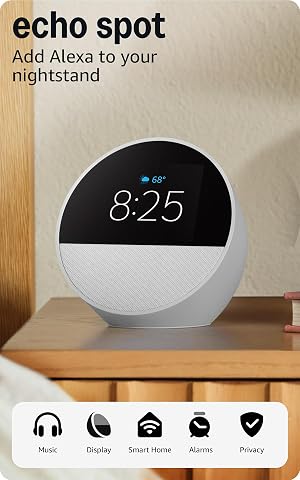
Amazon Echo Spot, Glacier White
- ✔ Display: 2.83-inch touchscreen, 240 × 320
- ✔ Dimensions: 4.5 × 4.1 × 4.4 inches
- ✔ Weight: 14.3 oz
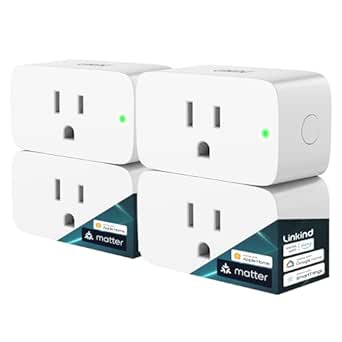
Linkind Matter Smart Plug, 4-Pack
- ✔ Pack size: 4 smart plugs
- ✔ Plug type: Type A
- ✔ Power rating: 15A / 1800W

Amazon Echo Show 5 (3rd Gen), Cloud Blue
- ✔ Display: 5.5-inch touchscreen
- ✔ Dimensions: 5.8 × 3.6 × 3.2 inches
- ✔ Weight: 16.1 oz
Difficulty: Beginner | Time: 30–60 minutes
What You’ll Need
Tools & Materials:
- A phone or computer for checking product details
- The recipient’s approximate home setup, if available
- A gift receipt or the retailer’s return information
Knowledge:
- Basic familiarity with the recipient’s comfort with apps and device setup
- A rough idea of which phone platform or smart home system they use, if any
You do not need the recipient’s passwords or access to their home accounts. If you cannot confirm a key compatibility detail, choose a device that works on its own or give a gift receipt so they can exchange it.
Amazon Echo Spot, Glacier White
The Echo Spot is our strongest holiday pick for someone who would appreciate a smart alarm clock as much as a smart speaker. Its 2.83-inch touchscreen puts time, weather, reminders, and song titles in view, while Alexa voice and touch controls can operate compatible smart home devices. That makes it easier to understand as a gift than a box of plugs: its everyday purpose is obvious even before the recipient builds routines.Compared with the Linkind plug pack, the Spot is a more complete standalone experience; the plugs are more useful when the recipient already knows which lamps or appliances they want to automate. Compared with the Echo Show 5, the Spot is the more privacy-conscious screen gift because it has no camera. It also includes eero Built-in for a limited Wi-Fi extension, but that benefit requires a compatible eero network and account linking, so we would treat it as a bonus rather than a reason to buy.The tradeoff is that this is still an Alexa-centered device, and its screen is small for watching content or video calling. Its compact speaker is intended for bedside and small-room use, not as a replacement for a larger audio system. This pick makes the most sense for a recipient who wants a visible clock, gentle wake-up routines, and convenient smart home control in one modest footprint.
Pros:
- Clock-focused display shows time, weather, reminders, and song titles at a glance.
- No camera, with a microphone-off button and recording controls.
- Combines alarms, music, Alexa, and compatible smart home control in one device.
- Can extend a compatible eero network, subject to range and performance limits.
Cons:
- The 2.83-inch screen is small for video or extended viewing.
- Alexa, Wi-Fi, and compatible devices are needed for many smart home functions.
- eero Built-in requires a compatible eero setup and has device and speed limits.
Best for: Someone setting up a bedside, office, or kitchen routine who wants a clock, Alexa controls, and a screen without a camera.
Not ideal for: Recipients who want video calls, a larger display, a platform-neutral device, or a speaker for filling a large room.
Bottom line: Choose the Echo Spot when we want a gift that feels useful immediately as a clock and can grow into Alexa-based home routines.
“Choose the Echo Spot when we want a gift that feels useful immediately as a clock and can grow into Alexa-based home routines.”
Linkind Matter Smart Plug, 4-Pack
For a recipient who already has favorite lamps, fans, or other suitable appliances, the Linkind Matter Smart Plug four-pack turns familiar objects into scheduled or remotely controlled devices. Its gift appeal comes from coverage: one pack can support several small routines around a home, rather than adding another screen to a crowded surface. Matter is designed to make setup across supported smart home platforms more direct, and the listing says local-network control can continue when the internet is down after setup.This is a different kind of present from the Echo Spot: it is less of a self-contained gadget and more of an enabling kit. It can be a better practical match for someone with a clear list of lights to automate, but it is less satisfying if they have nothing in mind to plug in. The four-pack also scales more easily than buying a single control point, while the Spot adds its own clock, sound, and voice interface.There are real setup caveats. Apple Home, Alexa, Google Home, and SmartThings use requires a Matter-certified hub or controller; the alternative AiDot app can be used without one. The plugs support 2.4 GHz Wi-Fi and IPv6, which may trip up someone expecting them to work on any network. They are Type A outlets rated at 15A/1800W, but that rating does not mean every appliance is an appropriate load. Compared with either Echo, these plugs avoid adding a microphone or camera, though their usefulness depends on the recipient’s existing devices and platform.
Pros:
- Four plugs can automate multiple compatible devices around the home.
- Matter support works with several major smart home platforms when paired with a required controller.
- Local-network control can continue during an internet outage after setup.
- Compact form and scheduling support make it useful for lamps and other suitable appliances.
Cons:
- Major platform use requires a Matter-certified controller; setup is not hub-free in those platforms.
- Supports 2.4 GHz Wi-Fi and IPv6, creating network compatibility constraints.
- Less compelling as a gift if the recipient has no intended devices or routines.
Best for: A household with compatible lamps or small appliances, a 2.4 GHz Wi-Fi network, and either a Matter controller or willingness to use AiDot.
Not ideal for: Someone without devices to automate, using a network that lacks 2.4 GHz or IPv6 support, or expecting setup without a controller in their preferred platform.
Bottom line: Pick the Linkind pack for recipients with devices ready to automate and the right network and controller already in place.
“Pick the Linkind pack for recipients with devices ready to automate and the right network and controller already in place.”
Amazon Echo Show 5 (3rd Gen), Cloud Blue
The Echo Show 5 is the most screen-forward option here. Its 5.5-inch display can show weather, news, photos, and compatible camera feeds, while its 2 MP camera supports video calls with people using the Alexa app or a screen-equipped Echo. For a recipient who wants to see family or check on pets, those functions give this gift a purpose the camera-free Echo Spot cannot match.That versatility also changes the privacy calculation. The Show 5 has both a microphone and camera, though it includes a built-in camera shutter and a combined mic/camera off control. The Spot is the simpler choice for a bedroom where a camera would feel intrusive; the Show 5 is more fitting in a kitchen or shared living space where calls and camera views are welcome. The screen is larger than the Spot’s, but still compact, so we would not choose it for watching shows at a distance.As a holiday gift, the Show 5 works best when its recipient will use the added visual features rather than just asking Alexa to control lights. It also supports compatible smart home devices and can display a photo slideshow, making it more personal than the Linkind plugs. Its drawback is that more capability means more consideration: the recipient needs Wi-Fi and an Alexa setup, and they should be comfortable placing a camera-equipped device in the chosen room. The Echo Spot is a better bedside clock; the Show 5 is the better family connection hub.
Pros:
- 5.5-inch display supports glances at weather, news, photos, and compatible camera feeds.
- 2 MP camera enables video calling and check-ins, with a physical shutter.
- Can control compatible smart home devices and show a photo slideshow.
- Privacy controls include microphone/camera off and voice recording controls.
Cons:
- The built-in camera may be unwelcome in bedrooms or privacy-sensitive homes.
- The screen remains small for sustained video viewing.
- Alexa features require Wi-Fi, setup, and compatible services or devices.
Best for: A recipient who wants Alexa video calls, photo display, compatible camera viewing, and smart home controls in a shared room.
Not ideal for: Someone who avoids cameras in the home, needs a larger viewing screen, or only wants a simple alarm clock or smart outlet.
Bottom line: Choose the Echo Show 5 when video calling and visual check-ins are central to the gift, and the recipient is comfortable with a camera-equipped Alexa device.
“Choose the Echo Show 5 when video calling and visual check-ins are central to the gift, and the recipient is comfortable with a camera-equipped Alexa device.”
As an Amazon Associate we earn from qualifying purchases.
Before You Start
Set a budget that includes any required hub, subscription, batteries, or accessories. Check current product specifications and the retailer’s return window before buying: compatibility, features, and subscription terms can vary by model and region. Avoid products that require you to create an account or connect to the recipient’s home before they can use the gift.
Step-by-Step Instructions
Step 1: Choose the kind of help the gift should provide
Start with a practical need or interest rather than a list of popular gadgets. Think about what would make daily life easier: lighting that can be controlled by voice, a doorbell that shows visitors, a speaker for music, a plug that schedules a lamp, or a sensor that alerts someone to a leak. Choose one clear use so the gift feels useful rather than like another device to manage.
Match the idea to the recipient’s routines. A smart speaker may suit someone who listens to music or sets timers. A smart plug can be a simple introduction for someone who wants to automate a lamp. A camera or doorbell may be welcome to one person and uncomfortable to another, so do not assume that more monitoring is a better gift.
Tip: For a first smart home gift, favor one device that solves a known problem and can work without a large system.
Check: You can describe in one sentence what the recipient could do with the device.
Step 2: Check what the recipient already uses
If you can, find out whether the recipient uses an iPhone or Android phone and whether they already have a smart home platform, such as Apple Home, Google Home, or Amazon Alexa. Check the product’s current compatibility details for the exact model. Some devices work with several platforms; others need a particular app, assistant, hub, or phone operating system.
Look for subtle ways to ask without spoiling the surprise. You could ask what voice assistant they use, whether they control lights from their phone, or whether their home Wi-Fi reaches the room where the device would go. If you cannot ask, choose a device with clearly documented standalone use and a flexible return policy.
Tip: Do not treat a logo on the box as proof that every feature works with the recipient’s setup. Read the supported features for the exact model.
Check: You know which app, platform, or hub the gift needs, or you have chosen a product that does not depend on an unknown setup.
Step 3: Confirm the home can support the device
Check the product requirements for Wi-Fi band, hub, power outlet, wiring, mounting surface, and phone app. Many products need a stable home Wi-Fi connection and a compatible phone; some need a separate hub. A wired doorbell may require existing doorbell wiring, while a battery model may need regular charging. A smart bulb is useful only if its fitting matches the recipient’s lamp.
Consider where the device will be used. A plug must fit the outlet without blocking neighboring sockets. A sensor needs a suitable location and, sometimes, a particular temperature range. Outdoor products must be rated for the local weather. If installation involves electrical wiring, drilling, or changing a lock, do not assume the recipient wants to handle that work.
Tip: Avoid buying a device that requires a permanent installation unless you know the recipient wants it and the home is suitable.
Check: The device’s power, network, fitting, and installation needs are compatible with what you know about the home.
Step 4: Review privacy and ongoing costs
Read the product listing and manufacturer’s privacy details to learn what information the device collects, whether it uses a microphone or camera, where recordings are stored, and whether a paid plan is needed for useful features. Check whether basic functions remain available without a subscription. If a device records sound or video, consider whether the recipient will be comfortable deciding where it is placed and who can access it.
Include recurring costs in your decision. Some products offer optional cloud storage or premium alerts; others require a plan for features that may seem central to the purchase. Do not create an account for the recipient or register the device under your own email as a shortcut. The person who will use it should control the account and choose their settings.
Tip: If the privacy terms or subscription requirements are unclear, pick a simpler product with fewer recording features and no required plan.
Check: You can explain whether the gift needs a subscription and whether it collects audio, video, or other personal data.
Step 5: Compare products and verify the exact model
Compare two or three products in the same category. Check the exact model name, supported platforms, required accessories, warranty, setup instructions, and return policy. Read recent reviews for recurring problems such as unreliable connectivity, difficult setup, or features locked behind a subscription. Treat a highly rated review as one source of information, not proof that the product fits this particular home.
Confirm that the retailer is selling the model you researched. Similar product names can refer to different generations with different hubs, power needs, or compatibility. If the recipient has a preferred platform, check that the listed integration is available in their country and that the features they care about are supported there.
Tip: Save the product page or take a note of the model number before checkout so you can compare the delivered item with the one you selected.
Check: The model number, included accessories, platform support, and return terms match your requirements.
Step 6: Buy the gift with an easy exchange option
Buy from a retailer with a clear return or exchange window, and include a gift receipt when available. Keep the order confirmation and check the expected delivery date. If the purchase includes batteries, mounts, or a hub, confirm whether those parts come in the box or must be purchased separately.
Do not open the product or connect it to your own network just to check it unless the retailer’s policy permits that. Opening or registering a device can complicate a return and may leave it tied to your account. If a basic visual check is useful, inspect the packaging and model label while keeping seals intact where possible.
Tip: Holiday return deadlines can differ from standard policies. Read the date and conditions rather than relying on a general seasonal returns claim.
Check: You have the correct model, a record of the purchase, and a practical way for the recipient to exchange it.
Step 7: Prepare a simple setup note
Add a short card that explains what the device does, what it needs, and where to find the setup guide. Mention any separate hub, compatible phone, Wi-Fi requirement, or optional subscription. Avoid writing down or requesting the recipient’s Wi-Fi password, account password, or verification code.
Offer help without taking over the setup. You can suggest setting it up together after the holiday, while letting the recipient create their own account, choose privacy settings, and decide where the device belongs. If the product includes a camera, microphone, or location feature, leave placement and access decisions to the person receiving it.
Tip: Keep the note brief and practical. Include the retailer’s gift receipt separately so the recipient can find it if needed.
Check: The recipient can tell what the gift needs and can set it up using their own account and preferences.
Common Mistakes to Avoid
- Buying a device because it is popular without checking the recipient’s platform. — Check the exact model’s app, phone, hub, and smart home support before checkout. If you cannot confirm compatibility, select a standalone product or include an exchange option.
- Overlooking a required hub, subscription, or installation step. — Read the requirements and pricing details for core features. Include necessary accessories in your budget and avoid products that need unconfirmed wiring or mounting work.
- Choosing a camera or microphone without thinking about the recipient’s privacy preferences. — Consider whether the device records or stores data, and let the recipient choose its placement and account settings. Select a less intrusive gift if their preference is unknown.
- Registering or setting up the device under the gift giver’s account. — Leave the device unregistered. The recipient should use their own email, set their own password, and control access.
Troubleshooting
Problem: The product listing does not clearly state whether it supports the recipient’s setup.
Solution: Check the manufacturer’s compatibility page using the exact model number. If support remains unclear, choose a model with confirmed compatibility or use a gift receipt.
Problem: The device needs an accessory that is not included.
Solution: Check the box contents and required accessories on the manufacturer’s product page. Buy the compatible accessory only after confirming the exact model, or choose a complete bundle.
Problem: The recipient cannot complete setup after opening the gift.
Solution: Have them check the app’s device requirements, Wi-Fi connection, phone compatibility, and any hub or account steps. Follow the manufacturer’s current setup guide; contact its support team if the device still will not connect.
Problem: The recipient does not want the device or cannot use it in their home.
Solution: Use the gift receipt and return window to exchange it for a simpler or compatible option. Keep the packaging and accessories together until the recipient has tested the device.
What Success Looks Like
The gift solves a need or matches an interest the recipient has, works with their phone or home platform, and fits the home’s power and network setup. You have checked privacy and recurring costs, kept a gift receipt, and provided a short setup note. The recipient can create their own account and choose settings without needing your credentials.
Next Steps
After the gift is opened, offer to help with setup if the recipient wants it. Let them choose the device location, create the account, connect it to their network, and set privacy permissions. Keep the packaging and accessories until the device works and the return period has passed. If setup reveals a mismatch, exchange the device within the retailer’s stated window.
Frequently Asked Questions
What is a good first smart home gift?
A smart plug, compatible bulb, or speaker can make a manageable first gift when it fits the recipient’s setup. Choose based on a known routine or need, and check whether it requires an app, hub, or particular platform.
Should I set up the device before wrapping it?
Usually, leave it unregistered and let the recipient set it up with their own account. Pre-registration can tie the product to your email or network and may expose settings the recipient should control.
Can I give a smart home device if I do not know the recipient’s Wi-Fi setup?
Yes, if you choose a product whose network requirements are clearly stated and include a gift receipt. Avoid devices that depend on a special hub, wiring, or uncertain Wi-Fi coverage.
How can I tell whether a smart home device needs a subscription?
Check the manufacturer’s current feature and pricing pages. Identify which features work without payment and whether the product needs a paid plan for functions the recipient is likely to expect.
What should I do if the recipient already owns a similar device?
Keep the receipt and ask whether they would prefer an exchange. If you can check discreetly before buying, choose an accessory that matches their existing system only after confirming the exact model and compatibility.