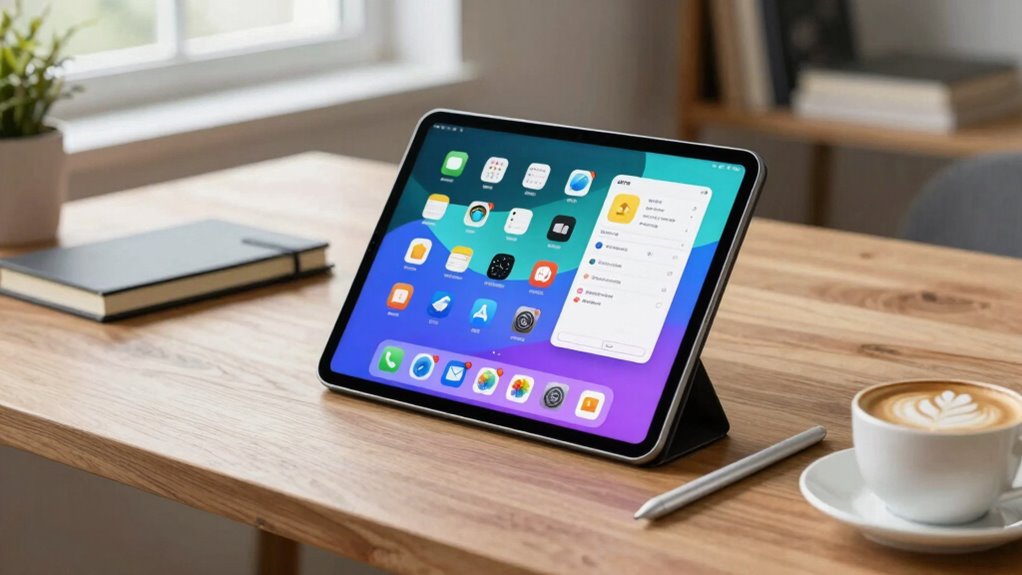

To choose a tablet that boosts your productivity, focus on tasks like note-taking, sketching, or multitasking. Make sure it supports a stylus with pressure sensitivity and palm rejection for smooth handwriting or art. Look for long battery life, fast charging, and strong performance to keep up with demanding work. Check compatibility within its ecosystem to seamlessly connect with your other devices. Want to discover more tips to pick the perfect device? Keep exploring for the full guide.

Get everyday essentials delivered free with Prime
- Fast, free delivery on millions of items
- Prime Video, Amazon Music and more included
- Member-only deals all year
Key Takeaways
- Prioritize tasks like note-taking, sketching, or multitasking to select features that enhance your primary activities.
- Ensure stylus support with pressure sensitivity and palm rejection for accurate handwriting and digital art.
- Opt for long battery life (10+ hours) and fast-charging to support remote and on-the-go productivity.
- Choose a high-performance display with responsive touch, high resolution, and color accuracy for clear visuals.
- Consider ecosystem integration for seamless device connectivity and streamlined workflow across your devices.

Are you overwhelmed by the variety of tablets available and unsure which one best suits your needs? It’s a common challenge, especially when trying to balance features that support productivity. To make a smart choice, start by considering what tasks you’ll perform most often. Will you be taking notes, sketching, editing documents, or managing multiple apps? Your priorities will guide your decision, especially when it comes to key features like stylus compatibility and battery longevity.
If you plan to use a stylus, check whether the tablet supports the specific stylus you prefer. Some devices offer dedicated styluses with pressure sensitivity and palm rejection, making them ideal for drawing or detailed note-taking. Others may have limited or no stylus support, which could hinder your workflow if you rely on handwriting or digital art. Confirming compatibility upfront saves you frustration later on and guarantees that your tablet complements your creative or organizational needs.
Battery longevity is another critical factor. A tablet that lasts only a few hours can disrupt your productivity, especially if you’re often on the go or working remotely without immediate access to charging points. Look for models with long battery life—many premium tablets now offer 10 hours or more of continuous use, enough to get through a workday or a long flight. Keep in mind that intensive tasks like video editing or multitasking can drain the battery faster, so consider tablets with larger batteries or fast-charging capabilities. This way, you won’t be tethered to an outlet or constantly worried about your device dying mid-task. Additionally, some tablets feature power management options that help extend battery life during heavy use. Incorporating efficient hardware can further optimize performance and battery life, enhancing overall productivity. A well-designed battery system is essential for maintaining consistent performance throughout your work sessions.
Beyond these features, think about the overall performance, including processor speed and RAM, to ensure smooth multitasking. A tablet with a responsive interface and ample memory helps you switch between apps seamlessly and complete tasks efficiently. Screen quality matters too—look for high-resolution displays that reduce eye strain and make reading or editing documents easier. Storage capacity is also worth considering; opt for enough space to store your files, apps, and media without constantly needing to delete or offload data. color accuracy in displays can significantly enhance your productivity by providing clearer visuals and reducing eye fatigue, especially during long work sessions.
Additionally, considering the ecosystem of the tablet can improve integration with other devices you may own, streamlining your workflow and reducing setup time. By evaluating these factors thoughtfully—stylus compatibility, battery longevity, performance, and ecosystem—you’ll be well-equipped to choose a tablet that enhances your productivity and fits seamlessly into your daily routine.
stylus with pressure sensitivity for tablets
As an affiliate, we earn on qualifying purchases.
As an affiliate, we earn on qualifying purchases.
Frequently Asked Questions
What Is the Best Tablet for Multi-Tasking?
The best tablet for multi-tasking is one that offers strong performance, stylus integration, and a high screen resolution. Look for devices like the iPad Pro or Samsung Galaxy Tab S8, which support multitasking features and include a responsive stylus for note-taking or drawing. A high-resolution display guarantees clarity when working on multiple apps or viewing detailed content, making your workflow smooth and efficient.
How Does Battery Life Affect Productivity?
Battery life considerably impacts your productivity by ensuring your tablet stays powered during long work sessions or travel. Good battery longevity means you won’t need frequent recharges, saving time and avoiding interruptions. Effective power management features help optimize battery use, so your device lasts longer. When choosing a tablet, prioritize models with strong battery performance to maintain consistent workflow and reduce stress caused by unexpected power drain.
Are There Specific Accessories That Boost Work Efficiency?
Stylus support and seamless keyboard integration greatly boost your work efficiency. Using a compatible stylus allows precise note-taking, sketching, and editing, while a well-integrated keyboard transforms your tablet into a mini laptop. Consider accessories that align with your workflow—like adjustable stands or portable cases—to create a comfortable, clutter-free workspace. These tools help you stay productive, streamline tasks, and smoothly switch between creative and professional pursuits.
Can I Use a Tablet for Professional Video Editing?
Yes, you can use a tablet for professional video editing if it offers high screen resolution and durability. Look for a device with a powerful processor, ample RAM, and a high-quality display to guarantee clear visuals and smooth editing. The durability is vital for frequent use, while a sharp screen resolution helps you see every detail in your videos. With the right tablet, you can efficiently handle professional editing tasks on the go.
Which Operating System Is Most Suitable for Work Tasks?
You’ll find iOS most suitable for work tasks, especially with cloud synchronization that keeps your files seamlessly updated across devices. Its robust security features protect sensitive information, giving you peace of mind. Imagine working effortlessly, your tablet synced and secure, as if the device itself anticipates your needs. Whether you’re managing emails or editing documents, iOS’s intuitive interface and strong security make it the ideal choice for productivity.
long battery life tablet for productivity
As an affiliate, we earn on qualifying purchases.
As an affiliate, we earn on qualifying purchases.
Conclusion
Now that you’ve navigated the maze of options, selecting the perfect tablet feels like finding your North Star—guiding you through the night of endless choices. With the right device in hand, your productivity blooms like a well-tended garden, vibrant and unstoppable. Think of your new tablet as a trusty compass, pointing you toward efficiency and creativity. Embrace it, and watch your work and passions flourish, turning everyday tasks into a symphony of achievement.
high-resolution display tablet for drawing
As an affiliate, we earn on qualifying purchases.
As an affiliate, we earn on qualifying purchases.
tablet with ecosystem integration
As an affiliate, we earn on qualifying purchases.
As an affiliate, we earn on qualifying purchases.
Halloween Picks
halloween
As an affiliate, we earn on qualifying purchases.