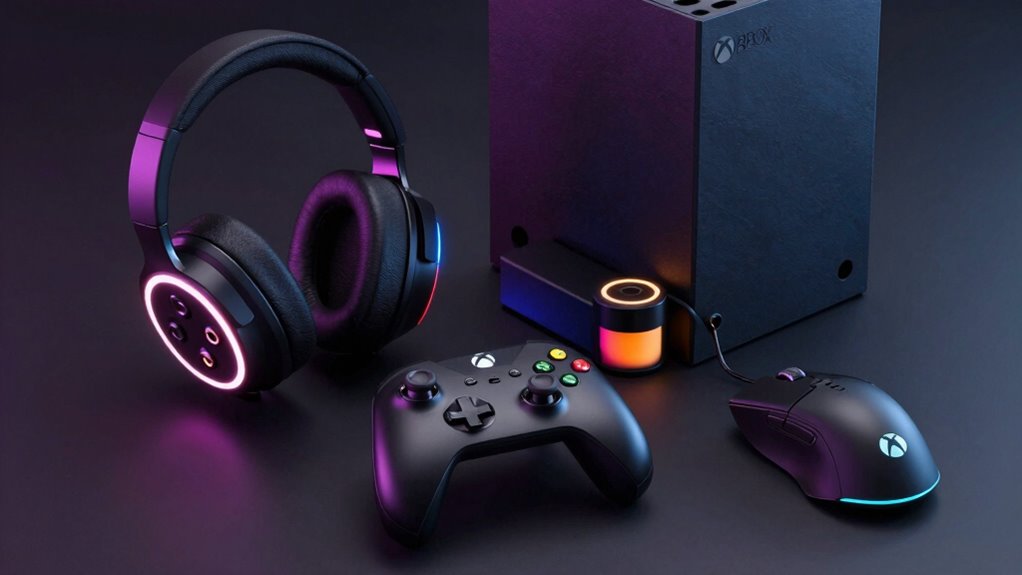

Finding the right accessories for your Xbox Series X can significantly enhance your gaming experience, whether it’s improving comfort, boosting performance, or adding convenience. The Xbox Elite Wireless Controller Series 2 stands out as the overall top choice thanks to its customization options and durability, but options like the GameSir G7 Pro Controller offer a more budget-friendly yet feature-rich alternative. Cooling accessories and remotes also play a critical role in maintaining performance and ease of use, though they come with tradeoffs in noise levels or compatibility. Continue reading for a detailed breakdown of the best accessories to elevate your Xbox Series X setup.

Get everyday essentials delivered free with Prime
- Fast, free delivery on millions of items
- Prime Video, Amazon Music and more included
- Member-only deals all year
Key Takeaways
- Controllers with customization and high build quality dominate the top rankings, balancing performance and durability.
- Cooling accessories vary widely in noise and effectiveness; choosing a quiet, efficient fan is key for long gaming sessions.
- Remote controls add convenience but often sacrifice some versatility compared to traditional controllers.
- Value isn’t just about price — features like adjustable cooling speed or programmable buttons can justify spending more.
- Compatibility and ease of setup are essential; accessories that seamlessly integrate with the Series X tend to be more reliable.
| Xbox Elite Wireless Controller Series 2 – Black |  | Best Overall for Customization and Pro-Level Play | Color: Black | Battery Life: Up to 40 hours (rechargeable) | Custom Profiles: 3 | VIEW ON AMAZON | See Our Full Breakdown |
| GameSir G7 Pro Controller for Xbox Series X|S, Xbox One, PC & Android – Black | 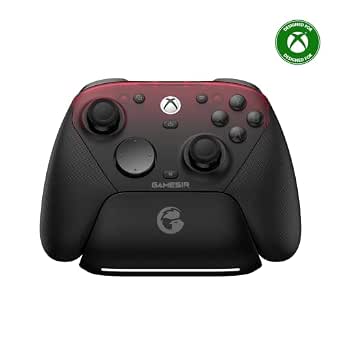 | Best Versatile Tri-Mode Connectivity with Deep Customization | Connectivity: Wired (Xbox), Wired & 2.4G (PC), Bluetooth (Android) | Sticks: TMR (Mag-Res) sticks | Triggers: Hall Effect analog triggers with Micro Switch trigger stops | VIEW ON AMAZON | See Our Full Breakdown |
| Xbox Wireless Gaming Controller – Shock Blue | 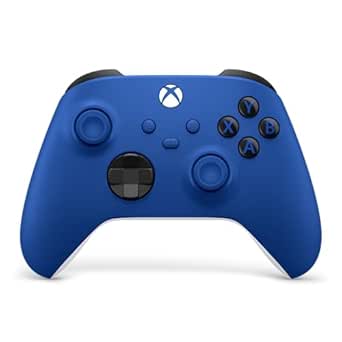 | Best for Versatility and Comfort at a Value Price | Color: Shock Blue | Connectivity: Xbox Wireless, Bluetooth, USB-C | Compatible Devices: Xbox consoles, PCs, TVs, mobile devices | VIEW ON AMAZON | See Our Full Breakdown |
| RGB Cooling Fan Charging Station for Xbox Series X |  | Best All-in-One Cooling, Charging, and Organization Solution | Compatible Console: Xbox Series X | Cooling Fans: Dual rear suction fans | Fan Speeds: 3 adjustable with LED indicator | VIEW ON AMAZON | See Our Full Breakdown |
| Media Remote Control for Xbox One & Xbox Series X|S (Black) |  | Best for Media Control and Convenience | Compatibility: Xbox One, Xbox Series X|S | Color: Black | Setup: Plug and play | VIEW ON AMAZON | See Our Full Breakdown |
| G-STORY Cooling Fan for Xbox Series X, Auto 3 Speed Adjust Temp Display RGB |  | Best Budget Cooling Solution with Smart Temperature Monitoring | Fan Speed Levels: 1500/1750/2000 RPM | Temperature Display: LED, real-time, °F/°C switchable | Power Source: Powered via Xbox Series X port | VIEW ON AMAZON | See Our Full Breakdown |
| MENEEA Cooling Fan with Dust Proof Cover for Xbox Series X |  | Best Multi-Function Cooling and Dust Protection Accessory | Fan Speeds: 3 gears (orange low, blue medium, green high) | Dust Covers: 2 sets included | USB Ports: 1x USB 3.0 (data), 1x USB 2.0 (charging) | VIEW ON AMAZON | See Our Full Breakdown |
| GameSir G7 Pro Wireless Controller – Zenless Zone Zero Edition (Xbox Series X|S, Xbox One, PC) |  | Best Premium Controller with Customization and Anti-Drift Technology | Compatibility: Xbox Series X|S, Xbox One, Windows PC | Connection: 2.4G wireless / wired | Polling Rate: Up to 1000Hz (PC only) | VIEW ON AMAZON | See Our Full Breakdown |
| MENEEA 5-in-1 Cooling Fan & Charging Stand for Xbox Series X |  | Best Space-Saving Multi-Functional Stand | Cooling Fan: Side-mounted, button-controlled | Batteries: 2 x 1400mAh rechargeable | Controller Charging: Dual dock with Type-C | VIEW ON AMAZON | See Our Full Breakdown |
| Auto Cooling Fan for Xbox Series X with LED Display and 9 RGB Light Modes |  | Best Advanced Cooling with RGB and Real-Time Display | Display: LED, real-time, °F/°C | Fan Modes: Low, Medium, High (auto/manual) | RGB Modes: 9 presets | VIEW ON AMAZON | See Our Full Breakdown |
| Xbox Series X 1TB Gaming Console with Wireless Controller – Carbon Black |  | Best Overall Console for Power and Versatility | Storage: 1TB custom NVMe SSD | Processing Power: 12 teraflops | Resolution: True 4K, HDR | VIEW ON AMAZON | See Our Full Breakdown |
| xbox series x accessorie | Compatibility |
|---|---|
| Xbox Elite Wireless Controller | Xbox Series X|S, Xbox One, Windows PC, cloud gaming, mobile |
| GameSir G7 Pro Controller for | — |
| Xbox Wireless Gaming Controlle | — |
| RGB Cooling Fan Charging Stati | — |
| Media Remote Control for Xbox | Xbox One, Xbox Series X|S |
| G-STORY Cooling Fan for Xbox S | Xbox Series X only |
| MENEEA Cooling Fan with Dust P | Xbox Series X |
| GameSir G7 Pro Wireless Contro | Xbox Series X|S, Xbox One, Windows PC |
| MENEEA 5-in-1 Cooling Fan & Ch | Xbox Series X only |
| Auto Cooling Fan for Xbox Seri | Xbox Series X only |
| Xbox Series X 1TB Gaming Conso | — |
More Details on Our Top Picks
Xbox Elite Wireless Controller Series 2 – Black
This controller stands out for its extensive customization options, including interchangeable thumbsticks, paddles, and D-pads, making it ideal for serious gamers who want tailored control. Its up to 40-hour rechargeable battery keeps you in the game longer without fussing over batteries, and adjustable-tension thumbsticks plus hair trigger locks enhance performance in competitive settings. Compared with the Xbox Wireless Controller – Shock Blue, this model offers deeper personalization but comes at a significantly higher price, which might deter casual players. The customization process requires the Xbox Accessories app, adding some setup complexity. Overall, this pick is perfect for gamers who prioritize precision and durability but don’t mind the premium price and setup time.
Pros:- Highly customizable with interchangeable thumbsticks, paddles, and D-pads
- Long 40-hour rechargeable battery life
- Adjustable-tension thumbsticks and hair trigger locks for competitive edge
- Broad compatibility across Xbox, PC, mobile, and cloud gaming
Cons:- Premium price point compared to standard controllers
- Full customization requires the Xbox Accessories app
Best for: Competitive gamers and customization enthusiasts who want a pro-grade controller.
Not ideal for: Casual players seeking an affordable, straightforward controller without extensive setup.
- Color:Black
- Battery Life:Up to 40 hours (rechargeable)
- Custom Profiles:3
- Trigger Locks:Three-step hair trigger locks
- Included Accessories:6 thumbsticks, 4 paddles, 2 D-pads, carrying case, charging dock
- Connectivity:Xbox Wireless, Bluetooth, USB-C
- Compatibility:Xbox Series X|S, Xbox One, Windows PC, cloud gaming, mobile
- Audio Jack:3.5mm
Our verdict“This controller is best suited for dedicated gamers who want maximum control and customization, despite the higher cost.”
GameSir G7 Pro Controller for Xbox Series X|S, Xbox One, PC & Android – Black
The GameSir G7 Pro excels at offering flexible connectivity, supporting wired Xbox, wired/2.4G PC, and Bluetooth Android modes, making it a strong choice for gamers who switch devices often. Its TMR magnetic-resistance sticks and Hall Effect triggers provide smooth, drift-resistant play, while the 1000Hz polling rate on PC ensures ultra-responsive input. Unlike the Xbox Wireless Controller – Shock Blue, which is wired only for Xbox, the G7 Pro offers true wireless freedom on Android and PC, but it requires wired connection for Xbox use, limiting portability. The built-in gyro aiming and customizable buttons add to its versatility, especially for mobile and PC gamers. This controller suits those looking for a multi-platform, feature-rich device but who don’t mind wired connections for Xbox or PC.
Pros:- Supports wired Xbox, wired & 2.4G PC, and Bluetooth Android modes
- Drift-free TMR sticks and Hall Effect triggers
- High responsiveness with 1000Hz polling rate on PC
- Includes charging station and customizable buttons via Nexus app
Cons:- Wired connection required for Xbox mode, limiting wireless flexibility
- Gyro aiming is only available on PC, not on Android or Xbox
Best for: Gamers who need a versatile, multi-device controller with extensive customization options.
Not ideal for: Players who prefer wireless Xbox connectivity in all modes or want a simple, plug-and-play experience.
- Connectivity:Wired (Xbox), Wired & 2.4G (PC), Bluetooth (Android)
- Sticks:TMR (Mag-Res) sticks
- Triggers:Hall Effect analog triggers with Micro Switch trigger stops
- Polling Rate:1000Hz on PC
- Extra Buttons:L5/R5 bumpers + lockable back buttons
- Gyro:Built-in (PC-only)
- Charging Station:Smart Auto Start-Stop
- Color:Black
Our verdict“Ideal for multi-platform gamers who value customization and responsiveness, despite some wired limitations on Xbox mode.”
Xbox Wireless Gaming Controller – Shock Blue
The Shock Blue controller offers a modern, ergonomic design with textured grips and a hybrid D-pad, making it comfortable for extended gaming sessions. Its versatile connectivity supports Xbox Wireless, Bluetooth, and USB-C, allowing use across consoles, PCs, TVs, and mobiles. Compared to the Elite Series 2, it lacks extensive customization but provides a straightforward, reliable experience. The built-in Share button and remappable buttons via the Xbox Accessories app add some flexibility, though remapping requires an app, and it doesn’t feature adjustable tension or paddles. This model appeals to gamers seeking a balance of comfort, compatibility, and affordability without extra bells and whistles.
Pros:- Versatile connectivity across multiple devices
- Comfortable, modern ergonomic design
- Textured grips and hybrid D-pad for better control
- Includes a Share button and remapping via app
Cons:- Button remapping depends on the Xbox Accessories app
- Requires batteries or separate charging solution (not specified)
Best for: Casual gamers and those who want a dependable, comfortable controller at an accessible price.
Not ideal for: Competitive players or customization enthusiasts who need advanced features like paddles or adjustable tension.
- Color:Shock Blue
- Connectivity:Xbox Wireless, Bluetooth, USB-C
- Compatible Devices:Xbox consoles, PCs, TVs, mobile devices
- D-pad:Hybrid D-pad
- Audio Jack:3.5mm
- Special Features:Share button, button remapping
Our verdict“This controller offers good value for those who prioritize comfort and compatibility over advanced customization.”
RGB Cooling Fan Charging Station for Xbox Series X
This multi-function stand combines cooling, charging, and storage in one sleek vertical unit. Its dual rear suction fans with adjustable speeds help keep the console cool during extended gaming sessions, while the dual controller charger with LED indicators ensures your controllers are ready to go. The 15 RGB lighting effects add a customizable aesthetic, and the 8 game card slots plus 2 expansion slots keep your collection organized. Unlike standalone cooling fans, this station consolidates multiple accessories into a single setup, but it only works with official Xbox Series X controllers and batteries are not included, which could be inconvenient for some users. It’s best for those who want a tidy, feature-rich hub for their console.
Pros:- Integrates cooling, charging, storage, and RGB lighting
- Fast dual controller charging in approximately 3.5 hours
- Built-in safety protections for overcurrent and overheating
- Space-saving vertical design
Cons:- Only compatible with official Xbox Series X controllers
- Batteries not included, so additional purchase needed
- Fan installation must be precise for proper operation
Best for: Xbox Series X owners seeking a space-efficient, all-in-one cooling, charging, and storage station.
Not ideal for: Players using third-party controllers or those who already have separate cooling or charging solutions.
- Compatible Console:Xbox Series X
- Cooling Fans:Dual rear suction fans
- Fan Speeds:3 adjustable with LED indicator
- Controller Charging:2 controllers in ~3.5 hours
- RGB Lighting Effects:15
- Game Card Slots:8
- Expansion Card Slots:2
- Extra Ports:1 USB port
Our verdict“This station offers a convenient, multi-functional hub ideal for organized, cool gaming setups but requires compatible controllers and extra batteries.”
Media Remote Control for Xbox One & Xbox Series X|S (Black)
The Media Remote provides a simple, plug-and-play solution for managing your entertainment with Xbox consoles. Its compact, lightweight design with motion-activated backlighting makes it easy to use in dark rooms, while the dedicated buttons for TV, Blu-ray, and streaming apps streamline your media experience. Unlike gaming-focused controllers, this remote is all about convenience, but its TV control functions depend on your specific setup and may require manual adjustments. Batteries are not included, which could add to initial cost. This remote makes the most sense for users who want a straightforward way to control media playback without complicated setup or gaming features.
Pros:- Plug-and-play setup with no pairing required
- Motion-activated backlighting for dark environments
- Controls TV, Blu-ray, and streaming apps
- Secure battery cover with a hook design
Cons:- TV control functions may vary depending on TV model
- Batteries are not included
Best for: Casual media users who want effortless control over their entertainment system connected to Xbox.
Not ideal for: Gamers who need advanced input options or gaming controls on their remote.
- Compatibility:Xbox One, Xbox Series X|S
- Color:Black
- Setup:Plug and play
- Backlighting:Motion activated
- Battery Cover:Hook design
- Warranty:Free replacement within warranty
Our verdict“This remote simplifies media control for casual users but may have limited compatibility depending on your TV setup.”
G-STORY Cooling Fan for Xbox Series X, Auto 3 Speed Adjust Temp Display RGB
This cooling fan stands out for its intelligent temperature sensing, automatically adjusting fan speed to prevent overheating while maintaining low noise levels. Unlike simpler fans that just blow air, its LED temperature display provides real-time feedback, helping users monitor their console’s health. Compared with the MENEEA 5-in-1 stand, this option focuses solely on cooling, making it ideal for those who want a dedicated cooling solution without extra features. The three adjustable speeds and RGB lighting enhance customization, but the fan’s reliance on the console’s power limits its versatility. Its lightweight and simple installation make it a hassle-free addition, although it may not be as effective during extended gaming sessions. Ideal for gamers seeking a budget-friendly, smart cooling accessory who prioritize console longevity without added clutter or functions.
Pros:- Affordable price point for effective cooling
- Automatic temperature sensing prevents overheating
- Low noise operation during gameplay
- Easy to install with plug-and-play design
Cons:- Limited to automatic mode; manual control can be less precise
- No additional USB ports or extra features
Best for: Budget-conscious gamers who want effective heat management without extra features
Not ideal for: Users seeking multifunctional accessories like charging docks or extensive lighting features
- Fan Speed Levels:1500/1750/2000 RPM
- Temperature Display:LED, real-time, °F/°C switchable
- Power Source:Powered via Xbox Series X port
- Lighting:RGB LED with color change based on temperature
- Noise Level:Low
- Compatibility:Xbox Series X only
Our verdict“This fan makes sense for gamers who want smart, budget-friendly cooling without extra bells and whistles.”
MENEEA Cooling Fan with Dust Proof Cover for Xbox Series X
The MENEEA cooling fan excels by combining cooling, dust protection, customizable lighting, and USB expansion into a single device. Compared to the G-STORY fan, it offers additional dust covers and USB ports, making it a more comprehensive setup for users concerned about dust and clutter. However, its USB 2.0 port supports only charging, not data transfer, and the dust covers require removal for optimal cooling, which can be inconvenient during intense gaming. Its three fan speeds are adjustable via touch switches, and the included dust covers help maintain cleaner, longer-lasting hardware. The stand’s vertical design saves space but might feel bulky for small setups. This pick is ideal for gamers who want a multi-functional, dust-resistant upgrade that also expands USB options.
Pros:- All-in-one design with cooling, dust protection, and lighting
- Three adjustable fan speeds with low noise
- Includes dust covers and silicone plugs for ports
- USB ports for charging and data expansion
Cons:- USB 2.0 port supports only charging, not data transfer
- Dust covers need removal for cooling efficiency
Best for: Gamers who want a combined cooling, dust protection, and USB expansion solution
Not ideal for: Players who prioritize compact or minimalistic setups without added accessories
- Fan Speeds:3 gears (orange low, blue medium, green high)
- Dust Covers:2 sets included
- USB Ports:1x USB 3.0 (data), 1x USB 2.0 (charging)
- Lighting:Colorful light strip with multiple modes
- Compatibility:Xbox Series X
- Noise Level:Low
Our verdict“Ideal for users seeking a robust, multi-purpose accessory that safeguards and cools their console in one package.”
GameSir G7 Pro Wireless Controller – Zenless Zone Zero Edition (Xbox Series X|S, Xbox One, PC)
The GameSir G7 Pro Zenless Zone Zero Edition distinguishes itself through its advanced anti-drift joysticks with Mag-Res TMR tech, surpassing the standard analog sticks found on the Xbox Series X controller. It offers extensive customization via the Nexus app, including remappable buttons and adjustable stick curves, making it ideal for competitive players. Compared with the standard Xbox controller, this model adds features like micro trigger stops and swappable faceplates, but its 1000Hz polling rate is limited to PC, leaving console users with less responsiveness. The inclusion of a charging station and extra D-pads enhances its appeal, though the special edition design may not suit everyone’s aesthetic preferences. This controller makes sense for gamers who want high customization, anti-drift technology, and a premium feel.
Pros:- Virtually eliminates stick drift with TMR joysticks
- Highly customizable through Nexus app
- Includes remappable buttons and swappable faceplate
- Stable wireless connection with charging station
Cons:- Polling rate limited to PC, not Xbox consoles
- Design may not appeal to all players
Best for: Competitive gamers and enthusiasts who value customization and premium features
Not ideal for: Casual players or those preferring a standard, less expensive controller
- Compatibility:Xbox Series X|S, Xbox One, Windows PC
- Connection:2.4G wireless / wired
- Polling Rate:Up to 1000Hz (PC only)
- Joysticks:Mag-Res TMR
- Triggers:Hall Effect with micro stops
- Extra Buttons:4 remappable
Our verdict“Perfect for serious gamers seeking a highly customizable, premium controller with anti-drift tech.”
MENEEA 5-in-1 Cooling Fan & Charging Stand for Xbox Series X
This stand combines cooling, charging, storage, and headset organization into a sleek vertical setup. Compared to standalone cooling fans like the B09P39L3KN, the MENEEA stand offers a more integrated solution, especially for space-constrained setups. Its side-mounted fan provides effective cooling, and the dual charging dock supports two controllers with rechargeable batteries included. The stand’s 10-disc storage and headset holder add convenience, though the USB ports support only charging, not data transfer, which may limit its utility for some users. The charger’s operation ceases when the console is off, which could be a drawback for those who prefer constant readiness. Its sturdy metal base with anti-slip pads ensures stability. This is a well-rounded choice for gamers who want compact, multi-functional organization.
Pros:- Combines cooling, charging, storage, and headset stand in one
- Supports two controllers with rechargeable batteries
- Space-saving vertical orientation
- Includes multiple disc slots and headset holder
Cons:- USB ports only support charging, not data transfer
- Charger stops when console is off
Best for: Gamers with limited space who want a space-efficient, all-in-one stand
Not ideal for: Players seeking a dedicated cooling-only device or minimal accessories
- Cooling Fan:Side-mounted, button-controlled
- Batteries:2 x 1400mAh rechargeable
- Controller Charging:Dual dock with Type-C
- Game Storage:10 discs
- USB Ports:2 (charging only)
- Compatibility:Xbox Series X only
Our verdict“Ideal for space-conscious gamers who want a versatile, compact stand with multiple functions.”
Auto Cooling Fan for Xbox Series X with LED Display and 9 RGB Light Modes
This cooling fan offers a high level of sophistication, with a real-time LED temperature display that provides precise monitoring and automatic fan speed adjustment for optimal cooling. Unlike the simpler G-STORY fan, its 9 RGB lighting modes add visual flair, making it appealing for aesthetic enthusiasts. The built-in USB hub supports charging controllers and headsets simultaneously, adding versatility. However, its plastic construction may feel less durable, and it’s only compatible with Xbox Series X, limiting cross-platform use. The automatic fan control ensures the console stays within safe temperature ranges, but some users might find the plastic build less premium. This device is best suited for gamers who value real-time data, vibrant lighting, and integrated charging in a space-saving form.
Pros:- Real-time LED temperature display with high accuracy
- Automatic fan speed adjustment based on temperature
- Nine RGB lighting modes for customization
- Integrated USB hub for charging accessories
Cons:- Plastic build may feel less durable
- Limited to Xbox Series X
Best for: Aesthetically-minded gamers who want precise temperature control and RGB lighting
Not ideal for: Players seeking a more durable, metal construction or multi-console compatibility
- Display:LED, real-time, °F/°C
- Fan Modes:Low, Medium, High (auto/manual)
- RGB Modes:9 presets
- USB Hub:Yes, 2.0
- Compatibility:Xbox Series X only
- Material:Plastic
Our verdict“Ideal for gamers who prioritize precise temperature monitoring, vibrant lighting, and integrated charging in a sleek design.”
Xbox Series X 1TB Gaming Console with Wireless Controller – Carbon Black
This Xbox Series X stands out as the most powerful console in the lineup, offering a stunning 12 teraflops of processing power that ensures smooth, high-fidelity gaming up to 120 FPS at true 4K resolution. Compared to the Xbox Series S, which sacrifices some performance and storage for affordability, the Series X delivers a richer visual experience and faster load times thanks to its custom 1TB NVMe SSD. The inclusion of a wireless controller with ergonomic improvements and a Share button makes multiplayer and streaming sessions more seamless, though the need for AA batteries might be a minor inconvenience for some. Backward compatibility across four generations of Xbox titles adds to its versatility, but gamers should note that storage expansion cards are sold separately and can be costly, and the built-in storage might fill quickly with large game files. This model is ideal for dedicated gamers seeking the best performance and future-proofing.
Pros:- Exceptional processing power with 12 teraflops for smooth, high-resolution gaming
- Fast load times thanks to the 1TB NVMe SSD and Quick Resume feature
- Backward compatibility across four Xbox generations broadens game library
Cons:- Extra storage expansion cards are expensive and sold separately
- Controller uses AA batteries, which can be inconvenient and add ongoing cost
Best for: Hardcore gamers who want the most powerful Xbox experience and plan to play across multiple generations.
Not ideal for: Casual players or those on a tight budget who might prefer a less expensive or more compact option.
- Storage:1TB custom NVMe SSD
- Processing Power:12 teraflops
- Resolution:True 4K, HDR
- Frame Rate:Up to 120 FPS
- Color:Carbon Black
- Ray Tracing:Hardware-accelerated
- Audio:3D Spatial Sound with Dolby Atmos
- Backward Compatibility:Xbox Series X|S, Xbox One, Xbox 360, Original Xbox
- Includes:Console, wireless controller, ultra-high-speed HDMI cable, power cable, two AA batteries
Our verdict“This console is best suited for players seeking top-tier performance and extensive game compatibility, despite higher costs for storage accessories.”
How We Picked
Our evaluation focused on performance, build quality, usability, and value. For controllers, we prioritized responsiveness, comfort, customization, and durability. Cooling accessories were assessed based on effectiveness, noise levels, and ease of installation. We also considered user reviews and compatibility with the Series X ecosystem to ensure each product offers a reliable experience. Accessories that add convenience without overcomplicating setup or sacrificing essential features earned higher ranks, while tradeoffs like noise or higher cost impacted lower rankings.
| xbox series x accessorie | Compatibility |
|---|---|
| Xbox Elite Wireless Controller | Xbox Series X|S, Xbox One, Windows PC, cloud gaming, mobile |
| GameSir G7 Pro Controller for | — |
| Xbox Wireless Gaming Controlle | — |
| RGB Cooling Fan Charging Stati | — |
| Media Remote Control for Xbox | Xbox One, Xbox Series X|S |
| G-STORY Cooling Fan for Xbox S | Xbox Series X only |
| MENEEA Cooling Fan with Dust P | Xbox Series X |
| GameSir G7 Pro Wireless Contro | Xbox Series X|S, Xbox One, Windows PC |
| MENEEA 5-in-1 Cooling Fan & Ch | Xbox Series X only |
| Auto Cooling Fan for Xbox Seri | Xbox Series X only |
| Xbox Series X 1TB Gaming Conso | — |
Factors to Consider When Choosing Xbox Series X Accessories
Choosing the right Xbox Series X accessories involves more than picking the most popular options. It’s essential to consider your gaming style, the environment you play in, and your budget. High-performance controllers can offer better responsiveness, but they often come at a premium. Cooling accessories help maintain performance during extended play, yet not all fans operate quietly. Remote controls add convenience but may lack advanced features or compatibility. By understanding these factors, you can tailor your accessory choices to suit your needs and avoid common pitfalls like overpaying for unnecessary features or buying incompatible gear.Controller Features and Compatibility
When selecting a controller, focus on responsiveness, comfort, and customization options like remappable buttons or adjustable thumbsticks. The Xbox Elite Series 2 offers extensive customization but comes at a higher price point, while controllers like the GameSir G7 Pro provide a solid balance of features and affordability. Compatibility with other devices, such as PC or Android, can also expand your gaming options, so check for multi-platform support if needed.
Cooling Solutions and Noise Levels
Extended gaming sessions can cause your Xbox Series X to heat up, making cooling accessories essential. However, some fans operate loudly, which can disrupt immersion or comfort. Look for models with adjustable speeds and noise reduction features. The G-STORY and MENEEA cooling fans stand out for their multiple speed settings and effective heat management, but they can be noisy at higher speeds. Weighing cooling efficiency against noise levels helps you pick a solution that maintains performance without becoming a distraction.
Remote Controls for Convenience
Remote controls can streamline navigation, especially when media playback is a priority. However, they often lack the advanced features of controllers, like vibration or extensive customization. The Media Remote Control for Xbox simplifies media control, but some users find it less versatile for gaming. Consider whether a remote adds value to your setup or if a controller with media buttons suffices.
Build Quality and Durability
Accessories should withstand regular use; cheap materials often lead to quicker wear and tear. Controllers with high-quality plastics and metal components tend to last longer, but they also cost more. Cooling fans and remotes with sturdy construction and reliable parts reduce the risk of malfunction, ensuring your investment endures through prolonged gaming periods.
Budget Considerations and Value
Higher-priced accessories often offer advanced features or better durability, but they aren’t always necessary for casual gamers. Balance your budget with the features you need most. For instance, investing in a premium controller makes sense if you prioritize competitive gaming, while budget-friendly cooling fans can prevent overheating without breaking the bank. Avoid overspending on features you won’t use, but don’t skimp on essentials like controller responsiveness or effective cooling.
Frequently Asked Questions
Do I need a separate cooling fan for my Xbox Series X?
While the Xbox Series X has a built-in cooling system, additional cooling accessories can help during extended gaming sessions, especially if you notice overheating or performance drops. External fans can provide extra airflow and stability, but they may add noise or require extra space. For most casual players, the stock cooling suffices, but enthusiasts or those with heavy use may benefit from a dedicated cooling solution for optimal performance.
Are premium controllers worth the extra cost?
Premium controllers like the Xbox Elite Series 2 offer enhanced responsiveness, customization options, and durability, making them a good investment for serious or competitive gamers. However, their higher price tag means casual players might not see proportional benefits. If you value precise control and plan to game extensively, investing in a premium controller makes sense. Otherwise, more affordable options can deliver satisfactory performance for everyday gaming.
Can I use my existing Xbox One accessories with the Series X?
Most Xbox One controllers and accessories are compatible with the Series X thanks to backward compatibility, but some specialized accessories may require updates or may not support all features. For controllers, this usually isn’t an issue, but for accessories like cooling fans or remotes, verify compatibility before purchase. Using compatible gear ensures stable operation and preserves your investment without needing to buy new peripherals immediately.
How important is wireless connectivity for controllers?
Wireless controllers provide convenience and freedom of movement, making them the preferred choice for most players. They eliminate clutter and allow for easy setup, but they rely on batteries or rechargeable packs that need regular maintenance. Wired controllers can offer a more stable connection with zero latency, which may appeal to competitive gamers. Consider your gaming environment and preferences when choosing between wired or wireless options.
What should I consider when choosing a remote for my Xbox Series X?
When selecting a remote, look for compatibility with your console, ergonomic design, and additional features like voice control or dedicated media buttons. A remote that integrates seamlessly with your setup simplifies media navigation, but some models lack advanced controls or may feel bulky. Think about how often you use your console for media playback and whether a remote adds enough convenience to justify its cost.
Conclusion
For most users, the Xbox Elite Wireless Controller Series 2 offers the best overall experience, especially for competitive or dedicated gamers. Budget-conscious players will find excellent value in controllers like the GameSir G7 Pro, which balances features and affordability. Those seeking enhanced cooling or media convenience should consider dedicated fans and remotes, but be mindful of noise and compatibility. Beginners or casual players can start with standard controllers and basic cooling options, while advanced users should prioritize durability, responsiveness, and customization in their accessories to maximize their gaming enjoyment.
Fall Picks
fall essentials
As an affiliate, we earn on qualifying purchases.