For photographers and Lightroom users in 2025, I recommend the 14.2-inch or 16.2-inch MacBook Pro with the M4 Max chip, 36GB of RAM, and at least 1TB of SSD storage. These models offer stunning Liquid Retina XDR displays, powerful performance, and extensive connectivity options like Thunderbolt ports, SDXC slots, and HDMI. Their portability combined with robust specs makes them ideal for photo editing on the go. Keep reading to discover more about these top choices.
Key Takeaways
- Opt for models with the M4 Max chip, high RAM (32GB or more), and large SSDs (1TB+), ideal for handling large Lightroom catalogs and editing tasks.
- Prioritize MacBook Pro versions with extensive port options, including SDXC, HDMI, and multiple Thunderbolt ports for versatile connectivity.
- Choose models with Liquid Retina XDR display, ProMotion technology, and high color accuracy for precise photo editing.
- Consider portability features like extended battery life and lightweight design for on-the-go photography workflows.
- Ensure seamless Apple ecosystem integration with features like AirDrop, iCloud, and external display support for efficient workflow management.

Apple 2024 MacBook Pro Laptop with M4 chip with 10‑core CPU and 10‑core GPU: Built for Apple Intelligence, 14.2-inch Liquid Retina XDR Display, 16GB Unified Memory, 1TB SSD Storage; Space Black
SUPERCHARGED BY M4 — The 14-inch MacBook Pro with M4 chip gives you spectacular performance in a powerhouse...
As an affiliate, we earn on qualifying purchases.
Apple 2024 MacBook Pro Laptop with M4 Max (14.2-inch, 36GB, 1TB SSD)

If you’re a photographer or Lightroom user seeking top-tier performance in 2025, the Apple 2024 MacBook Pro with M4 Max is my top pick. Its 14.2-inch Liquid Retina XDR display delivers vibrant, high-contrast visuals, perfect for editing detailed images. Powered by a 14-core CPU and 32-core GPU, plus 36GB of unified memory, it handles large files and complex workflows effortlessly. The 1TB SSD ensures quick access to your photo library and projects. With seamless macOS integration, excellent battery life, and advanced features like AppleCare+ support, this MacBook Pro truly elevates your creative process while maintaining portability.
Best For: creative professionals and power users seeking a high-performance, portable MacBook Pro for demanding tasks like photo editing, 3D rendering, and software development.
Pros:
- Exceptional display quality with Liquid Retina XDR and high brightness for accurate color and contrast
- Powerful M4 Max chip with ample memory and storage for demanding workflows
- Seamless integration within the Apple ecosystem and extended coverage with AppleCare+
Cons:
- Premium price point may be prohibitive for some users
- Limited ports may require additional adapters or hubs
- Heavier than some other ultrabooks, potentially impacting portability for certain users

Apple 2024 MacBook Pro with Apple M4 Max Chip 16-inch. 36GB RAM, 1TB SSD Storage - Silver (Renewed)
SUPERCHARGED BY M4 PRO OR M4 MAX — The 16-inch MacBook Pro with the M4 Pro or M4...
As an affiliate, we earn on qualifying purchases.
Apple 2024 MacBook Pro with M4 Max Chip, 16-inch, 36GB RAM, 1TB SSD, Silver (Renewed)
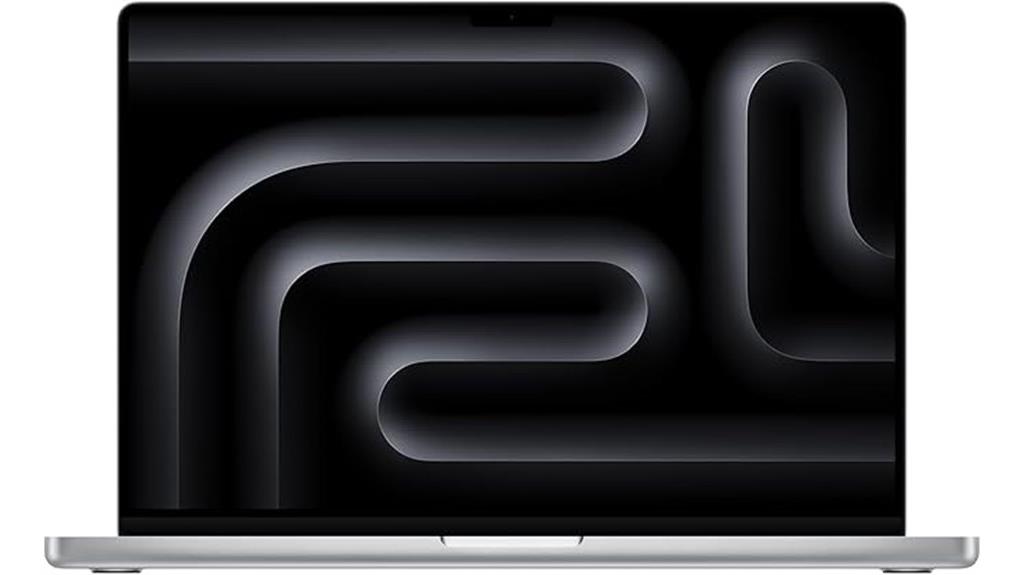
The Apple 2024 MacBook Pro with M4 Max chip stands out for photographers and Lightroom users who demand top-tier performance and stunning visuals. Its 16.2-inch Liquid Retina XDR display offers incredible brightness and contrast, making photo editing precise and vibrant. Equipped with 36GB RAM and a 1TB SSD, it handles large files and complex workflows effortlessly. The M4 Max chip powers demanding tasks like rendering high-resolution images and 3D content smoothly. With extensive connectivity options, a professional-grade camera, and seamless ecosystem integration, this renewed model is an excellent choice for creative professionals seeking power, portability, and reliability in one package.
Best For: creative professionals and photographers who need high-performance processing, stunning visual display, and extensive connectivity for demanding editing and rendering tasks.
Pros:
- Exceptional 16.2-inch Liquid Retina XDR display with high brightness and contrast for precise editing
- Powerful M4 Max chip with 36GB RAM and 1TB SSD handles large files and complex workflows efficiently
- Extensive connectivity options including Thunderbolt 5, SDXC card slot, HDMI, and ecosystem integration for versatile work setup
Cons:
- Renewed model may have limited warranty compared to new units
- Premium price point might be a consideration for budget-conscious users
- Heavy and large form factor could impact portability for some users
Apple 2024 MacBook Pro Laptop with M4 Max, 14‑core CPU, 32‑core GPU: Built for Apple Intelligence, 14.2-inch Liquid Retina XDR Display, 36GB Unified Memory, 1TB SSD Storage; Space Black
SUPERCHARGED BY M4 PRO OR M4 MAX — The 14-inch MacBook Pro with the M4 Pro or M4...
As an affiliate, we earn on qualifying purchases.
Apple 2024 MacBook Pro Laptop with M4 Max

Photographers and Lightroom users will appreciate the Apple 2024 MacBook Pro with M4 Max for its stunning Liquid Retina XDR display, which delivers exceptional color accuracy and contrast perfect for editing high-resolution photos. The 14.2-inch screen offers 3024×1964 resolution, support for a billion colors, and peak HDR brightness of 1600 nits. Its ProMotion technology with adaptive refresh rates up to 120Hz guarantees smooth visuals. Powered by the M4 Max chip, it provides a 14-core CPU, 32-core GPU, and up to 128GB of memory, making it a powerhouse for demanding photo workflows. Plus, with extensive connectivity options, it’s built for professional multimedia tasks.
Best For: photographers, creative professionals, and Lightroom users seeking a high-performance laptop with exceptional display quality and powerful editing capabilities.
Pros:
- Stunning 14.2-inch Liquid Retina XDR display with accurate color and high contrast for photo editing
- Powered by the advanced M4 Max chip with up to 128GB of memory, ideal for demanding workflows
- Extensive connectivity options including multiple Thunderbolt 5 ports, HDMI, SDXC card slot, and MagSafe 3
Cons:
- Premium price point may be prohibitive for some users
- Slightly heavy at 3.56 pounds, less portable for on-the-go use
- Limited to macOS, which may not suit users requiring Windows-based software compatibility
Factors to Consider When Choosing a Macbook Pro for Photographers and Lightroom
When choosing a MacBook Pro for photography and Lightroom, I focus on key factors like display quality, processing power, and storage options to guarantee smooth editing. Connectivity and port availability matter too, especially for external drives and accessories, while battery life affects portability during on-the-go shoots. Considering these points helps me pick a model that balances performance and convenience perfectly.
Display Quality and Brightness
Choosing a MacBook Pro for photography and Lightroom work means paying close attention to display quality and brightness. A high-quality display like Liquid Retina XDR offers a wide color gamut and high resolution, ensuring accurate color reproduction essential for editing. Brightness levels reaching up to 1600 nits allow me to work precisely in HDR and brightly lit environments. The high contrast ratio of 1,000,000:1 reveals more detail in shadows and highlights, making photo editing more accurate. Support for ProMotion technology with a 120Hz refresh rate delivers smoother scrolling and responsiveness. Additionally, True Tone technology adjusts color temperature based on ambient lighting, helping me review images consistently across different settings. Overall, these features guarantee my display is both vibrant and reliable for detailed editing.
Processing Power and GPU
Processing power and GPU performance are key factors that directly impact how effectively I can handle large Lightroom catalogs and complex edits. A powerful processor like the M4 Max with a 14-core CPU ensures smooth multitasking and fast rendering of high-resolution images. The 32-core GPU accelerates rendering, preview generation, and real-time editing, making my workflow much faster. Ample unified memory, such as 36GB, allows me to work seamlessly without lag, even with multiple high-res photos open. Fast SSD storage, like 1TB, ensures quick access to large files and smooth import/export processes. Hardware-accelerated video and image processing engines further boost responsiveness, reducing rendering times during editing sessions. Overall, a robust combination of CPU, GPU, and memory greatly enhances my efficiency in Lightroom.
Memory and Storage Options
Ever wondered why memory and storage are critical for your Lightroom workflow? The answer lies in performance and efficiency. I recommend at least 16GB of RAM to handle large catalogs and multitasking seamlessly. For high-resolution images and complex edits, 36GB or more of unified memory is ideal, preventing lag and speeding up rendering. Storage capacity matters just as much; a 1TB SSD is the minimum I’d suggest for storing extensive photo libraries and ensuring fast access times. Larger options like 2TB or 4TB SSDs give you ample space for raw files and backups without relying on external drives, streamlining your workflow. Sufficient memory and storage reduce bottlenecks, letting you work smoothly and focus on your creativity rather than technical limitations.
Port Availability and Connectivity
To guarantee a seamless workflow, it’s essential to focus on port availability and connectivity options on a MacBook Pro. I look for models with multiple Thunderbolt 4 or 5 ports, ensuring fast data transfer and easy connection of external devices like card readers and drives. An SDXC card slot is necessary for directly transferring photos without adapters, saving time. I also prioritize models with HDMI ports and a headphone jack, allowing me to connect external displays and high-impedance headphones for accurate audio monitoring. Having several ports, such as three Thunderbolt connections, makes it easier to connect multiple peripherals simultaneously. Additionally, support for external high-resolution monitors via Thunderbolt or HDMI is indispensable for precise photo editing and color accuracy, making port options a key factor in my choice.
Battery Life and Portability
While having multiple ports is important for connecting external devices, I also focus on how long I can work without needing to recharge. Longer battery life means I can edit and review photos in the field without constantly searching for outlets. It supports intensive tasks like high-resolution RAW editing in Lightroom, keeping my workflow smooth and uninterrupted. Portability, indicated by weight and size, is vital for outdoor shoots and travel, making it easier to carry the MacBook Pro wherever I go. A lightweight, compact model enhances mobility, so I can work on the move without feeling weighed down. Consistent battery performance ensures I can rely on my device during long editing sessions, boosting my productivity and reducing stress when working remotely or in the field.
Ecosystem Compatibility
Choosing a MacBook Pro that works seamlessly within the Apple ecosystem can substantially boost your photography workflow. Integration with devices like iPhones and iPads allows for quick transfers and effortless multitasking. Features like AirDrop, iCloud, and Handoff streamline photo management, editing, and sharing, saving you time. It’s essential to verify that your MacBook supports the latest macOS features and is compatible with Lightroom and other creative apps optimized for Apple Silicon. Additionally, look for ecosystem-connected accessories such as external drives and display calibrators that guarantee a cohesive editing setup. Compatibility with Continuity and Universal Control enables smooth multitasking and file sharing across all your Apple devices, making your creative process more efficient and less cluttered.
Frequently Asked Questions
How Does the M4 Max Chip Improve Photo Editing Performance?
The M4 Max chip boosts my photo editing by offering faster processing speeds and improved GPU performance, making tasks like rendering and exporting much quicker. I notice smoother multitasking and better handling of large Lightroom catalogs without lag. Its increased efficiency means I can work seamlessly on high-resolution images and complex edits, saving me time and making my workflow more efficient.
Is 36GB RAM Sufficient for Large Lightroom Catalogs?
Is 36GB of RAM enough for big Lightroom catalogs? Absolutely. I’ve found that 36GB handles large collections smoothly, allowing me to edit seamlessly without lag. Think of it as having a spacious workspace that keeps all your files accessible. While more RAM can help, for most photographers working with extensive catalogs, 36GB strikes a great balance between performance and cost. It’s enough to keep your workflow flowing effortlessly.
What Are the Battery Life Expectations for Intensive Photo Editing?
Battery life during intensive photo editing can vary, but I typically expect around 4 to 6 hours on a high-performance MacBook Pro. Heavy tasks like rendering or working with large files drain the battery faster, so I recommend keeping your charger handy. To maximize battery life, I close unnecessary apps, reduce screen brightness, and enable power-saving features. This way, I can work longer without interruptions.
How Does the 1TB SSD Compare to Larger Storage Options?
A 1TB SSD offers solid storage for most photographers, but if you’re working with large RAW files or extensive libraries, larger options like 2TB or 4TB might be better. I find that 1TB strikes a good balance between capacity and cost, but if you often run out of space, upgrading to bigger drives guarantees smoother workflow without constant file management. Always consider your storage needs carefully before deciding.
Are Refurbished Macbook Pros Reliable for Professional Photography Work?
I’ve used refurbished MacBook Pros for my professional photography work, and they’ve been incredibly reliable. For instance, I recently upgraded to a refurbished 16-inch model, and it performs just like new, handling large RAW files and Lightroom edits seamlessly. As long as you buy from a reputable seller with a warranty, refurbished Macs are a smart, cost-effective choice that won’t compromise your workflow or quality.
Conclusion
Picking the right MacBook Pro is like choosing the perfect canvas for your art—you want space, clarity, and durability. With these top models, you’re equipped to paint your photographic masterpieces seamlessly. Just remember, the best tool isn’t always the biggest or newest, but the one that fits your style and needs. Trust your instinct, and you’ll create masterpieces that stand the test of time—much like a timeless work of art.