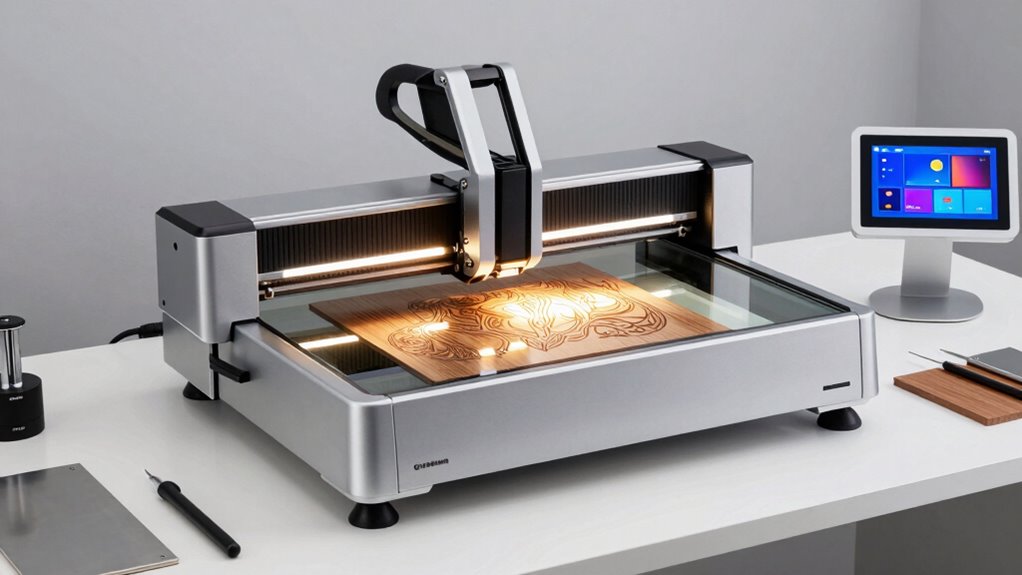

If you’re exploring laser engravers, you’ll find a wide range of options with varying power, precision, and features. The K15 Pro Laser Engraver 10W stands out as the best overall for its versatility in handling different materials. The xTool S1 40W Laser Cutter and Engraver is a top pick for power and speed, ideal for more demanding projects. Meanwhile, the LaserPecker LP1 Plus offers a compact, beginner-friendly experience for hobbyists. The major tradeoffs in this category often revolve around power versus ease of use, safety, and price. Continue reading for a detailed comparison to find the perfect fit for your needs.

Get everyday essentials delivered free with Prime
- Fast, free delivery on millions of items
- Prime Video, Amazon Music and more included
- Member-only deals all year
Key Takeaways
- Power levels range from 5W to 40W, significantly impacting engraving speed and material compatibility.
- Safety features like enclosed designs and dual cameras are common in higher-end models but add to the cost.
- Budget options like the LaserPecker LP1 Plus prioritize portability and ease for beginners, sacrificing some precision.
- Materials compatibility varies, with some engravers optimized for metal and glass, others for wood and acrylic.
- Pricing correlates strongly with features, power, and safety, meaning higher investment generally yields more versatility and durability.
| K15 Pro Laser Engraver 10W – CNC DIY Laser Cutter for Metal, Wood, Acrylic, Glass, Stone |  | Best for Beginners and Small Projects | Power: 10W | Work Area: 11.8×7.9 inches (A4) | Material Compatibility: Wood, acrylic, leather, coated metal | VIEW ON AMAZON | See Our Full Breakdown |
| ATOMSTACK 20W Laser Engraver A20 PRO V2 |  | Best for Detailed Precision and Professional Use | Laser Power: 20,000mW | Engraving Speed: up to 400mm/s | Laser Class: 4 | VIEW ON AMAZON | See Our Full Breakdown |
| xTool S1 40W Laser Cutter and Engraver with Rotary Bundle |  | Best for Large Projects and Versatile Capabilities | Laser Power: 40W | Bed Size: 23.93″ x 15.16″ | Speed: 600mm/s | VIEW ON AMAZON | See Our Full Breakdown |
| xTool M2 10W Laser Engraver with Dual Cameras, Enclosed Safe Design |  | Best for Precision and Versatile Small-Scale Projects | Power: 10W | Weight: 36.2 pounds | Dimensions: 28 x 25 x 12 inches | VIEW ON AMAZON | See Our Full Breakdown |
| ELIDOR 6000mW Laser Engraver and Cutter Machine |  | Best for High-Precision Hobbyist and Small Business Use | Laser Power: 6W | Engraving Accuracy: 0.01mm | Laser Spot Size: 0.04 × 0.14 mm | VIEW ON AMAZON | See Our Full Breakdown |
| Twotrees TTS-10 Pro Laser Engraver, 10W High Precision Desktop Laser Cutter |  | Best Overall for Versatile Hobbyists and Small Businesses | Optical Power: 10W (10,000mW) | Wavelength: 450nm ± 5nm | Working Area: 300 x 300 mm | VIEW ON AMAZON | See Our Full Breakdown |
| xTool M2 10W Color Craft Laser Engraver with Full-Color CMYK Printer and Dual Cameras |  | Best for Colorful Custom Projects and Real-Time Accuracy | Weight: 43.3 pounds | Laser Power: 10,000mW | Size: 27.5 x 24.8 x 10.75 inches | VIEW ON AMAZON | See Our Full Breakdown |
| xTool F2 Ultra UV Laser Engraver, 5W UV Laser for Glass and Crystal Engraving |  | Best for Ultra-Precise Glass and Crystal Engraving | Laser Power: 5W | Laser Type: UV laser | Max Speed: 15,000 mm/s | VIEW ON AMAZON | See Our Full Breakdown |
| Twotrees TTS-55 Pro Laser Engraver 5500mW |  | Best for Heavy-Duty Cutting and Engraving with High Power | Laser Power: 5500mW | Working Area: 300x300mm | Material Compatibility: Wood, leather, acrylic, stainless steel | VIEW ON AMAZON | See Our Full Breakdown |
| xTool F2 5W IR & 15W Diode Dual Laser Engraver with Built-in 50MP Camera |  | Best for Versatile Small-Batch and On-Site Use | Laser Power (IR): 5W | Laser Power (Diode): 15W | Camera Resolution: 50MP | VIEW ON AMAZON | See Our Full Breakdown |
| ACMER S2 Laser Engraver, 12000mW Laser Cutter Engraving Machine |  | Best for High-Precision Small Projects and Material Variety | Power: 12W laser module | Total System Power: 72W | Working Area: 300×300mm | VIEW ON AMAZON | See Our Full Breakdown |
| BlazeX M3 10W Laser Engraver Machine with Enclosure and Accessories |  | Best for Safe, Versatile Hobbyist and Beginner Use | Laser Power: 10W | Precision: 0.01mm | Materials Compatible: wood, metal, glass, leather | VIEW ON AMAZON | See Our Full Breakdown |
| LaserPecker LP1 Plus Mini Laser Engraver for Beginners |  | Best for Portable, Quick-Start Personal Projects | Product Dimensions: 1 x 1 x 1 inches | Item weight: 2.4 pounds | Model Number: LP1 Plus | VIEW ON AMAZON | See Our Full Breakdown |
| laser engraver | Material Compatibility | Laser Power |
|---|---|---|
| K15 Pro Laser Engraver 10W | Wood, acrylic, leather, coated metal | — |
| ATOMSTACK 20W Laser Engraver A | — | 20,000mW |
| xTool S1 40W Laser Cutter and | Wood, metal, acrylic | 40W |
| xTool M2 10W Laser Engraver wi | Wood, leather, fabric | — |
| ELIDOR 6000mW Laser Engraver a | — | 6W |
| Twotrees TTS-10 Pro Laser Engr | — | — |
| xTool M2 10W Color Craft Laser | — | 10,000mW |
| xTool F2 Ultra UV Laser Engrav | Glass, crystal, acrylic, ceramics | 5W |
| Twotrees TTS-55 Pro Laser Engr | Wood, leather, acrylic, stainless steel | 5500mW |
| xTool F2 5W IR & 15W Diode Dua | 300+ materials | — |
| ACMER S2 Laser Engraver | wood, leather, acrylic, coated metal, and more | — |
| BlazeX M3 10W Laser Engraver M | — | 10W |
| LaserPecker LP1 Plus Mini Lase | — | — |
More Details on Our Top Picks
K15 Pro Laser Engraver 10W – CNC DIY Laser Cutter for Metal, Wood, Acrylic, Glass, Stone
The K15 Pro stands out for its user-friendly design, making it ideal for hobbyists starting with laser engraving. Compared to the xTool M2 10W, it offers a more straightforward setup and a smaller workspace, which is perfect for small crafts but limits larger projects. Its high precision (0.01mm) and fast engraving speed (15,000mm/min) deliver detailed results quickly. The wireless control adds convenience, but the limited work area might frustrate those wanting bigger outputs. Upgrades for metal engraving are available, although they come at additional cost, and software setup can be a hurdle for absolute beginners. Overall, this is a solid choice for newcomers focused on small, precise projects with ease of use in mind.
Pros:- Easy to assemble, with a comprehensive starter kit included
- High precision and rapid engraving speeds
- Compatible with multiple materials and upgradable for metal
Cons:- Limited workspace size may restrict larger projects
- Requires some familiarity with software and technical setup
Best for: Beginners, hobbyists, and small-scale crafters starting with laser engraving.
Not ideal for: Professionals needing large workspaces or industrial-scale production, due to its limited size and upgrade scope.
- Power:10W
- Work Area:11.8×7.9 inches (A4)
- Material Compatibility:Wood, acrylic, leather, coated metal
- Maximum Cutting Thickness:12mm plywood, 8mm acrylic
- Precision:0.01mm
- Speed:15,000mm/min
Our verdict“Ideal for beginners seeking a compact, precise laser engraver for small crafts and DIY projects.”
ATOMSTACK 20W Laser Engraver A20 PRO V2
The ATOMSTACK A20 PRO V2 offers a significant upgrade in laser power and precision over smaller models like the K15 Pro. Its 20W laser enables faster cutting and more detailed engraving on metals, wood, and acrylic, appealing to those pursuing professional results. The high engraving accuracy of 0.01mm and a lifespan of up to 10,000 hours make it suitable for frequent use. However, the increased power and complexity demand strict safety precautions, which might be daunting for beginners. Assembly is straightforward, but some users may find the setup and calibration process more involved than the K15 Pro. This model makes the most sense for experienced hobbyists or small businesses needing fast, precise, and durable equipment, but it’s less suited for casual users concerned about safety or ease of use.
Pros:- High-precision engraving with detailed dot technology
- Fast processing speeds and long laser lifespan
- Durable aluminum frame and multiple control options
Cons:- Requires strict safety precautions due to high laser power
- Setup and calibration may be complex for newcomers
Best for: Experienced hobbyists, small business owners, and professionals requiring high precision and durability.
Not ideal for: Beginners or those seeking a simple, low-cost entry-level laser engraver due to its safety and setup complexity.
- Laser Power:20,000mW
- Engraving Speed:up to 400mm/s
- Laser Class:4
- Engraving Accuracy:0.01mm
- Lifespan:up to 10,000 hours
Our verdict“Best suited for experienced users demanding high precision, speed, and durability in a laser engraver.”
xTool S1 40W Laser Cutter and Engraver with Rotary Bundle
The xTool S1 40W is designed for larger, more ambitious projects, offering a substantial 23.93″ x 15.16″ bed and powerful 40W laser, making it ideal for cutting thicker materials like 18mm wood. Its high speed of 600mm/s and advanced safety features, including an enclosed design and emergency stop, make it suitable for both home use and small commercial applications. Compared to the ATONSTACK 20W, its larger bed and higher power expand project scope but come at a premium price and increased weight—86.8 pounds. It requires more space and technical calibration, which could be a barrier for casual hobbyists. This model is best for users who need to handle large or complex projects regularly and prioritize safety and power, but it may be overkill for light hobby use.
Pros:- Large bed size and auto-passthrough technology for big projects
- High power (40W) capable of cutting thick materials
- Enhanced safety features for secure operation
Cons:- Heavy and requires a dedicated workspace
- High price point may be prohibitive for casual users
Best for: Small business owners, professionals, or hobbyists working on large-scale or complex projects.
Not ideal for: Casual hobbyists or users with limited space, due to its size, weight, and cost.
- Laser Power:40W
- Bed Size:23.93″ x 15.16″
- Speed:600mm/s
- Material Compatibility:Wood, metal, acrylic
- Safety Features:Enclosed, flame sensors, emergency stop
- Weight:86.8 pounds
Our verdict“Best for users needing a large, powerful, and safe laser cutter for big or professional projects.”
xTool M2 10W Laser Engraver with Dual Cameras, Enclosed Safe Design
The xTool M2 10W excels in precision and safety, featuring dual cameras that allow for accurate placement and real-time workspace preview. Its enclosed design makes it suitable for home environments, unlike open-frame models like the K15 Pro. While it offers full-color printing options and supports various materials such as leather, wood, and fabric, its 10W laser limits heavy-duty cutting, making it less ideal for industrial tasks. Setup is user-friendly, but additional modules like the CMYK inkjet are sold separately, which can increase overall cost. Its compact size and smart features appeal to small business owners or hobbyists focusing on detailed crafts and personalized products, but those needing larger work areas or more powerful lasers should consider alternatives.
Pros:- Built-in dual cameras for accurate material placement
- Enclosed safety design suitable for home use
- Supports multiple materials and full-color printing
Cons:- Additional modules are sold separately, increasing cost
- Limited laser power for heavy-duty tasks
Best for: Hobbyists and small business owners prioritizing precision, safety, and versatility in a compact form.
Not ideal for: Users seeking heavy-duty cutting or large-scale production, due to its limited laser power and size.
- Power:10W
- Weight:36.2 pounds
- Dimensions:28 x 25 x 12 inches
- Material Compatibility:Wood, leather, fabric
- Safety Features:Enclosed, dual cameras
- Warranty:1 Year
Our verdict“Perfect for small-scale, detailed projects where safety and precision are paramount.”
ELIDOR 6000mW Laser Engraver and Cutter Machine
The ELIDOR Z6 6W offers high-precision engraving in a compact package, making it appealing for hobbyists and small enterprises. Its laser spot size (0.04 × 0.14 mm) and accuracy up to 0.01mm enable detailed work on wood, leather, and acrylic, similar to the K15 Pro, but with a focus on fine detail. The lightweight design (4.89 pounds) and compatibility with software like LaserGRBL and LightBurn make it accessible for users comfortable with technical setup. However, its small 300x300mm working area limits larger projects, and safety precautions are essential given the laser’s power. It is best suited for users doing detailed crafts or personalized small items, but less so for those needing bigger or industrial-scale engravings.
Pros:- High-precision detailed engraving
- Lightweight and portable design
- Compatible with popular software and file formats
Cons:- Limited working area restricts larger projects
- Requires technical setup and safety precautions
Best for: Hobbyists or small business owners focused on detailed, small-scale engraving projects.
Not ideal for: Users wanting large or high-volume production runs, due to limited working area.
- Laser Power:6W
- Engraving Accuracy:0.01mm
- Laser Spot Size:0.04 × 0.14 mm
- Working Area:300 × 300 mm
- Weight:4.89 pounds
- Compatibility:LaserGRBL, LightBurn, Windows, macOS, Linux
Our verdict“A great option for detailed small projects and hobbyists who value precision over size.”
Twotrees TTS-10 Pro Laser Engraver, 10W High Precision Desktop Laser Cutter
The Twotrees TTS-10 Pro stands out as a high-power 10W laser with a sizable 300x300mm work area that balances power and precision. Compared with the xTool M2 20W, it offers less laser wattage but maintains excellent accuracy and material compatibility for a broader range of hobbyist projects. Its connectivity options—Wi-Fi, USB, and TF card—make it flexible, though it doesn’t support heavy-duty metal engraving without surface prep. The tradeoff here is that its size can limit larger projects, and surface treatment is often needed for metals. This engraver makes the most sense for small-scale artisans and hobbyists seeking reliable performance across varied materials without the premium cost of larger industrial units.
Pros:- High-power 10W laser enabling deep, fast engraving
- Large 300x300mm work area suitable for diverse projects
- Flexible connectivity including Wi-Fi, USB, and TF card
- Compatible with popular software like LightBurn and LaserGRBL
Cons:- Limited suitability for uncoated or bare steel without surface treatment
- Size might be restrictive for larger workpieces
- Requires surface prep for certain materials
Best for: Hobbyists and small business owners needing versatile, precise engravings on multiple materials
Not ideal for: Professionals working primarily with uncoated metals or needing larger work areas for industrial-scale production
- Optical Power:10W (10,000mW)
- Wavelength:450nm ± 5nm
- Working Area:300 x 300 mm
- Engraving Precision:±0.1 mm
- Max Engraving Speed:10,000 mm/min
- Connectivity:Wi-Fi, USB, TF Card
Our verdict“This model is ideal for hobbyists or small artists needing a reliable, precise engraver with versatile connectivity.”
xTool M2 10W Color Craft Laser Engraver with Full-Color CMYK Printer and Dual Cameras
The xTool M2 10W combines laser engraving with full-color CMYK printing, making it uniquely suited for detailed, multi-material crafting. Its dual cameras allow real-time workspace preview, which boosts placement accuracy—especially useful for intricate designs. Compared to the Twotrees TTS-10 Pro, it offers the advantage of full-color output, but it’s also significantly heavier and larger, requiring more dedicated workspace. The additional modules, like the IR laser, are sold separately, adding to the overall cost. For beginners, the learning curve may be steep given its multifunctionality, but experienced crafters will appreciate the creative flexibility. This device is best for creative professionals or serious hobbyists who want both engraving and printing capabilities in one unit.
Pros:- Combines CMYK printing and laser engraving for comprehensive crafting
- Dual cameras provide real-time workspace preview for precise positioning
- Supports a wide variety of materials with customizable workflows
- Powerful 10W laser for detailed work
Cons:- Heavy and large, requiring significant workspace
- Additional modules like IR laser come at extra cost
- Steep learning curve for new users
Best for: Creative professionals or advanced hobbyists seeking multi-material, full-color design options
Not ideal for: Casual users or those with limited space who only need basic laser engraving
- Weight:43.3 pounds
- Laser Power:10,000mW
- Size:27.5 x 24.8 x 10.75 inches
- Supported Materials:Wood, leather, fabric, plastic
- Built-in Cameras:Dual for real-time preview
- Warranty:1 Year
Our verdict“This pick makes the most sense for experienced crafters wanting a multifunctional device for colorful, detailed projects.”
xTool F2 Ultra UV Laser Engraver, 5W UV Laser for Glass and Crystal Engraving
The xTool F2 Ultra UV excels at micron-level engraving, especially on fragile and transparent materials like glass and crystal. Its 5W UV laser offers a different approach from typical diode lasers, delivering precise, dark-edged engravings without affecting the surface underneath. Compared with the Twotrees TTS-10 Pro, which is more versatile across materials, the F2 specializes in delicate, high-precision work that’s ideal for custom gifts or professional applications. The dual 48MP cameras support auto-focus and alignment, simplifying complex projects. However, as a Class 4 laser, safety precautions and understanding are essential, and the workspace dimensions are not specified, which could limit larger projects. This machine is best suited for artists or professionals needing inside-glass or crystal engraving with micron accuracy.
Pros:- Micron-level engraving precision for delicate surfaces
- Supports engraving on fragile and transparent materials
- Auto-focus and dual camera alignment simplify setup
- Enclosed, safe design suitable for small spaces
Cons:- Requires understanding of laser safety due to Class 4 classification
- Price and workspace dimensions are not specified
- Limited to inside-surface engraving, not suitable for larger projects
Best for: Artists and professionals focusing on high-precision glass or crystal engraving
Not ideal for: Beginners or users seeking a multi-material engraver for diverse crafts
- Laser Power:5W
- Laser Type:UV laser
- Max Speed:15,000 mm/s
- Engraving Area:Spacious workspace (unspecified)
- Material Compatibility:Glass, crystal, acrylic, ceramics
- Camera:Dual 48MP with auto-focus
Our verdict“This engraver is perfect for precision glass and crystal work, though it’s not suited for large or multi-material projects.”
Twotrees TTS-55 Pro Laser Engraver 5500mW
The Twotrees TTS-55 Pro offers a substantial 5500mW laser, making it capable of cutting and engraving thicker or denser materials like stainless steel, leather, and acrylic with speed. It surpasses the 10W options in raw power, enabling more aggressive work, but it may be overkill for delicate projects that can be easily damaged by such high wattage. Wireless control via Wi-Fi and mobile apps adds convenience, yet the setup can be complex for those new to laser engraving. Compared with the Twotrees TTS-10 Pro, it’s less precise at fine detail but excels in cutting through tougher materials quickly. Its focal length and spot size are optimized for industrial and heavy-duty tasks, so small hobbyists might find it too powerful or cumbersome. This model is best for small-scale industrial use or advanced hobbyists needing high power for robust materials.
Pros:- High-powered 5500mW laser for fast, thick material cutting
- Supports a variety of materials, including metals
- Wireless control with mobile app for convenience
- Good accuracy for robust projects
Cons:- Laser power may damage delicate projects
- Setup can be complex for newcomers
- Potential safety concerns due to high power
Best for: Small businesses or hobbyists requiring high-power cutting and engraving on metal and thick materials
Not ideal for: Beginners or casual users focused on fine detail work or delicate materials
- Laser Power:5500mW
- Working Area:300x300mm
- Material Compatibility:Wood, leather, acrylic, stainless steel
- Focus Spot Size:0.08*0.46mm
- Speed:up to 30,000 mm/min
- Control:Wi-Fi, offline TF card
Our verdict“This laser is tailored for users needing industrial-level cutting and engraving, not casual or fine-detail hobby projects.”
xTool F2 5W IR & 15W Diode Dual Laser Engraver with Built-in 50MP Camera
The xTool F2 stands out for its dual-laser system, combining a 5W IR laser and a 15W diode laser, allowing users to handle engraving, cutting, and marking on more than 300 materials. Its high-resolution 50MP camera provides precise positioning, ideal for detailed projects and quick alignment—something the ACMER S2 lacks with its fixed camera setup. The F2’s fast processing speed of up to 6000mm/s makes it suitable for small-batch production, especially when portability and quick setup are priorities. However, its size and power limit it to small-scale applications and on-site work, and safety precautions are necessary due to its Class 4 laser. Compared to the BlazeX M3, it offers greater speed but sacrifices some material capacity and power, making it less ideal for heavy-duty or large projects.
Pros:- Dual-laser system offers versatile engraving, cutting, and marking options
- High-resolution 50MP camera enables precise alignment and complex designs
- Fast processing speeds facilitate efficient batch work
- Portable and ready-to-use right out of the box
Cons:- Limited to small-batch and on-site applications due to size and power
- Requires strict safety precautions because of Class 4 laser classification
- Learning curve for beginners unfamiliar with laser safety and setup
Best for: Small business owners or hobbyists needing portable, precise on-site engraving on diverse materials
Not ideal for: Users seeking large-scale production or high-power industrial engraving, due to its size and power limitations
- Laser Power (IR):5W
- Laser Power (Diode):15W
- Camera Resolution:50MP
- Max Speed:6000mm/s
- Weight:4.6 kg
- Material Compatibility:300+ materials
- Engraving Accuracy:0.00199 inches
- Class:Class 4
- Included Accessories:Base plate, base material kit
Our verdict“This laser engraver is best suited for small-scale, on-site, and versatile projects where portability and precision are key.”
ACMER S2 Laser Engraver, 12000mW Laser Cutter Engraving Machine
The ACMER S2 offers a true 12W laser with a 300×300mm workspace, making it a solid choice for detailed engraving and cutting on over 100 materials such as wood, leather, and acrylic. Its 0.01mm accuracy rivals more expensive models like the BlazeX M3, but it requires some technical setup and familiarity with design software, which might be challenging for beginners. Compared to the xTool F2, it sacrifices portability for a larger, more precise working area suited to small business or craft projects. Its compatibility with popular software like LightBurn and LaserGRBL enhances flexibility, yet its size limits large-scale production. This model makes the most sense for users who prioritize precision and material variety over size and power.
Pros:- High accuracy at 0.01mm for detailed, precise engravings
- Compatible with popular design software including LightBurn and LaserGRBL
- Spacious 300×300mm workspace suitable for multiple projects
- Supports cutting and engraving on over 100 materials
Cons:- Limited to small-scale projects because of its size
- Requires some technical expertise for software setup and operation
- Price is not specified, which could impact budget considerations
Best for: Small business owners or hobbyists focused on detailed, high-precision engraving on a variety of materials
Not ideal for: Beginners or users needing a larger working area or industrial-grade power, due to its setup complexity and size
- Power:12W laser module
- Total System Power:72W
- Working Area:300×300mm
- Laser Spot Size:0.08 × 0.08mm
- Positioning Accuracy:0.01mm
- Material Compatibility:wood, leather, acrylic, coated metal, and more
- Weight:7.98 pounds
- Software Compatibility:ACMER Studio, LightBurn, LaserGRBL
Our verdict“This engraver is ideal for those needing high precision and material versatility in small projects, with a focus on detailed craft work.”
BlazeX M3 10W Laser Engraver Machine with Enclosure and Accessories
The BlazeX M3 combines a 10W laser with an enclosed, Class 1 safety-rated design, making it particularly appealing for hobbyists and beginners wary of safety concerns. Its 0.01mm precision delivers detailed results across over 300 materials, including metals and glass, which sets it apart from many entry-level models. The included enclosure and comprehensive starter kit promote safe and immediate use, contrasting with more open designs like the LaserPecker LP1 Plus. However, it may have a steeper learning curve for those new to laser setups and software, and its size limits it to small projects. It’s best for users seeking a balance of safety, versatility, and ease of use in a home or small workshop environment.
Pros:- High-precision engraving on a wide range of materials
- Safe to use with Class 1 enclosure and protective features
- Includes a comprehensive starter kit for immediate use
- Supports both engraving and cutting applications
Cons:- Learning curve for beginners unfamiliar with laser safety and software
- Limited to small-scale projects due to size
- Requires setup time and compatible software knowledge
Best for: Hobbyists or beginners seeking a safe, all-in-one machine for small projects and diverse materials
Not ideal for: Users needing industrial power or large-scale production, due to its size and project scope
- Laser Power:10W
- Precision:0.01mm
- Materials Compatible:wood, metal, glass, leather
- Safety Rating:Class 1
- Included Accessories:Protective enclosure, tool kit
- Engraving Area:300×300mm
Our verdict“This machine is well-suited for safety-conscious hobbyists or beginners wanting versatile, precise engraving at home.”
LaserPecker LP1 Plus Mini Laser Engraver for Beginners
The LaserPecker LP1 Plus excels in portability, weighing just 2.4 pounds and measuring 1 inch on each side, making it perfect for quick, on-the-go engraving. Its simple two-minute setup is a clear advantage over larger, more complex models like the xTool F2. While its small size limits it mostly to minor projects on materials such as wood, leather, and paper, it offers adjustable stand and magnetic base options for flexible angles, ideal for personalization and DIY tasks. However, with mixed customer ratings and the need for a power bank for outdoor use, it might not satisfy those seeking high-volume or detailed professional work. This pick makes the most sense for hobbyists or crafters who prioritize mobility over large-scale capacity.
Pros:- Extremely portable and lightweight for travel or outdoor use
- Quick setup with just 2 minutes to start
- Compatible with various small materials like wood, leather, and paper
- Adjustable stand and magnetic base for flexible positioning
Cons:- Customer reviews are mixed, indicating inconsistent performance or durability
- Limited to small-scale projects and materials
- Requires a power bank for outdoor or mobile use, adding extra setup
Best for: DIYers and crafters needing a portable, easy-to-use engraver for personal projects and quick customizations
Not ideal for: Users aiming for large, detailed, or industrial-scale engraving, due to its size and limited power
- Product Dimensions:1 x 1 x 1 inches
- Item weight:2.4 pounds
- Model Number:LP1 Plus
- Warranty:Product Warranty available
Our verdict“This engraver is best suited for casual users and hobbyists seeking portable, on-demand personalization tools for small projects.”

How We Picked
The products were evaluated based on performance, versatility, safety, build quality, and value. I prioritized engravers that balance power with usability, ensuring they serve both hobbyists and professionals. Safety features, such as enclosure and dual cameras, were essential for user protection. Additional factors included ease of setup, maintenance needs, and whether the device offers expandability or advanced features. The ranking reflects a combination of these criteria, highlighting options that deliver strong performance at different price points and user levels.Factors to Consider When Choosing Laser Engraver
Choosing the right laser engraver requires understanding your specific needs and balancing key factors. Power determines what materials you can work with and how quickly projects are completed. Safety features are critical, especially for hobbyists or small workshops. Usability, including software compatibility and setup complexity, can greatly influence your experience. Material compatibility varies between models, so consider what you’ll engrave most often. Budget constraints also shape the decision, as higher power and safety features typically come at a premium. Keep these considerations in mind to select a device that offers the best value for your intended projects.Power and Material Compatibility
The wattage of a laser engraver directly impacts its ability to cut or engrave different materials. Lower-powered units (around 5-10W) are suitable for light engraving on plastics, wood, and leather, making them good for hobbyists. Higher-powered models (above 20W) can handle metals and thicker materials but often require more careful operation and safety measures. Consider what materials you plan to work with most often, and choose a wattage that balances speed and safety. Remember, more power can also mean higher costs and increased maintenance.
Safety Features and Enclosure
Safety should never be overlooked in laser engraving. Enclosed designs help contain fumes, laser exposure, and debris, making them ideal for small workshops or home use. Features like dual cameras aid in precise positioning and reduce errors, saving time and material. However, advanced safety features often add to the upfront cost, so weigh how important protection is relative to your workspace and experience level. Proper training and safety gear are equally important, regardless of the device’s built-in protections.
Ease of Use and Software Compatibility
An intuitive interface and compatible software can dramatically reduce setup time and frustration. Some models come with proprietary software, which may be more streamlined but less flexible. Others support common platforms like LightBurn or LaserGRBL, offering broader design options. Beginners should favor models with straightforward controls and good customer support, while experienced users might prioritize customizable settings and advanced features. Compatibility with your existing workflow can make or break your overall experience.
Size, Portability, and Future Expandability
The physical size of the engraver influences where you can place it and how portable it is. Compact models like the LaserPecker LP1 Plus are perfect for small spaces and occasional projects, but may lack power or material versatility. Larger, more robust units like the xTool S1 or TTS-55 Pro are suitable for serious hobbyists or small businesses but require dedicated space. Consider whether you want a device you can move easily or one that can grow with your skills, possibly including features like rotary attachments or higher power options.
Budget and Long-Term Investment
Pricing varies widely, from budget-friendly options under $500 to premium models exceeding $2000. Cheaper options often sacrifice power, safety features, or durability, leading to more maintenance or limited material compatibility over time. Investing in a more capable device can save you money and frustration in the long run, especially if you plan to scale your projects. However, for casual or beginner use, lower-cost models can still deliver satisfying results without breaking the bank.
Frequently Asked Questions
Can I engrave metal with a laser engraver?
Engraving on metal is possible, but it depends on the laser’s power and type. Most standard diode lasers, around 5-10W, are better suited for engraving rather than cutting or marking metals. Higher-powered fiber or CO2 lasers, typically 30W and above, are more effective for metal work. Additionally, some engravers require special coatings or marking compounds for metallic surfaces. Carefully check the specifications and material compatibility before making a purchase if metal engraving is your primary goal.
What safety precautions should I take when using a laser engraver?
Safety is paramount when operating a laser engraver. Always work in a well-ventilated area and wear appropriate eye protection designed for the laser wavelength. Enclosed units offer added safety but still require careful handling. Avoid direct eye exposure to the laser beam and keep flammable materials away from the workspace. Regularly inspect and maintain the device, and follow the manufacturer’s safety guidelines to prevent accidents or injuries. Proper training and understanding of the machine’s operation significantly reduce risks.
Is a higher wattage laser always better?
While higher wattage lasers can cut or engrave thicker and harder materials more quickly, they are not necessarily the best choice for every user. Increased power often comes with higher costs, larger size, and more complex safety requirements. For hobbyists or light projects, a lower-powered unit may be more practical and easier to operate. Consider your typical projects, workspace constraints, and budget before opting for the most powerful model, as it may offer more than you need and increase your setup’s complexity.
How important is software compatibility in choosing a laser engraver?
Software compatibility plays a significant role in your overall experience. A device that supports popular design programs or open-source platforms can provide more flexibility and reduce learning curves. Proprietary software might be streamlined but can limit customization or integration with other tools. Ensuring your chosen engraver works seamlessly with your preferred design software can save time and frustration, especially if you plan to create complex or repeated projects. Compatibility also affects updates, support, and future expandability.
What maintenance does a laser engraver require?
Regular maintenance keeps your laser engraver performing optimally and extends its lifespan. This includes cleaning lenses and mirrors to prevent beam loss, checking for firmware updates, and inspecting wiring and safety features. For models with enclosed designs, cleaning out fumes and debris is essential to prevent damage and ensure consistent results. Power calibration and software updates are also important, especially for professional or high-use machines. Establishing a routine maintenance schedule can help avoid costly repairs and downtime.
Conclusion
For general use and versatility, the K15 Pro Laser Engraver 10W offers a balanced mix of power and ease, making it ideal for hobbyists and small workshops. The xTool S1 40W stands out for those needing higher speed and material versatility, suitable for more serious projects. Beginners should consider the LaserPecker LP1 Plus for its straightforward setup and portable design, while professionals or small businesses aiming for maximum precision and safety might lean toward models like the xTool M2 20W. Your choice depends on your project scope, experience level, and budget, but these picks serve as reliable starting points across different user profiles.
As an affiliate, we earn on qualifying purchases.Fall Picks
fall essentials