TL;DR

Get everyday essentials delivered free with Prime
- Fast, free delivery on millions of items
- Prime Video, Amazon Music and more included
- Member-only deals all year
A good student laptop backpack combines sturdy protection, comfortable design, and smart features. Recent trends focus on eco-friendly materials and tech integration, making your daily commute easier and safer.
Ever carried a backpack that felt like a brick on your shoulders? Or one that soaked through during a sudden downpour? If you’re tired of flimsy bags that don’t protect your tech or hurt your back, this guide is for you.
Here’s what you’ll learn: how to pick a backpack that shields your laptop, fits your style, and keeps up with your busy student life. Plus, insider tips on the latest innovations that make your daily haul smarter and safer.
Prioritize padded laptop sleeves and water-resistant fabrics for maximum protection.
Choose ergonomic backpacks with padded straps and breathable back panels to avoid back pain.
Stay updated on tech-integrated backpacks—features like USB ports and RFID-blocking are increasingly common.
Eco-friendly materials are no longer a trend but a standard for sustainable, durable backpacks.
Compare features and prices carefully—smart backpacks offer high tech but cost more, while traditional ones are budget-friendly.
What Makes a Student Laptop Backpack Truly Good?
The best backpacks do more than just hold your laptop. They combine comfort, durability, and smart features. Understanding why these aspects matter helps you make smarter choices. For example, a water-resistant fabric isn’t just about staying dry—it’s about preventing moisture from seeping into compartments, which could cause your electronics to short circuit or get damaged over time. This means your investment in a water-resistant backpack offers long-term protection and peace of mind. Similarly, ergonomic design isn’t just comfort for comfort’s sake; it reduces strain on your shoulders and back during long days, preventing chronic pain and fatigue. Choosing a backpack with a padded, adjustable strap and a breathable back panel ensures proper weight distribution, which can significantly impact your overall posture and health. A dedicated padded laptop sleeve isn’t just a nice feature—it’s a crucial safeguard that absorbs shocks and prevents scratches, especially when rushing between classes or navigating crowded spaces. Multiple compartments aren’t merely for organization—they help balance the weight across your pack, reducing stress on your shoulders and spine, and making your daily commute less physically taxing. Think of your backpack as a tech-savvy, stylish safety deposit box—its features are designed to protect and organize your valuables efficiently, extending the lifespan of both your tech and your back.
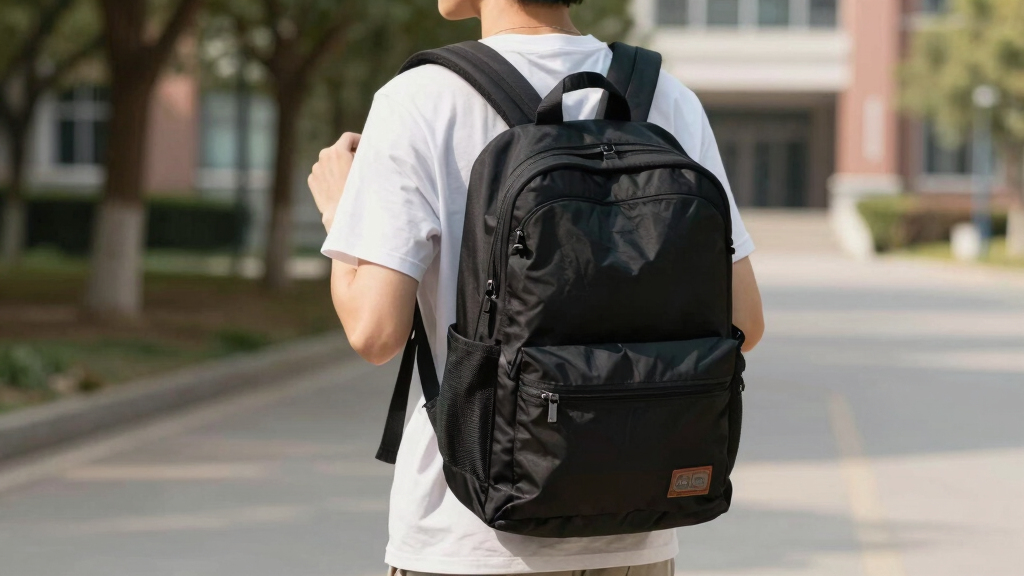
water-resistant student laptop backpack
As an affiliate, we earn on qualifying purchases.
As an affiliate, we earn on qualifying purchases.
How to Pick a Backpack That Lasts and Protects Your Tech
- Check Material Quality: Material quality isn’t just about appearance; it directly impacts how well your backpack withstands daily wear and environmental challenges. High-quality nylon or polyester fabrics with water resistance are essential because they resist tears, frays, and moisture ingress. Choosing recycled fabrics isn’t just eco-friendly—it often involves rigorous manufacturing standards that ensure durability. This means your backpack can handle the rigors of campus life, from sudden rainstorms to accidental bumps, without compromising your device’s safety or your investment’s longevity.
- Evaluate Padding & Reinforcements: Adequate padding in the laptop compartment acts as a shock absorber, protecting your device from impacts caused by accidental drops or knocks—common in busy campus settings. Reinforced bottoms prevent the wear and tear that occurs when placing your bag on rough surfaces like concrete or stairs. These reinforcements are essential for extending your backpack’s lifespan, ensuring it remains functional and protective over years of use, rather than just a few months.
- Test Comfort & Fit: Trying on a backpack in-store isn’t just about how it looks; it’s about how it feels during extended wear. Padded shoulder straps and adjustable fittings help distribute weight evenly, reducing strain on your shoulders, neck, and back. Breathable back panels prevent excessive sweating, which can lead to discomfort and skin irritation. Proper fit isn’t just comfort—poorly fitted backpacks can cause postural issues over time, leading to chronic pain or injury. Investing in a well-designed, comfortable pack promotes better posture and overall well-being during your busy days.
- Assess Storage Options: Multiple pockets and compartments aren’t merely organizational tools—they’re critical for maintaining balance and ease of access. Properly designed storage helps distribute weight evenly, reducing pressure points and preventing strain. Capacity should match your daily load, typically around 20-25 liters, allowing you to carry all essentials without overstuffing. Overloading can stress zippers, seams, and the overall structure, decreasing durability and risking damage to your tech. Striking a balance between size and capacity ensures your backpack remains durable and functional, minimizing the need for repairs or replacements.
For example, a student on a college campus in Seattle swears by a water-resistant North Face model with padded straps—perfect for unpredictable weather and long days. The key is understanding that durability and protection are investments that pay off by reducing replacement costs and safeguarding your tech.
ergonomic school backpack with padded straps
As an affiliate, we earn on qualifying purchases.
As an affiliate, we earn on qualifying purchases.
Comparison Table: Traditional vs. Smart Student Backpacks
| Feature | Traditional Backpack |
|---|---|
| Build | Simple fabric with basic compartments |
| Protection | Padding and water resistance |
| Tech Features | Usually none |
| Weight | Light (1.5-2.5 lbs) |
| Price Range | $30 – $80 |
| Feature | Smart Backpack |
|---|---|
| Build | Includes USB ports, RFID-blocking pockets |
| Protection | Enhanced security with hidden compartments |
| Tech Features | Built-in charging ports, cable management |
| Weight | Usually slightly heavier (2-3 lbs) |
| Price Range | $100 – $200+ |
tech-enabled student backpack with USB port
As an affiliate, we earn on qualifying purchases.
As an affiliate, we earn on qualifying purchases.
Latest Trends in Student Laptop Backpacks You Should Know
Backpacks are evolving fast. Here’s what’s hot in 2023:
- Eco-Friendly Materials: Recycled fabrics and sustainable manufacturing are on the rise, appealing to eco-conscious students.
- Smart Features: Built-in USB charging ports and RFID-blocking pockets keep your devices powered and your info safe.
- Slim & Lightweight Designs: Modern backpacks are less bulky but still hold all essentials, perfect for crowded campuses.
- Modular & Customizable: Some brands now offer attachable accessories and expandable compartments, allowing you to personalize your pack.
One college student in California swapped her bulky, old backpack for a sleek, eco-friendly model with a built-in charger—she swears it made her mornings smoother.
As an affiliate, we earn on qualifying purchases.
Your Top Questions About Student Laptop Backpacks Answered
- What should I prioritize when choosing a backpack? Focus on comfort, protection, and features that match your daily needs—like water resistance or tech ports.
- Are waterproof backpacks worth it? Absolutely. They protect your laptop and books during sudden rainstorms, saving you from soggy tech and ruined notes.
- How can I protect my laptop from damage? Use a padded sleeve inside a sturdy backpack, and avoid overstuffing to prevent pressure on your device.
- What’s a good budget option? Look for reputable brands like AmazonBasics or JanSport under $50, which offer solid protection and durability.
Conclusion
Picking the right student laptop backpack isn’t just about style or price. It’s about finding a bag that protects your tech, feels comfortable, and fits your daily grind. Think of it as your mobile command center—ready for whatever campus throws your way.
Invest a little time now, and your backpack will support your journey—rain or shine, heavy books or light days. After all, your tech deserves a fortress, and you deserve comfort with every step.
Halloween Picks
halloween
As an affiliate, we earn on qualifying purchases.