
When setting up home security cameras, focus on strategic placement that covers key entry points and perimeter areas while respecting privacy boundaries. Avoid pointing cameras toward neighbor’s windows or private spaces like bedrooms or gardens. Consider lighting and camera types, and secure your devices with strong passwords to prevent hacking. Balancing security with privacy is essential for a reliable system. Keep these tips in mind, and you’ll find it easier to create an effective, respectful setup that meets your needs.
Key Takeaways
- Prioritize key entry points and vulnerable areas for camera placement to maximize security coverage.
- Respect privacy boundaries by avoiding private spaces and neighbor properties when positioning cameras.
- Use appropriate lighting and vantage points to ensure clear footage day and night.
- Secure cameras and footage with strong passwords and encryption to prevent hacking.
- Balance security needs with privacy considerations to prevent misunderstandings and legal issues.
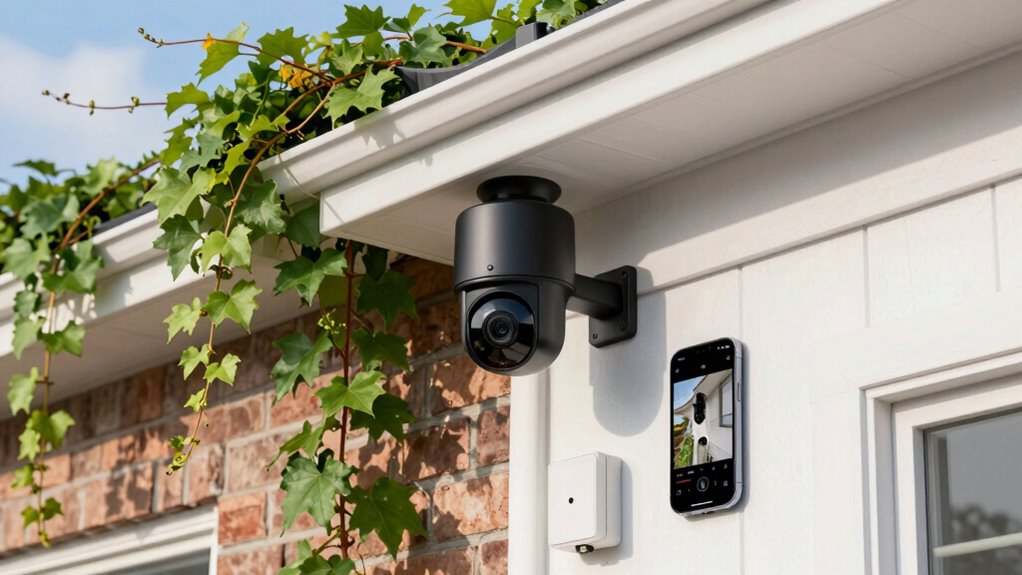
Are you ready to improve your home’s security with a camera system? Before you start installing cameras, it’s essential to consider how your setup will impact your privacy and the privacy of others. Privacy concerns are a real issue, and you want to make sure your cameras only capture what’s necessary. Think about where you place each camera so that it doesn’t intrude on neighbors’ properties or invade personal spaces like bedrooms, bathrooms, or private gardens. Respecting privacy isn’t just ethical; it can also prevent potential legal issues down the line.
Ensure your security cameras respect privacy to avoid legal issues and protect personal boundaries.
When planning your camera placement, prioritize visibility of key areas like entry points—front door, back door, and garage. These spots are the most vulnerable and should be monitored closely. Avoid mounting cameras in a way that points directly into neighbors’ windows or outdoor spaces that aren’t yours. Instead, angle your cameras to focus on your property’s perimeter and common areas. Proper camera placement balances security needs with respecting privacy boundaries. Keep in mind that higher vantage points often provide better coverage and less tampering risk, but they shouldn’t overlook private spaces. Additionally, understanding privacy boundaries and how they relate to security can help prevent misunderstandings or complaints. Incorporating Indonesian decor masks into your home can serve as a reminder of cultural respect and harmony, even in security practices.
As you decide where to install each camera, consider the field of view and lighting conditions. Cameras placed in shaded or dark areas might require additional lighting to capture clear images at night. Also, think about the accessibility of each camera for maintenance—if you can easily reach it, you’ll save time and hassle. You don’t want cameras so high up or hidden that they’re ineffective or hard to service later. Remember to avoid blind spots by overlapping camera views, so every vulnerable area is covered.
Another crucial factor is the type of camera you choose. Wireless cameras are convenient and flexible, but they require secure Wi-Fi networks to prevent hacking. Wired cameras, while more complex to install, tend to be more reliable and secure from interference. Whichever you select, ensure your equipment and footage are protected with strong passwords and encryption. This not only keeps your security system safe but also preserves your privacy.
In all, a thoughtful home security camera setup involves more than just installing devices. It requires careful planning of camera placement to maximize security while respecting privacy boundaries. By taking the time to consider what areas need coverage and how your cameras will be viewed and accessed, you’ll create an effective security system that keeps your home safe without infringing on others’ privacy.

GMK Security Cameras Wireless Outdoor 4 Pack, 2K Battery Powered Cameras for Home Security, Color Night Vision, Motion Detection, 2-Way Talk, IP65 Waterproof, Remote Access, Cloud/SD Storage
【2K Ultra HD & Full Color Night Vision – 4 Cam Kit】Upgrade your home security with this 4…
As an affiliate, we earn on qualifying purchases.
As an affiliate, we earn on qualifying purchases.
Frequently Asked Questions
How Do I Connect Multiple Cameras to a Single System?
To connect multiple cameras to a single system, start by ensuring each camera has proper wiring—either wired or wireless—based on your setup. You’ll need to connect the cameras to a central hub or NVR that supports multiple channels. Make sure each camera has a reliable power source, whether through POE (Power over Ethernet) or separate power adapters. Test each connection to confirm clear footage and stable power for seamless monitoring.
What Is the Best Camera Placement for Maximum Coverage?
To achieve maximum coverage, you need to think like a security mastermind! Place your cameras at ideal heights—around eye level or slightly higher—to capture clear images and avoid blind spots. Position cameras where they cover key entry points, pathways, and vulnerable areas, while avoiding obstructions. Strategically placing cameras ensures you eliminate blind spots and get a panoramic view of your property, making it almost impossible for intruders to go unnoticed!
How Do I Ensure My Camera Footage Is Secure?
To guarantee your camera footage is secure, prioritize privacy concerns by choosing cameras with strong data encryption. Regularly update your camera’s firmware to patch vulnerabilities, and use strong, unique passwords for your security system. Enable two-factor authentication if available. Keep your network secure with a strong Wi-Fi password and consider segmenting your home network. These steps help protect your footage from unauthorized access and maintain your privacy.
Can I Access My Security Feed Remotely?
Yes, you can access your security feed remotely. Many cameras support remote access, allowing you to view live streaming from your smartphone or computer anytime. To do this, you typically need to set up a secure account and connect your camera to the internet. Once configured, you can monitor your home remotely, ensuring peace of mind whether you’re at work or on vacation.
What Features Should I Look for in a Home Security Camera?
When choosing a security camera, focus on fabulous features like smart home integration and sharp video quality. Seek cameras that seamlessly sync with your existing smart devices for simple control. Prioritize clear, high-definition footage so you can spot specifics easily. Look for features like night vision, motion detection, and two-way audio to make your setup smarter, safer, and more protected. These essential features guarantee your home stays protected and your peace of mind intact.

2026 Enhanced 2K UHD Security Cameras Wireless Outdoor – Free Cloud & SD Storage, Dual-Band WiFi 2.4G/5G, Full-Color Night Vision, 6-Month Battery, Motion Alerts, IP66 Weatherproof, 2-Way Talk
📌【Why Choose Us?】 Millions of families trust realhide for hassle-free, reliable home security. From easy setup to long-lasting…
As an affiliate, we earn on qualifying purchases.
As an affiliate, we earn on qualifying purchases.
Conclusion
Setting up your home security camera is like installing a silent guardian, always watching but never interfering. Think of it as a calm, watchful eye amid the chaos of daily life—providing peace of mind without the noise of constant surveillance. When you finish, you’ll see your home protected, not just with technology but with a quiet confidence. It’s the difference between wandering through your day unsure and feeling secure, knowing you’re always one step ahead.

VIMTAG 2.5K Cameras for Home Security Outdoor/Indoor, Color Night Vision Security Camera for Baby/Pet/Dog/Nanny, Light/Siren, Motion Detection, 2-Way Audio, Work with Alexa, Cloud/Card Storage, 2Pcs
𝐄𝐚𝐬𝐲 𝐒𝐞𝐭𝐮𝐩 𝐈𝐧𝐝𝐨𝐨𝐫/𝐎𝐮𝐭𝐝𝐨𝐨𝐫 𝐂𝐚𝐦𝐞𝐫𝐚 — 2.5K HD video, vibrant color night vision and IP66, ensuring you never miss…
As an affiliate, we earn on qualifying purchases.
As an affiliate, we earn on qualifying purchases.
VIMTAG 2.5K Cameras for Home Security Outdoor/Indoor, Color Night Vision Security Camera for Baby/Pet/Dog/Nanny, Light/Siren, Motion Detection, 2-Way Audio, Work with Alexa, Cloud/Card Storage, 2Pcs
𝐄𝐚𝐬𝐲 𝐒𝐞𝐭𝐮𝐩 𝐈𝐧𝐝𝐨𝐨𝐫/𝐎𝐮𝐭𝐝𝐨𝐨𝐫 𝐂𝐚𝐦𝐞𝐫𝐚 — 2.5K HD video, vibrant color night vision and IP66, ensuring you never miss…
As an affiliate, we earn on qualifying purchases.
As an affiliate, we earn on qualifying purchases.