A Halloween podcast can mean a solo ghost story, a noisy costume-party interview, or a quick recording from a haunted-house queue. I ranked these microphones by how well their connection, pickup pattern, controls, and included mounting gear suit those jobs—not by treating every mic as a studio voiceover tool. The FIFINE AmpliTank K688CT is my strongest all-round pick for a desk-based show because it combines a dynamic capsule, a boom arm, and both USB and XLR connections. The ZealSound K66 makes more sense when live mute and monitoring controls matter, while the TONOR TC-777 is a simpler starter kit with the core accessories already included.

Get everyday essentials delivered free with Prime
- Fast, free delivery on millions of items
- Prime Video, Amazon Music and more included
- Member-only deals all year
The main tradeoff is between convenience and room control. USB condenser models are easy to set up, but they can be less forgiving of a lively room; the FIFINE’s dynamic design and arm are better suited to controlling mic position during dramatic narration. For mobile, playful clips, the Kikkerland Breaking News Mini Microphone is the unusual choice, though its limited specifications make it a weaker main mic for a polished podcast. I’ve ranked the picks around the likely Halloween use: clear voices, quick setup, and practical handling when the room or recording format changes.
Complete the kit



Key Takeaways
- For a serious desk-based Halloween show, the FIFINE K688CT is the most adaptable pick: dynamic pickup, USB and XLR options, and a supplied boom arm give it room to grow.
- The ZealSound K66 is the control-focused alternative, with physical mute, gain, echo, noise-reduction, and zero-latency headphone monitoring for live spooky chats.
- The TONOR TC-777 suits a first-time host who wants a basic USB mic plus tripod, shock mount, and pop filter in one package, though its PVC body and short cable limit flexibility.
- The Kikkerland mini mic is best for handheld costume interviews and casual clips, not as a dependable centerpiece for a multi-person or studio-style podcast.
- For a noisy Halloween room, mic placement and speaking close to the capsule matter more than a feature labeled noise reduction; none of these options can erase a party happening nearby.
| FIFINE AmpliTank K688CT USB/XLR Dynamic Podcast Microphone Kit with Boom Arm | 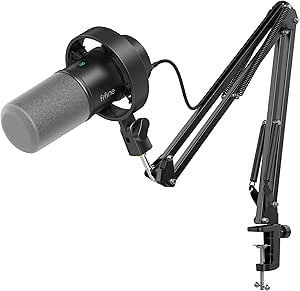 | Best Overall for a Desk-Based Halloween Show | Microphone type: Dynamic | Connectivity: USB and XLR | Polar pattern: Unidirectional cardioid | VIEW LATEST PRICE | See Our Full Breakdown |
| ZealSound K66 USB Podcast Microphone with Noise Reduction, Gain and Mute Controls |  | Best for Live Controls and Flexible Devices | Microphone type: Condenser USB microphone | Pickup pattern: Cardioid | Frequency response: 40 Hz–18 kHz | VIEW LATEST PRICE | See Our Full Breakdown |
| TONOR Podcast Microphone, USB Computer Mic, Cardioid Condenser | 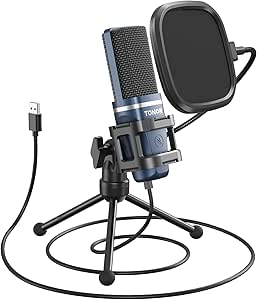 | Best Value Starter Kit for a Simple Desk Setup | Connectivity: USB | Connector: USB Type-A | Polar pattern: Unidirectional cardioid | VIEW LATEST PRICE | See Our Full Breakdown |
| Kikkerland Breaking News Mini Microphone – Handheld Mini Mic for Content Creation and Podcast Recording | 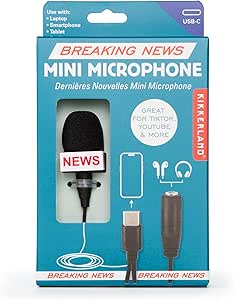 | Best Compact Pick for Costume Interviews and Casual Clips | Form factor: Handheld mini microphone | Connectivity: USB | Connector: USB Type-C | VIEW LATEST PRICE | See Our Full Breakdown |
| Halloween podcast microphone | Connectivity | Microphone type | Polar pattern | Connector |
|---|---|---|---|---|
| FIFINE AmpliTank K688CT USB/XL | USB and XLR | Dynamic | Unidirectional cardioid | — |
| ZealSound K66 USB Podcast Micr | — | Condenser USB microphone | — | — |
| TONOR Podcast Microphone | USB | — | Unidirectional cardioid | USB Type-A |
| Kikkerland Breaking News Mini | USB | — | — | USB Type-C |
More Details on Our Top Picks
FIFINE AmpliTank K688CT USB/XLR Dynamic Podcast Microphone Kit with Boom Arm
If I were choosing one microphone here for a Halloween podcast that might start as a solo narration and later add guests or a more involved setup, I would put the FIFINE AmpliTank K688CT first. Its dynamic cardioid design is a sensible match for voice work in an ordinary room, where fans, keyboard noise, or household sounds may intrude. That does not mean it cancels a party in the next room; close placement and a quiet recording spot still matter. The included windscreen and shock mount help with practical desk recording, while the metal boom arm makes it easier to bring the capsule close to the speaker and keep it positioned during character voices.
Its strongest advantage over the TONOR and ZealSound is the USB-and-XLR route. USB keeps the first recording session straightforward, with tap-to-mute, gain, and headphone-volume controls available in that mode. XLR can connect to an interface or mixer later, but the built-in controls do not carry over to XLR operation. That distinction matters: a buyer moving to XLR should expect to manage gain and monitoring through other equipment rather than assuming the microphone’s USB controls still apply.
For a Halloween episode with dramatic narration, the arm is more useful than the TONOR’s compact tripod because it gives the mic a more flexible position and can free desk space. Compared with the ZealSound K66, the FIFINE is less about a collection of front-panel adjustments and more about mounting flexibility and a growth path. Its tradeoffs are real: it is corded, the boom-arm clamp only fits desks under two inches thick, and it requires an interface or mixer for XLR use. I rank it first because that combination suits the broadest range of serious desk-based podcast plans in this group.
Pros:- USB and XLR connectivity support a simple start and a later interface-based setup.
- Dynamic cardioid design is suited to close-miked speech in a home recording space.
- Included metal boom arm, windscreen, and shock mount help position and manage the microphone.
- USB mode provides tap-to-mute, gain, and headphone monitoring controls.
Cons:- Mute, gain, and headphone controls work only in USB mode.
- The boom-arm clamp is limited to desks under two inches thick.
- XLR recording requires an audio interface or mixer, adding equipment to the setup.
Best for: Hosts recording Halloween stories, interviews, or character-led episodes at a desk who want included mounting gear and a path from USB to XLR.
Not ideal for: People recording entirely on a phone, anyone with a desk too thick for the clamp, or buyers who want the mic’s gain and mute controls to work over XLR.
- Microphone type:Dynamic
- Connectivity:USB and XLR
- Polar pattern:Unidirectional cardioid
- Maximum SPL:130 dB
- Frequency range:50 Hz–16 kHz
- USB controls:Tap-to-mute, gain, and headphone volume
- Included accessories:Metal boom arm, windscreen, and shock mount
- Desk clamp capacity:Desks under 2 inches thick
Our verdict“I’d choose the FIFINE K688CT for the most adaptable desk-based Halloween podcast setup, provided the desk fits its clamp and the USB/XLR control difference suits my plans.”
ZealSound K66 USB Podcast Microphone with Noise Reduction, Gain and Mute Controls
The ZealSound K66 is my pick for a host who wants to manage a recording without reaching for software every time a guest coughs or the room gets too loud. Its front-facing controls cover mic volume, monitoring volume, echo, mute, and noise reduction, and the headphone jack provides zero-latency monitoring. For a Halloween call-in or live conversation, monitoring can help a host hear whether a whisper is too quiet or a theatrical growl is too hot before the recording is over.
It also reaches beyond the usual computer-only setup. The listed compatibility includes Windows, Mac, PS4, PS5, iPhone, iPad, USB-C devices, and tablets, with USB-C and Lightning adapters included. That gives it an advantage over the TONOR when a host wants to record a short guest segment on a mobile device. I would still check the connection requirements for the specific phone or tablet before relying on it for a location recording; broad compatibility does not mean every device behaves identically.
Compared with the FIFINE K688CT, the K66 emphasizes on-mic adjustment and device reach, while the FIFINE supplies an arm and a dynamic design that better suits a carefully positioned desk setup. The K66’s noise-reduction mode may help with background sounds, but the supplied details do not claim that it eliminates them. That distinction matters during Halloween: costume rustling, excited guests, music, and room echo can remain audible. Another gap is mounting: the description does not say that a stand or boom arm is included, so I would confirm what is in the box or plan a separate mount. It ranks below the FIFINE because its recording kit is less fully specified, but its control layout makes it a strong alternative for active sessions.
Pros:- Physical mute, microphone volume, monitoring, echo, and noise-reduction controls.
- Zero-latency monitoring through a 3.5 mm headphone jack.
- USB-C and Lightning adapters broaden supported device options.
- Plug-and-play operation keeps setup accessible to new podcasters.
Cons:- Noise reduction is described as helping with background sounds, not removing them.
- The supplied information does not specify an included microphone stand or mounting accessories.
- The condenser design and controls do not replace good placement in a lively room.
Best for: Hosts who want hands-on mute, monitoring, echo, and noise-reduction controls, especially those recording across computers and supported mobile devices.
Not ideal for: Buyers who need a clearly specified included boom arm or tripod, or anyone expecting noise reduction to silence a busy party room.
- Microphone type:Condenser USB microphone
- Pickup pattern:Cardioid
- Frequency response:40 Hz–18 kHz
- Sampling rate:46 kHz
- Sensitivity:–45 dB ±3 dB
- Monitoring:3.5 mm headphone jack with zero-latency monitoring
- Controls:Mic volume, monitoring volume, echo, mute, and noise reduction
- Included adapters:USB-C and Lightning
Our verdict“I’d choose the K66 when live controls and mobile-device compatibility matter more than a supplied boom arm or a dynamic mic design.”
TONOR Podcast Microphone, USB Computer Mic, Cardioid Condenser
The TONOR TC-777 is the straightforward entry point in this lineup. It connects over USB Type-A and is described as plug-and-play, so a new host can get a basic computer recording setup running without first shopping for an interface. The package also includes a foldable tripod, mini shock mount, and pop filter. Those accessories give it a clear advantage over the ZealSound K66, whose mounting gear is not specified in the supplied description. For an introductory Halloween episode recorded at a desk, having the essential pieces together can reduce setup decisions.
The mic uses a cardioid condenser pattern, with the capsule aimed at the speaker to help prioritize the voice over sound coming from elsewhere. That can support solo storytelling, but it should not be mistaken for a soundproofing feature. A hard-walled room, nearby computer fan, or party in the background can still make its way into a recording. The pop filter and shock mount address plosives and handling or desk vibration rather than general room noise. I would place it close to the narrator and keep the room as quiet as practical.
Compared with the FIFINE K688CT, the TONOR is less flexible and less upgradeable: it has USB rather than USB/XLR connectivity, and its small tripod is not the same as a supplied boom arm. In return, it is a simpler fit for a beginner who wants a compact bundle. The stated 1.9-meter cable may restrict where it can sit relative to a computer, and the PVC housing may feel less substantial than a metal-bodied alternative. It is also not compatible with Xbox consoles. I rank it behind the ZealSound because it lacks the K66’s listed live controls and mobile adapters, yet it remains a sensible starter choice when included accessories matter more than adjustments or expansion.
Pros:- Plug-and-play USB setup does not require separate drivers.
- Tripod, mini shock mount, and pop filter are included.
- Cardioid pickup is suited to a single speaker positioned in front of the mic.
- Listed compatibility covers Windows, macOS, PS4/5, and common communication apps.
Cons:- Not compatible with Xbox consoles.
- The 1.9-meter cable may constrain desk placement.
- PVC enclosure may feel less durable than a metal alternative.
Best for: First-time computer podcasters who want a simple USB mic with a tripod, shock mount, and pop filter supplied.
Not ideal for: Xbox users, hosts needing a longer cable or XLR upgrade path, and anyone who wants mobile adapters or extensive on-mic controls.
- Connectivity:USB
- Connector:USB Type-A
- Polar pattern:Unidirectional cardioid
- Impedance:680 ohm
- Signal-to-noise ratio:80 dB
- Cable length:1.9 m
- Weight:345 g
- Included items:Microphone, power cord, foldable tripod, mini shock mount, pop filter, and manual
Our verdict“I’d pick the TONOR TC-777 for an uncomplicated first computer podcast when its included tripod kit matters more than live controls or an upgrade path.”
Kikkerland Breaking News Mini Microphone – Handheld Mini Mic for Content Creation and Podcast Recording
The Kikkerland Breaking News Mini Microphone has a distinct job: it is the playful, portable option for quick clips, costume interviews, or a Halloween-themed social segment where the mic itself can be part of the bit. Its handheld form is easier to carry around than the desk-focused FIFINE or TONOR, and USB-C plus a standard audio jack give it two connection routes as described. Voice-activated recording may also suit hands-free capture in supported arrangements, although the supplied information does not explain exactly how that feature works with different devices.
That portability comes with a much thinner set of recording details than the other picks. The provided specifications identify it as a single-channel mic but do not provide a frequency response, pickup pattern, or detailed monitoring and level controls. I would not assume it can match the defined cardioid designs or the FIFINE’s close-miked dynamic setup for a polished episode. Voice activation can also react to unwanted sounds, which is a real risk in a room full of guests, music, or costume noise. It needs a powered device and has no built-in battery, so it is portable in size rather than fully self-powered.
Compared with the TONOR, the Kikkerland is less of a ready-made desk recording kit and more of a grab-and-go novelty mic. It is also a better fit for a roving interview than the K66 if compact handling matters more than gain, mute, and headphone controls. I place it fourth because the other three provide more clearly specified tools for building a voice-led podcast. Still, it fills a real niche: a host collecting short reactions in costume or making playful behind-the-scenes content may value the handheld format more than a traditional desk stand.
Pros:- Compact handheld shape is convenient for on-the-go recording.
- Listed USB-C and standard audio-jack connectivity offer connection options.
- Voice-activated recording is intended for hands-free use.
- Its playful format suits costume interviews and informal Halloween content.
Cons:- Requires a powered device and has no built-in battery.
- Voice activation may pick up background noise.
- Single-channel capture and limited published audio specifications make its podcast role less certain.
Best for: Creators making casual handheld Halloween interviews, short clips, or playful content with a powered compatible device nearby.
Not ideal for: Hosts seeking a primary mic for polished narration, detailed manual controls, or recording without a powered device.
- Form factor:Handheld mini microphone
- Connectivity:USB
- Connector:USB Type-C
- Special feature:Voice-activated recording
- Channels:1
- Power:Requires a powered device; no built-in battery
- Model name:Breaking News Mini Microphone
- Use:Content creation, video recording, karaoke, and podcast recording
Our verdict“I’d choose the Kikkerland for portable, informal Halloween clips, but not as my main microphone for a polished podcast.”
How We Picked
I judged these four options against the demands of a Halloween podcast rather than general microphone shopping. A spooky episode may involve whispered narration, louder character voices, guest conversations, quick recording on a phone, or movement around a decorated room. I therefore focused on whether a microphone can support clear, controlled speech and how much equipment a new host needs before recording.
Connection and setup shaped the first comparison. USB plug-and-play models can get a host recording without an audio interface, while XLR adds a path toward an interface or mixer as a show grows. Phone and tablet support matters for on-location clips, but compatibility claims do not guarantee that every included cable or adapter suits every device. I also looked at the controls available during a live recording: mute, gain, headphone monitoring, and echo adjustments can be useful when a host needs to manage levels without stopping the show.
Next, I compared each model’s pickup approach and included accessories. Cardioid pickup can help prioritize a voice in front of the mic, but room noise still depends on placement, distance, and the space itself. The dynamic FIFINE has a different role from the condenser TONOR and ZealSound: its design, supplied arm, and windscreen make it a compelling desk voice mic, while the condensers prioritize simple USB recording and direct controls. A tripod, shock mount, pop filter, boom arm, and headphone output each solve different problems, so I gave credit only where the supplied details support that benefit.
Finally, I considered the specific buyer who benefits—and the one who should pass. The rankings favor useful combinations for Halloween formats, not a claim that one mic will suit every room or voice. Product details provided here do not include a clear frequency response or detailed recording performance for the Kikkerland mini mic, so I treat it as a novelty-friendly portable option rather than assuming studio capability. Where a limitation is explicit—such as the TONOR’s stated Xbox incompatibility, the ZealSound’s unspecified mounting accessories, or the FIFINE clamp’s desk-thickness limit—I include it in the buying advice.
| Halloween podcast microphone | Microphone type | Connectivity | Connector |
|---|---|---|---|
| FIFINE AmpliTank K688CT USB/XL | Dynamic | USB and XLR | — |
| ZealSound K66 USB Podcast Micr | Condenser USB microphone | — | — |
| TONOR Podcast Microphone | — | USB | USB Type-A |
| Kikkerland Breaking News Mini | — | USB | USB Type-C |
Factors to Consider When Choosing Halloween Podcast Microphones
I would choose a Halloween podcast microphone by starting with the recording format, then checking how much room noise, movement, and equipment the setup involves. A solo host at a quiet desk has different needs from a costumed interviewer moving through a crowded gathering. The distinctions below help map each of these four picks to a realistic use.
Match the mic to the recording format
For a sit-down ghost story or a regular interview show, a mic that can stay close to the speaker is easier to manage than one held at changing distances. The FIFINE K688CT supplies a boom arm, while the TONOR TC-777 comes with a foldable tripod. The arm offers more positioning flexibility, but it depends on the desk meeting the clamp’s under-two-inch limit. A tripod is simpler and more compact, though it occupies space on the desk and may make the mic position less adaptable.
For quick costume interviews, a handheld mic such as the Kikkerland is more natural to pass between people. The tradeoff is that people must hold it at a reasonably consistent distance, and the published details give less guidance about its audio characteristics than the other options. For a mobile phone or tablet recording, the ZealSound’s included USB-C and Lightning adapters make it the clearest fit in this group, subject to checking device compatibility before the session.
Treat noise reduction as support, not soundproofing
Halloween recordings often happen around decorations, guests, music, rattling props, or HVAC noise. A cardioid pattern is intended to favor sound from the front of the microphone, but it cannot remove every sound from the room. A close, consistent speaking position and a quieter space will usually matter more than expecting a microphone feature to clean up a chaotic recording.
The ZealSound lists a noise-reduction mode, which may help with background sounds, but its description does not claim to eliminate them. The FIFINE’s dynamic design and included arm encourage close placement, a useful approach when the host can control the setup. The TONOR includes a pop filter and shock mount, but those address plosive bursts and vibrations rather than distant voices or party music. I would use those accessories for their intended jobs and still record a short test in the actual room.
Choose USB convenience or an XLR growth path
USB is the simplest starting point in this selection. The TONOR and ZealSound are plug-and-play USB models, and the FIFINE also offers USB operation with controls for mute, gain, and headphone volume. That can be enough for a new host recording directly to a computer. The Kikkerland’s USB-C connection is aimed at compact-device use, but the available product details are less specific about broader recording controls.
The FIFINE is the only model here with both USB and XLR. XLR can make sense if I plan to add an interface or mixer, but it is not a free upgrade: the added equipment handles the signal chain, and the microphone’s listed controls work only in USB mode. If I want a simple setup with no separate interface, USB avoids that extra step. If I already own suitable XLR equipment or expect to build a more involved studio arrangement, the FIFINE has the clearest expansion route.
Prioritize controls for live recording
For a live Halloween conversation, physical controls can prevent small problems from becoming interruptions. The ZealSound K66 has mute, mic-volume, monitoring-volume, echo, and noise-reduction controls, plus a headphone output for zero-latency monitoring. This is the strongest match here for a host who wants to hear the mic feed and adjust settings directly. The FIFINE also includes USB mute, gain, and headphone-volume controls, though it is less control-rich based on the listed features.
The TONOR description focuses on a straightforward connection and included accessories rather than a suite of on-mic controls. The Kikkerland lists voice activation but not a comparable manual control set. A mute button is especially useful when recording with a guest or in a shared space, but it does not replace editing, level checks, or a quiet recording environment. I would select the K66 for hands-on adjustment and choose the FIFINE if mounting and XLR flexibility matter more.
Check the full setup, not just the microphone
Before choosing, I would verify what sits between the microphone and the recording device. The TONOR’s listed connector is USB Type-A, and its 1.9-meter cable may limit placement. The ZealSound includes USB-C and Lightning adapters, but I would still confirm the intended device and app. The FIFINE’s boom-arm clamp only fits desks under two inches thick, so an otherwise useful kit could be a poor physical fit. The Kikkerland requires a powered device and does not include a built-in battery.
Accessories also shape the overall choice. The TONOR supplies a tripod, shock mount, and pop filter; the FIFINE includes a metal arm, windscreen, and shock mount. The ZealSound’s described package does not specify a stand, so I would not assume one is included. For the Kikkerland, I would treat portability and format as the main reasons to choose it, not presume that it comes with the mounting or monitoring features of a desk podcast kit.
Plan for narration, guests, and layered effects
A microphone records the voices and sounds presented to it; it does not create a convincing haunted atmosphere by itself. For solo narration, I would prioritize a stable close position and an easy way to monitor levels. For two or more people, I would plan how each voice reaches the mic and whether separate microphones or editing will be needed. These products are single-microphone options, so the Kikkerland’s single-channel specification is particularly worth noting for anyone imagining a multi-person recording through one device.
Sound effects can be recorded separately or added during editing rather than played loudly beside the narrator. That helps keep dialogue understandable and gives the host more control over spooky pauses, whispers, and sudden stingers. The ZealSound’s echo control may offer an adjustment within its setup, but it is not a substitute for designing the sound in the recording or editing process. For a cleaner finished episode, I would record the voice clearly first and add effects as separate layers.
Frequently Asked Questions
Which microphone is the best overall for a Halloween podcast?
I rank the FIFINE AmpliTank K688CT first for a desk-based Halloween show because it combines a dynamic cardioid mic, a supplied boom arm, and USB/XLR connectivity. USB gives a direct way to begin, while XLR leaves room for an interface-based setup later. It is not the best fit for every buyer: the clamp has a desk-thickness limit, and its mute, gain, and headphone controls work only over USB. If mobile-device adapters or extensive live controls matter more, the ZealSound K66 may fit better.
Is the ZealSound K66 noise reduction enough for a Halloween party?
I would not rely on the K66’s noise-reduction mode to remove a loud party, music, or nearby conversation. Its description says the mode helps reduce background sounds, not that it eliminates them. A cardioid pattern, close mic placement, and a quieter recording corner can help, but a short test recording is the best way to check the actual room. For a crowded event, I would treat the K66 as a tool with useful controls rather than a substitute for room management.
Which option is simplest for a first-time podcaster?
The TONOR TC-777 is a clear beginner choice for a computer-based setup because it is described as plug-and-play and includes a tripod, shock mount, and pop filter. That gives a new host several basic pieces without requiring a separate stand purchase based on the provided package details. The ZealSound is another accessible USB option, particularly if direct mute and monitoring controls matter, but its description does not specify included mounting accessories. Xbox users should skip the TONOR because it is listed as incompatible with Xbox consoles.
Can I record a Halloween podcast on a phone or tablet with these microphones?
The ZealSound K66 has the clearest stated mobile support, with USB-C and Lightning adapters and compatibility listed for iPhone, iPad, USB-C devices, and tablets. The Kikkerland is described with USB-C and a standard audio jack, but it requires a powered device and has fewer published audio details. The TONOR is a USB Type-A model intended for computers and listed consoles, while the FIFINE offers USB and XLR without the same stated phone-adapter package. I would verify the exact device, port, and recording app before relying on a mobile setup.
Is the Kikkerland mini mic suitable as my main podcast microphone?
I would choose the Kikkerland Breaking News Mini Microphone for casual handheld clips, costume interviews, or a playful segment where portability matters more than detailed controls. Its product information does not specify a pickup pattern, frequency response, or a set of manual monitoring and gain controls, so I cannot recommend it as confidently for a polished, recurring desk show. It also has no built-in battery and needs a powered device. For a main voice mic, the FIFINE, ZealSound, or TONOR offers more clearly described podcast-oriented features.
Conclusion
For a desk-based host who wants the broadest path from a basic recording to a more involved setup, I would choose the FIFINE AmpliTank K688CT, after checking that its clamp fits the desk. For a live host who wants direct mute, gain, echo, and headphone-monitoring controls—or plans to use a supported phone or tablet—the ZealSound K66 is the better match. A first-time computer podcaster who wants a tripod, shock mount, and pop filter supplied can keep the setup simple with the TONOR TC-777, while remembering its cable, build, and Xbox limitations.
If my Halloween content is mostly quick costume interviews or casual clips on the move, I would pick the Kikkerland mini mic for its handheld format, not for a studio-style sound workflow. Whichever option I choose, I would make a test recording in the intended room, speak close to the mic, and keep effects separate from the main voice track when possible. That practical setup work will matter more than any promise of automatic noise control when ghosts, guests, and background sounds share the same space.
Columbus Day / Indigenous Peoples' Day Picks
long weekend sales
As an affiliate, we earn on qualifying purchases.