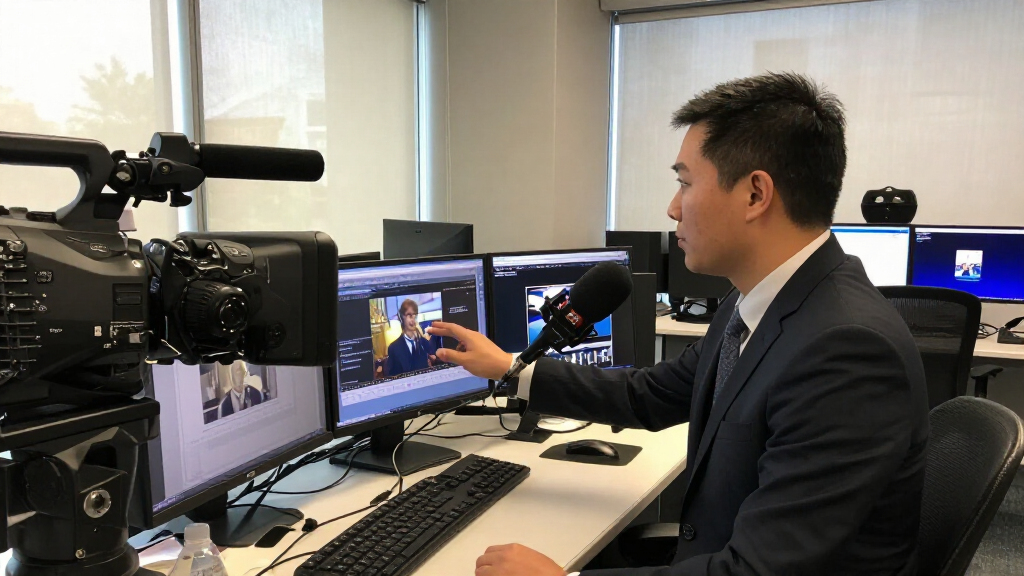

Whether you’re a seasoned journalist, a budding content creator, or a media professional expanding your toolkit, having the right news & media equipment is essential for high-quality production. This checklist is designed to guide you through the must-have gear that enhances your audio, video, and editing capabilities, ensuring your content stands out. We’ve organized the list into key categories so you can easily navigate and find what suits your specific needs.
Use this resource as a quick reference when shopping or upgrading your equipment. Each section highlights the most important features to consider, common pitfalls to avoid, and practical advice on sizing, compatibility, and performance. Remember, investing in reliable, well-suited gear can make a significant difference in your media projects’ professionalism and efficiency.
Take your time to evaluate your current setup against this checklist, and prioritize equipment that offers flexibility, durability, and ease of use. With the right tools in hand, you’ll be better prepared to produce compelling stories and engaging multimedia content.
Microphones
The Shure SM7dB is a staple in professional broadcasting and streaming environments. Its dynamic design helps reduce background noise, making it ideal for voice recordings in less-than-ideal acoustic settings. When choosing a microphone, consider the primary use—whether for interviews, podcasts, or live streaming—and ensure the model offers the necessary connectivity and compatibility with your setup. The SM7dB’s integrated preamp simplifies setup and improves audio clarity, a boon for content creators who want studio-quality sound without complex equipment. Avoid models that lack sufficient noise cancellation or have incompatible connectors, as these issues can compromise your audio quality.
Size and fit are less of a concern here, but ensure your microphone stand or boom arm can support the SM7dB comfortably. Proper placement and distance from your mouth are critical for optimal sound capture, so invest in a good shock mount or pop filter if not included. Remember, a high-quality microphone is a cornerstone of professional media production, and the SM7dB’s reputation makes it a reliable choice for various media applications.
What to look for:
- XLR connectivity for professional audio quality
- Built-in preamp for clear sound
- Effective noise rejection
- Comfortable, adjustable mounting options
- Compatibility with your existing audio interface
Shure SM7dB Dynamic Vocal Microphone with Preamp for Streaming – Black

The Shure SM7dB is a professional dynamic microphone that offers warm, natural sound with a built-in preamp for simplified setup. It features focused cardioid pickup, onboard tone-shaping controls, and rugged construction, making it ideal for streaming, podcasting, and studio recording.
Pros:
- Built-in preamp simplifies signal chain
- Excellent noise rejection with cardioid pattern
- Tone-shaping controls for customized sound
- Rugged all-metal build for durability
Cons:
- May be more expensive than basic microphones
- Requires XLR interface for use
- Built-in preamp may add complexity for some users
Best for: Voice recording and streaming
Not ideal for: Music recording or instrument use
Bottom line: A versatile, professional-grade microphone for all your voice needs.
Lighting Equipment
Good lighting can elevate your video quality dramatically, and the GVM 200W LED Video Light with softbox offers a versatile solution for both studio and field production. Its adjustable brightness and color temperature allow you to create the perfect ambiance, whether you’re shooting interviews, tutorials, or live streams. The included softbox diffuses light evenly, reducing harsh shadows and giving your footage a polished look. When selecting lighting, consider the size of your shooting space and the type of content you produce—larger or more diffuse lighting setups may be necessary for bigger scenes or softer aesthetics. Avoid overly bright or inconsistent lights that can cause glare or color imbalance.
Ensure the light’s compatibility with your existing power sources and controls, and pay attention to the color rendering index (CRI), which affects how colors appear on camera. The GVM 200W’s portability and adjustable stand make it suitable for various settings, but always verify that your setup has enough space for proper positioning. Proper lighting setup is crucial for professional-looking videos, and investing in adjustable, high-quality lights like the SD200B kit ensures you won’t need frequent upgrades.
What to look for:
- Adjustable brightness and color temperature
- Diffusion options like softboxes
- Compatible with standard light stands
- High CRI for true-to-life color rendering
- Portable and easy to set up
GVM 200W LED Video Light with Softbox, SD200B Photography Lighting Kit with Blue

The GVM SD200B is a versatile 200W LED studio light offering adjustable color temperature from 2700K to 6800K and a maximum brightness of 45400Lux at 1 meter. It features 12 dynamic light effects, app and DMX control, and comes with a softbox and light stand, making it ideal for professional video and photography work.
Pros:
- High brightness with adjustable color temperature
- Multiple dynamic lighting effects and scene modes
- App and DMX control for flexible operation
- Sturdy all-metal construction for durability
Cons:
- Complex setup for beginners
- Higher price point for professional features
- Requires compatible app or DMX system for full control
Best for: Studio and on-location video shoots
Not ideal for: Low-light or quick setup scenarios
Bottom line: A flexible lighting kit that enhances your video’s look.
Cameras
The Digital Camera with 4K UHD Video and 48MP Photos is a powerful all-in-one device suitable for capturing stunning visuals in both photo and video formats. Its 4K video capability ensures high-quality footage, while the 48MP sensor provides detailed still images. When selecting a camera, consider your primary focus—whether it’s fast autofocus, low-light performance, or connectivity options. Compatibility with accessories like external microphones, tripods, and memory cards is also important to maximize functionality. Avoid models that lack user-friendly interfaces or have limited recording options, as these can hinder workflow and creative flexibility.
Size and ergonomics matter, especially if you’ll be shooting handheld or on the move. Make sure the camera fits comfortably in your grip and has a sturdy build for durability. The included 32GB card is a good start, but consider additional storage for longer shoots. Properly assessing your needs and ensuring your camera’s features align with your projects will help you produce professional-quality content consistently.
What to look for:
- 4K UHD video recording capability
- High-resolution sensor (at least 20MP+)
- Reliable autofocus system
- Compatibility with external accessories
- Good battery life and storage options
Digital Camera with 4K UHD Video and 48MP Photos, Includes 32GB Card

This compact digital camera supports 4K video recording and 48MP high-resolution photos, ideal for travel, vlogging, and capturing special moments. Features include 16X digital zoom, smart autofocus, webcam functionality, and versatile shooting modes, all in a portable design with complete accessories.
Pros:
- High-quality 4K video and 48MP photos
- Compact and travel-friendly design
- Includes complete accessories like 32GB SD card and extra batteries
- Versatile shooting modes and webcam functionality
Cons:
- Limited maximum ISO of 400 may affect low-light performance
- Small form factor may be less comfortable for extended use
- Basic features may not satisfy professional photographers
Best for: Content creators needing high-quality footage
Not ideal for: Specialized cinematography or low-light shooting
Bottom line: A well-rounded camera for high-resolution media production.
Audio Recorders
The Zoom F8n Pro Field Recorder is a favorite among filmmakers and field journalists for its robust features and reliability. With 8 inputs and 10 tracks, it offers extensive flexibility for multi-mic setups, interviews, and ambient sound recording. Its rugged build and professional-grade preamps ensure high-quality audio capture even in challenging environments. When choosing an audio recorder, consider the number of inputs you need, battery life, and ease of operation. Avoid models with limited track counts or poor preamp quality, as these can compromise your audio fidelity. Compatibility with your existing microphones and accessories is also key to seamless operation.
Size and weight are practical considerations—ensure the recorder fits comfortably in your gear bag and is easy to operate with gloves or in low-light conditions. Properly managing inputs and levels during recording prevents distortion and ensures clean sound. The F8n’s advanced features make it suitable for professional projects, but always test your setup beforehand to avoid surprises during critical shoots. High-quality audio recording is fundamental to compelling media, and this recorder provides the professional-grade tools necessary for your projects.
What to look for:
- Multiple XLR inputs with phantom power
- High-resolution audio recording (up to 24-bit/192kHz)
- Durable, field-ready design
- Intuitive interface and controls
- Extended battery life and storage options
Zoom F8n Pro Field Recorder for Filmmakers with 8 Inputs & 10 Tracks
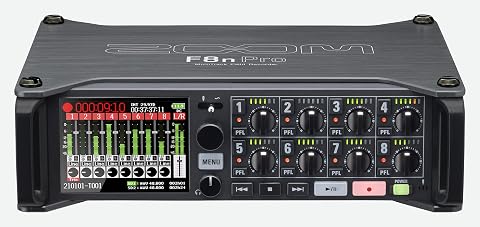
The Zoom F8n Pro is a professional 8-channel/10-track field recorder designed for filmmakers and audio professionals. It features 32-bit float recording, dual SD card slots for redundancy, high-quality preamps, and industry-leading timecode accuracy, ensuring pristine audio capture in demanding environments.
Pros:
- High-quality 32-bit float recording for clip-free audio
- Dual SD card slots provide redundancy and large storage capacity
- Industry-leading timecode accuracy ensures synchronization
- Flexible workflow with simultaneous recording and USB interface
Cons:
- Complex for beginners to operate
- Relatively high price point
- Requires multiple accessories for full functionality
Best for: Filmmaking and field journalism
Not ideal for: Casual or low-budget projects
Bottom line: A rugged, feature-rich recorder for high-quality sound.
Tripods & Stands
The Manfrotto 290XTRA Aluminum Camera Tripod with 496 Ball Head offers stability and versatility for a wide range of shooting scenarios. Its sturdy aluminum construction provides durability, while the three-segment design allows for adjustable height and compact storage. When selecting a tripod, consider the weight of your camera gear and the types of shots you’ll be capturing—whether static interviews, dynamic pans, or low-angle shots. Avoid tripods that are too lightweight or lack smooth panning mechanisms, as these can result in shaky footage or difficulty in precise framing. Ensuring compatibility with your camera’s mounting plate and load capacity is essential for safe operation and optimal performance.
Size and weight are important—if you’ll be traveling or shooting on location, opt for a lightweight model that still offers stability. Check the tripod’s maximum height and whether it can be folded down to a manageable size. Proper setup and balance are critical to avoid camera shake and to achieve professional results. Investing in a reliable tripod like the Manfrotto 290XTRA ensures your shots are steady and your production quality remains high, whether you’re in the studio or in the field.
What to look for:
- Compatible mounting plate and quick-release system
- Maximum load capacity suitable for your camera gear
- Adjustable height and sturdy locking mechanisms
- Lightweight and portable for travel
- Smooth panning and tilt movement
Manfrotto 290XTRA Aluminum Camera Tripod with 496 Ball Head, 3 Segments, 4 Angle

This durable aluminum tripod features adjustable height, multiple leg angles, and a versatile ball head, making it suitable for various photography styles. It supports up to 22 lbs and includes a carry case for portability, ideal for DSLR and mirrorless cameras.
Pros:
- Versatile with 4 independent leg angle positions
- Supports heavy camera gear up to 22 lbs
- Includes a carry case for easy transport
- Full Arca-Swiss compatibility for quick mounting
Cons:
- No specific maximum height listed
- Some users may find the tension adjustment complex
- Limited information on tripod weight
Best for: Studio and on-location filming
Not ideal for: Heavy or bulky camera setups
Bottom line: A dependable tripod to keep your shots steady and professional.
Editing Software
For editing your media projects, Adobe Premiere Pro remains a top choice for professionals and enthusiasts alike. Its comprehensive features support a wide range of editing tasks—from basic cuts to advanced color grading and effects. When choosing editing software, consider your workflow, system compatibility, and whether the tool integrates well with other creative apps you use. Avoid software that is overly complicated for your skill level or lacks essential features you need for your projects. The 12-month subscription model offers flexibility, but always verify that your computer meets the software’s system requirements to ensure smooth operation.
Ease of use, update frequency, and customer support are additional factors to consider. The right editing software can significantly streamline your post-production process, saving you time and frustration. Adobe Premiere Pro’s versatility and professional-grade capabilities make it suitable for a variety of media projects, from news segments to feature films. Make sure to keep your software updated to access the latest features and improvements, and consider tutorials or training if you’re new to the platform.
What to look for:
- Wide format support and export options
- Intuitive user interface
- Advanced editing and color grading tools
- Integration with other Adobe Creative Cloud apps
- Regular updates and customer support
Adobe Premiere Pro Video Editing and Production Software – 12-Month Subscription
Adobe Premiere Pro is a professional video editing software used for film, TV, and web content creation. It offers advanced tools powered by AI for editing, color correction, audio refinement, and effects, suitable for creators from Hollywood filmmakers to YouTubers.
Pros:
- Powerful AI-driven editing tools that simplify complex tasks
- Supports a wide range of formats including 8K and virtual reality
- Seamless integration with other Adobe apps like After Effects
Cons:
- Requires a subscription, which can be costly over time
- Steep learning curve for beginners
- Performance depends on high-end hardware
Best for: Professional video editing projects
Not ideal for: Basic editing needs or budget constraints
Bottom line: A powerful editing suite that elevates your media productions.
Starting with a well-planned shopping list ensures you prioritize quality and functionality over unnecessary extras. Focus on the essentials first, such as microphones, lighting, and cameras, to build a solid foundation for your media projects. Once your core equipment is in place, you can expand gradually with accessories and software tailored to your specific needs and budget.
Remember, investing in reliable, professional-grade gear pays off in the long run by enhancing your content’s quality and your workflow efficiency. Happy shopping, and here’s to creating compelling stories and engaging media that captivate your audience!