

When people compare smart home devices, the real choice is often between building around a hub and buying Wi-Fi products that connect directly to the router. Hub-based devices can coordinate across compatible protocols and may keep more routines running locally, but they add a controller and require attention to compatibility. Wi-Fi devices are usually easier to add one at a time, though each product may rely on its own app, cloud service, and network connection. Choose a hub-based setup if you want a coordinated system that can grow; choose Wi-Fi devices if you value quick setup and have a small number of straightforward needs.

Get everyday essentials delivered free with Prime
- Fast, free delivery on millions of items
- Prime Video, Amazon Music and more included
- Member-only deals all year

Amazon Echo Show 15 (2nd Gen), 15.6" Full HD Smart Display with Fire TV and Alexa
- ✔ Display: 15.6-inch Full HD, 1920 x 1080
- ✔ Dimensions: 16.1 x 10.1 x 1.4 inches
- ✔ Weight: 4.96 lb
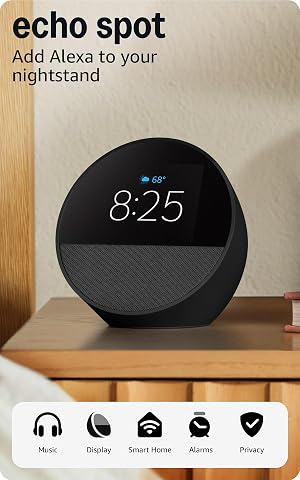
Amazon Echo Spot Smart Alarm Clock with Alexa (Black)
- ✔ Display: 2.83-inch touchscreen, 240 x 320
- ✔ Dimensions: 4.5 x 4.1 x 4.4 inches
- ✔ Weight: 14.3 oz (405 g)

Sonos Era 100 Wireless Smart Speaker (White)
- ✔ Model: Sonos Era 100
- ✔ Connectivity: Wi-Fi, Bluetooth, USB, line-in via adapter
- ✔ Voice assistant: Amazon Alexa
The distinction is not absolute: some hubs connect to Wi-Fi, and some Wi-Fi devices can work with broader platforms. Check each product’s supported standards, controller requirements, and local control features. The comparison below focuses on the typical tradeoff between a central hub and devices that operate directly over Wi-Fi.
At a Glance
| Criteria | Hub-based smart home devices | Wi-Fi smart home devices | Winner |
|---|---|---|---|
| Initial setup | Requires a compatible hub and device pairing; more steps at the start | Often connects directly through a device app and home Wi-Fi | B |
| Compatibility and expansion | Can support multiple protocols through one controller, subject to product compatibility | Depends on each product’s network and platform support; check before buying | A |
| Reliability | Some systems can keep selected functions working locally if internet access fails | Depends on router coverage, network load, and whether the device needs cloud access | A |
| Automation | Central rules can coordinate compatible devices across brands and device types | Can automate through apps or platforms, but cross-brand routines may take extra setup | A |
| Privacy and cloud dependence | Local operation may reduce cloud reliance, but depends on hub, device, and service | Cloud features and account requirements vary by manufacturer | Depends |
| Upfront cost | Hub adds an initial expense; compatible devices may share one control system | No hub required, though each device may have its own cost or subscription | B |
| Day-to-day management | More unified when supported devices are configured in the same system | May involve several manufacturer apps and accounts | A |
Amazon Echo Show 15 (2nd Gen), 15.6" Full HD Smart Display with Fire TV and Alexa
The Echo Show 15 (2nd Gen) is the most complete smart home choice in this group because it combines visible controls with broad device connectivity. Its 15.6-inch Full HD screen can display customizable widgets and a smart home dashboard, making it suited to a shared area where household members can check information or manage compatible devices at a glance. Support for Zigbee, Matter, and Thread gives it a wider hub role than the Spot, which is centered on bedside Alexa tasks, or the Sonos speaker, which focuses on audio.Built-in Fire TV adds a separate entertainment use, and the 13 MP camera supports video calls with auto-framing and zoom. The physical shutter and mic-off button provide direct privacy controls. The tradeoff is physical: this display is much larger and heavier than the other picks, so we need to plan for a wall mount or dedicate counter space. It makes the most sense when a screen is useful to the household; for a bedroom clock or music-first setup, the Spot or Era 100 is a less imposing fit.
Pros:
- Large Full HD touchscreen supports landscape or portrait placement.
- Built-in hub supports Zigbee, Matter, and Thread devices.
- Fire TV and customizable widgets add entertainment and household information.
- Camera has auto-framing, zoom, and a physical shutter.
Cons:
- Its size and weight require a planned mounting spot or substantial counter space.
- The supplied connectivity details exclude ad-hoc Wi-Fi networks.
Best for: Households that want a visible shared dashboard, broad smart home protocol support, and streaming in one fixed location.
Not ideal for: Anyone with limited wall or counter space, or shoppers who mainly need a compact alarm clock or dedicated music speaker.
Bottom line: Choose the Echo Show 15 when you want one prominent device to connect, display, and organize smart home activity.
“Choose the Echo Show 15 when you want one prominent device to connect, display, and organize smart home activity.”
Amazon Echo Spot Smart Alarm Clock with Alexa (Black)
For a bedside table or small work surface, the Echo Spot delivers a more practical footprint than the Echo Show 15. Its 2.83-inch touchscreen can show time, weather, and song information, while Alexa handles compatible smart home commands. That makes it a useful room-level assistant, though its display is too small to serve as the kind of shared visual dashboard the larger Echo Show provides.The Spot’s distinctive extra is eero Built-in, which can extend Wi-Fi coverage by up to 1,000 square feet when paired with a compatible eero router and linked account. That may make it more useful than a basic smart clock for an existing eero household, but it is not a general-purpose mesh extender. With no camera, a mic-off button, and in-app controls, it keeps privacy controls straightforward. Compared with the Sonos Era 100, it offers a screen and alarm-clock role, while the Sonos is better suited to fuller music listening. The Spot’s single full-range speaker and tiny display set clear limits.
Pros:
- Compact shape suits nightstands and smaller surfaces.
- Touchscreen displays time, weather, and song titles.
- eero Built-in can extend coverage with a compatible eero router.
- Physical mic-off button and in-app privacy controls; no camera.
Cons:
- The 2.83-inch screen cannot replace a full-size smart display.
- Wi-Fi extension depends on compatible eero hardware and account linkage.
- Its single full-range speaker is less audio-focused than the Sonos Era 100.
Best for: People who want an Alexa alarm clock with basic smart home controls in a bedroom, kitchen, or office, especially if they already use compatible eero equipment.
Not ideal for: Buyers who need a large household dashboard, richer speaker performance, or Wi-Fi extension without a compatible eero router.
Bottom line: Pick the Echo Spot for a compact bedside Alexa setup, particularly when its eero feature fits your existing network.
“Pick the Echo Spot for a compact bedside Alexa setup, particularly when its eero feature fits your existing network.”
Sonos Era 100 Wireless Smart Speaker (White)
The Sonos Era 100 earns its place by making sound the center of the smart home experience. Its dual-tweeter architecture and larger midwoofer are designed to provide stereo separation and bass from a compact cabinet, while Trueplay tuning adjusts the sound for room acoustics. With built-in Alexa, it can also respond to voice commands and control compatible smart home devices, but it does not provide the display or the Zigbee, Matter, and Thread hub capabilities of the Echo Show 15.Wi-Fi, Bluetooth, and optional line-in give the Era 100 more ways to play audio than the Echo Spot’s compact clock setup. The line-in option requires a separate adapter, however, and corded power means this is a stationary speaker rather than one to carry around. It is also not water-resistant, which narrows placement options near sinks or outdoors. Compared with the Echo Show, the Era 100 is a better fit when listening takes priority over visual controls; compared with the Spot, it is the more dedicated audio choice but lacks an alarm-clock screen.
Pros:
- Dual tweeters and a larger midwoofer are designed for stereo detail and bass.
- Wi-Fi and Bluetooth support flexible audio streaming.
- Trueplay tuning adjusts EQ to room acoustics.
- Compact multiroom speaker with built-in Alexa.
Cons:
- Line-in requires a separate adapter.
- Corded power prevents battery-powered placement.
- Not water-resistant, limiting bathroom and outdoor use.
Best for: Listeners who want a compact, Alexa-enabled speaker for Wi-Fi or Bluetooth music and multiroom audio in a dry indoor space.
Not ideal for: Anyone seeking a visual smart home dashboard, battery portability, water resistance, or line-in without an extra adapter.
Bottom line: Choose the Era 100 when listening and multiroom playback matter more than a screen or broad device hub.
“Choose the Era 100 when listening and multiroom playback matter more than a screen or broad device hub.”
As an Amazon Associate we earn from qualifying purchases.
Key Differences
The biggest practical difference is where coordination happens. A hub-based setup gives compatible devices a shared controller, which can make routines and expansion easier to manage. That structure can be worthwhile for households planning to add sensors, lights, locks, or other devices over time. It also introduces another component to configure and maintain. A Wi-Fi setup keeps the starting point simple: connect a product to the network and use its app. That works well for a few devices, but the experience can become fragmented as manufacturers add separate apps, accounts, and automation systems.
Neither approach guarantees reliability or privacy. A hub may run some actions locally, but device support and settings determine what continues during an internet outage. Wi-Fi products vary in their cloud requirements, and a local network connection alone does not mean a device will work without internet access. For either option, check what happens when the router or service is unavailable, how long updates are provided, and whether the product works with the voice assistant or platform you already use.
Cost follows the same pattern. Wi-Fi devices generally avoid a hub purchase, making them a better-value starting point for a small setup. A hub becomes easier to justify when it replaces scattered controls or enables routines across several compatible devices. Paying more for a hub makes sense when you will use those shared capabilities; for one bulb or plug, it is usually unnecessary.
Detailed Comparison
Initial setup (Wi-Fi smart home devices wins — moderate)
Wi-Fi wins by a moderate margin for a first device: it typically connects straight to the router through an app, while a hub setup first requires configuring the controller and then pairing compatible products. The difference matters most to someone who wants one smart plug or light working quickly. With several devices, the extra initial hub steps may be offset by having one system to manage.
Compatibility and expansion (Hub-based smart home devices wins — moderate)
Hub-based systems generally win by a moderate margin for planned expansion because a controller may support more than one device protocol and bring compatible products into shared routines. This is not universal: standards and device support vary, so verify the exact combination before buying. Wi-Fi devices are easy to add individually, but a growing collection can depend on a patchwork of brands and platform integrations.
Reliability (Hub-based smart home devices wins — moderate)
Hub-based setups have a moderate advantage when the hub and devices support local control, since selected actions may continue without an internet connection. That can matter for basic routines or sensors during a service interruption. It is not a blanket guarantee: internet-dependent features may still stop, and a hub or local network fault can affect the system. Wi-Fi device reliability depends on router coverage, network congestion, and cloud requirements, so the specific product design matters.
Automation (Hub-based smart home devices wins — moderate)
A hub-based system usually wins by a moderate margin for coordinating compatible devices. For example, one rule might respond to a sensor by changing lights and another supported device. Wi-Fi products can also run schedules and routines, but cross-brand coordination may rely on a separate platform or multiple apps. For a single timed light, the difference is minor; for a home with several device types, unified automation is more useful.
Privacy and cloud dependence (major difference)
There is no universal winner, and the difference can be major for privacy-conscious buyers. Some hub systems process supported routines locally, while others still use manufacturer or platform cloud services. Wi-Fi products range from local-control models to products whose remote access or automation relies heavily on cloud accounts. Compare data policies, account requirements, local-control options, and update commitments for the individual products rather than assuming the connection type settles the question.
Upfront cost (Wi-Fi smart home devices wins — moderate)
Wi-Fi wins by a minor to moderate margin for a small setup because there is no separate hub to buy. For a single device, that is usually the better value. As the number of devices grows, a hub’s cost may be easier to justify if it simplifies control or enables useful automations. Do not count on hub devices being cheaper; compare the total cost of the specific products and any required subscriptions.
Day-to-day management (Hub-based smart home devices wins — moderate)
Hub-based systems often win by a moderate margin once several compatible devices are installed, since routines and controls can live in one system. Wi-Fi products are straightforward individually, but separate apps and accounts may add friction to everyday use. Platform support can narrow that gap, so check whether the products you are considering appear in the same app and whether their key features remain available through it.
Hub-based smart home devices: Pros and Cons
Pros:
- Can coordinate compatible devices through a shared controller
- May support several protocols, widening expansion options
- Some setups offer local routines and control
- Can reduce the need to manage multiple device apps
Cons:
- Hub adds cost and setup work
- Compatibility varies across hubs, devices, and software versions
- A hub can become a central point of failure
- Some features still depend on cloud services or internet access
Wi-Fi smart home devices: Pros and Cons
Pros:
- Usually simple to set up one device at a time
- Avoids the separate cost of a hub
- Works well for basic needs such as a light, plug, or camera
- Broad product choice across manufacturers
Cons:
- Many devices can mean several apps and accounts
- Expansion and cross-brand control depend on platform support
- Network congestion or weak coverage can affect performance
- Cloud reliance varies and may limit features during outages
Who Should Choose What
Choose Hub-based smart home devices if:
- You expect to add several device types and want shared routines.
- You want to bring compatible devices using different protocols into one system.
- Local control during an internet outage matters and the products you choose support it.
Choose Wi-Fi smart home devices if:
- You need only a few devices and want to avoid a hub purchase.
- You prefer to install products one at a time with a direct Wi-Fi connection.
- Your chosen devices already work well with the app or platform you use.
Skip both if: Skip connected devices that lack clear security updates, usable privacy settings, or reliable support for your household’s network and accessibility needs.
Value for Money
Wi-Fi devices offer better value when the goal is modest: one smart plug, a few bulbs, or a device that already works with the household’s preferred app. There is little reason to pay for a hub if its coordination features will go unused. The low entry cost also makes it easier to try a category before committing to a larger system.
Paying more for a hub is worthwhile when you plan to use it as the shared control point for several compatible products. The value comes from simpler routines, potentially broader protocol support, and, in some systems, local operation. Those benefits depend on the actual devices and software, so check for required subscriptions and cloud features before calculating total cost. A hub is a poor value if the devices you want do not integrate with it or if you still need separate apps for their main functions.
Final Verdict
For most people starting with one or two smart home devices, Wi-Fi is the better choice: it costs less to begin and usually takes less effort to configure. Choose products that support the platform you already use and that state clearly how they handle internet outages and account data.
Choose a hub-based setup if you are building a broader system and will use its shared automations, protocol support, or local controls. The deciding factor is whether coordinated expansion is worth the controller’s cost and setup. If it is, a hub can be the stronger long-term fit; if not, direct Wi-Fi devices are the more sensible buy.
Frequently Asked Questions
Do smart home devices need a hub?
No. Many devices connect directly to Wi-Fi and work through a manufacturer app or a compatible smart home platform. A hub is useful when your selected devices require one or when you want a shared controller for supported routines.
Are hub-based devices more reliable?
They can be, when the hub and devices support local control, but the label alone does not guarantee reliability. Check which functions work without internet access and what happens if the hub, router, or cloud service is unavailable.
Can Wi-Fi smart home devices work together?
Yes, if their apps or platforms support the same integrations. Confirm that the features you need, such as routines or voice control, work across the specific brands. A shared Wi-Fi connection by itself does not make devices compatible.
Is a smart home hub worth the extra cost?
It can be worth paying more if you plan to connect several compatible devices and will use unified control or automation. For one or two simple devices, Wi-Fi is generally the better value because it avoids a separate controller.